







Question: Using basic C++ and from the code used below the images both .cpp and .h files... follow the directions in the images.. FOLLOWING IS THE
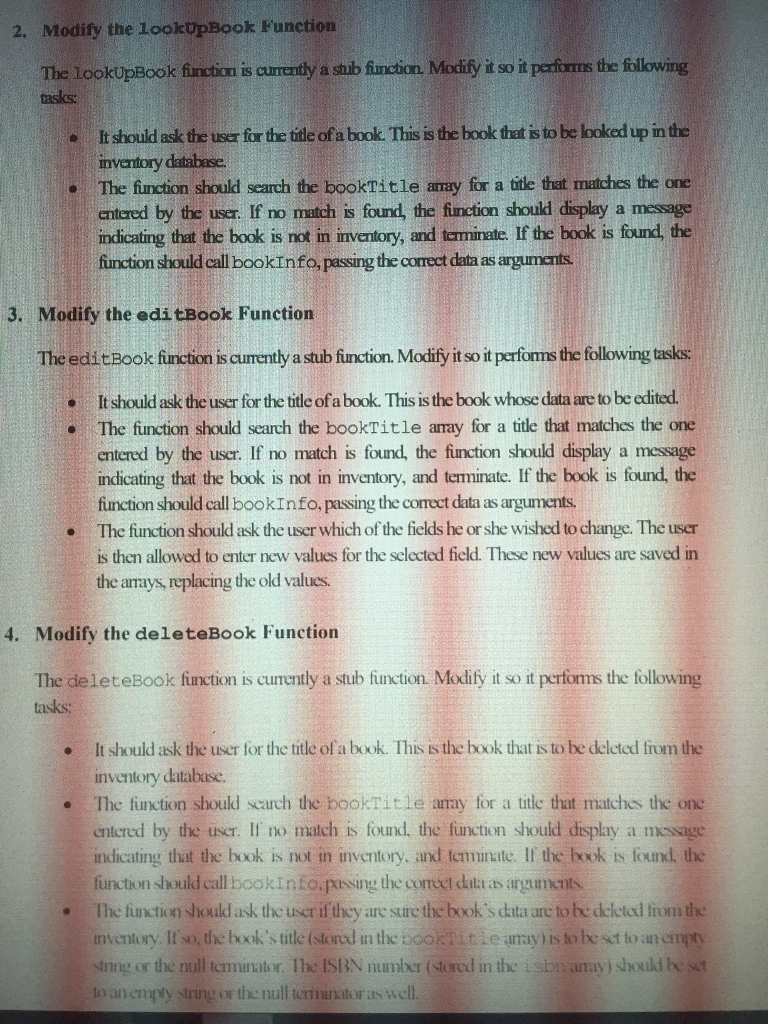
Using basic C++ and from the code used below the images both .cpp and .h files... follow the directions in the images..
FOLLOWING IS THE .CPP FILE
#include
#include
#include
#include "mainmenu.h"
#include
#include
#include
using namespace std;
const int SIZE = 20;
int main(){
string author[SIZE];
string publisher[SIZE];
string dateAdded[SIZE];
string isbn[SIZE];
string bookTitle[SIZE];
int qtyOnHand[SIZE];
char choice = '1';
while(choice > 49 || choice
{
cout
cout
cout
cout
cout
cout
cout
cin >> choice;
system("cls");
if(choice 52)
{
cout
cout
cin >> choice;
}
else{
switch(choice)
{
case '1':
cashier();
break;
case '2':
invmenu();
break;
case '3':
reports();
break;
case '4':
cout
return 0;
}
cout
}
}
system("cls");
system("pause");
return 0;
}
void cashier(){
const double salesTax = 0.06;
double price;
double subtotal;
double tax;
double total;
char again;
string date;
string isbn;
string title;
int quantity;
do
{
cout
cout
getline(cin, date);
cout
cin >> quantity;
cin.ignore();
cout
getline(cin, isbn);
cout
getline(cin, title);
cout
cin >> price;
cout
subtotal = quantity * price;
tax = subtotal * salesTax;
total = subtotal + tax;
cout
cout
cout
cout
cout
cout
cout
cout
cout
cout
cout
cout
cout
cout
cout
cout
cin >> again;
cin.ignore();
}
while (again == 'Y' || again == 'y');
system("cls");
system("pause");
}
void invmenu()
{
char choice;
while(choice != 53)
{
cout
cout
cout
cout
cout
cout
cout
cout
cin >> choice;
system("cls");
while(choice 53)
{
cout
cout
cin >> choice;
}
switch(choice)
{
case '1':
lookUpBook();
break;
case '2':
addBook();
break;
case '3':
editBook();
break;
case '4':
deleteBook();
break;
case '5':
cout
system("pause");
system("cls");
return;
}
cout
system("cls");
}
}
void lookUpBook()
{
cout
system("pause");
}
void addBook()
{
cout
system("pause");
}
void editBook()
{
cout
system("pause");
}
void deleteBook()
{
cout
system("pause");
}
void bookInfo(string isbn[], string bookTitle[], string author[], string publisher[], string dateAdded[], int qtyOnHand[],
double wholesale[], double retail[]){
cout
cout
cout
cout
cout
cout
cout
cout
cout
cout
cout
}
void reports(){
char choice;
while(choice != 55)
{
cout
cout
cout
cout
cout
cout
cout
cout
cout
cout
cin >> choice;
system("cls");
while(choice '7')
{
cout
cout
cin >> choice;
system("cls");
}
switch(choice)
{
case '1':
listing();
break;
case '2':
wholesale();
break;
case '3':
retail();
break;
case '4':
quantity();
break;
case '5':
cost();
break;
case '6':
age();
break;
case '7':
cout
system("pause");
system("cls");
return;
}
cout
}
}
void listing()
{
cout
system("pause");
system("cls");
}
void wholesale()
{
cout
system("pause");
system("cls");
}
void retail()
{
cout
system("pause");
system("cls");
}
void quantity()
{
cout
system("pause");
system("cls");
}
void cost()
{
cout
system("pause");
system("cls");
}
void age()
{
cout
system("pause");
system("cls");
}
FOLLOWING IS .H FILE
#include
using namespace std;
void invmenu(); void repListing(); void repWholesale(); void repRetail(); void repQty(); void repCost(); void repAge(); void cashier(); void lookUpBook(); void addBook(); void editBook(); void deleteBook(); void reports(); void bookinfo(string, string, string, string, string, int, double, double); void wholesale(); void retail(); void quantity(); void cost(); void age(); void listing();
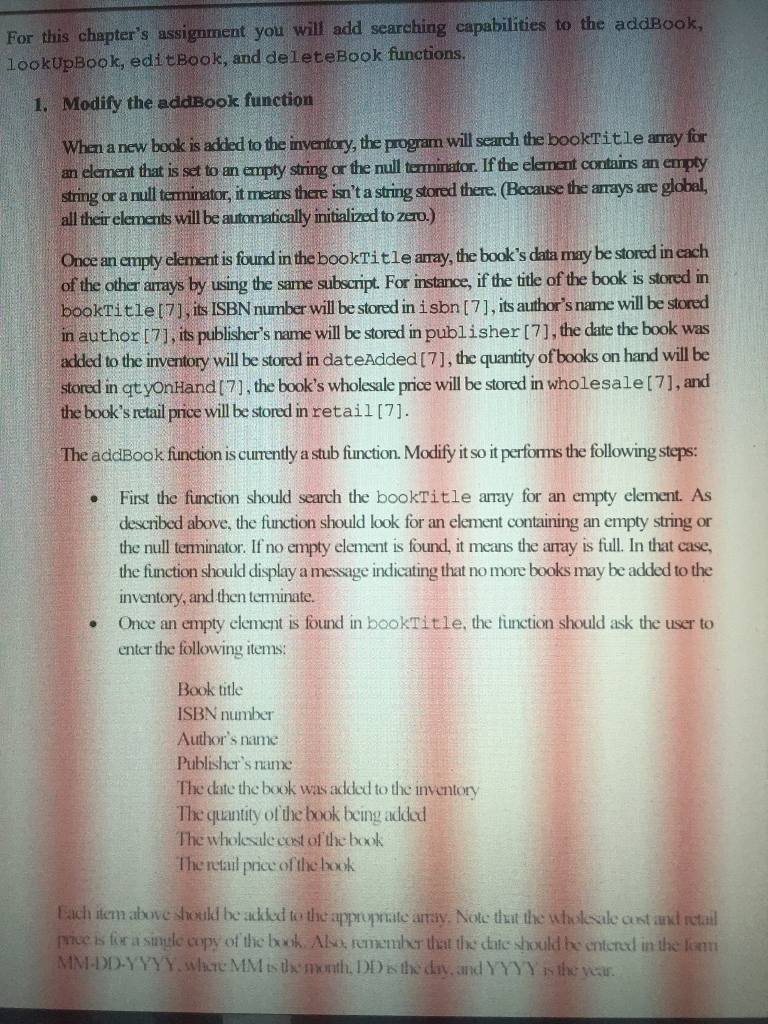
For this chapter's assignment you will add searching capabilities to the addBook, lookUpBook, editBook, and deleteBook functions. 1. Modify the addBook function When a new book is added to the inventory, the program will search the bookTitle amy for an element that is set to an empty string or the null terninator. If the element contains an empty string or a null terminator, it means there isn't a string stored there. (Because the arrays are global, all theirelements will be automatically initialized to zero.) Once an empty element is found in the bookTitle aray, the book's data may be stored in cach of the other arrays by using the same suhscript For instance, if the title of the book is stored in bookTitle(7), its ISBN number will be stored in isbn (7], its author's name will be stored in author [7), its publisher's name will be stored in publisher [71, the date the book was added to the inventory will be stored in dateAdded [7], the quantity of books on hand will be stored in qtyonHand (7], the book's wholesale price will be stored in wholesale [7], and the book's retail price will be stored in retail[7]. The addBook function is cumently a stub fiunction. Modify it so it performs the following steps: First the function should search the bookTitle aray for an empty element. As described above, the function should look for an element containing an empty string or the null terminator. If no empty element is found, it means the array is full. In that case the fiunction should display a message indicating that no more books may be added to the inventory, and then terminate. Once an empty element is found in bookTitle, the function should ask the user to enter the following items . . Book title ISBN number Author's name Publisher's name The date the book was added to the inventory The quantity of the book being added The wholesale cost of the book The retail price of the book iem above should be aed to the appropriate array. Nolc tuat the wholoale cust and itail mue is for a single copy of the book. Also, remember that the date should be entend in the lim DD-Y YYY.whre MM l ty, the narth. DI hs the day, and YYYtewar For this chapter's assignment you will add searching capabilities to the addBook, lookUpBook, editBook, and deleteBook functions. 1. Modify the addBook function When a new book is added to the inventory, the program will search the bookTitle amy for an element that is set to an empty string or the null terninator. If the element contains an empty string or a null terminator, it means there isn't a string stored there. (Because the arrays are global, all theirelements will be automatically initialized to zero.) Once an empty element is found in the bookTitle aray, the book's data may be stored in cach of the other arrays by using the same suhscript For instance, if the title of the book is stored in bookTitle(7), its ISBN number will be stored in isbn (7], its author's name will be stored in author [7), its publisher's name will be stored in publisher [71, the date the book was added to the inventory will be stored in dateAdded [7], the quantity of books on hand will be stored in qtyonHand (7], the book's wholesale price will be stored in wholesale [7], and the book's retail price will be stored in retail[7]. The addBook function is cumently a stub fiunction. Modify it so it performs the following steps: First the function should search the bookTitle aray for an empty element. As described above, the function should look for an element containing an empty string or the null terminator. If no empty element is found, it means the array is full. In that case the fiunction should display a message indicating that no more books may be added to the inventory, and then terminate. Once an empty element is found in bookTitle, the function should ask the user to enter the following items . . Book title ISBN number Author's name Publisher's name The date the book was added to the inventory The quantity of the book being added The wholesale cost of the book The retail price of the book iem above should be aed to the appropriate array. Nolc tuat the wholoale cust and itail mue is for a single copy of the book. Also, remember that the date should be entend in the lim DD-Y YYY.whre MM l ty, the narth. DI hs the day, and YYYtewar
Step by Step Solution
There are 3 Steps involved in it

Get step-by-step solutions from verified subject matter experts
 Study Help