







Question: USING C++ 1) Write a maze solving program, with the following functionality. (Note that further implementation details and advice are provided at the end of
USING C++
1) Write a maze solving program, with the following functionality. (Note that further implementation details and advice are provided at the end of this document.)
- App menu: The program prints to the console a menu presenting the user with the options listed hereafter. It performs whichever operation is selected by the user, prints the results and other output accordingly, and returns to the menu (unless Exit is chosen).
- Load maze: The program reads a maze layout from a plain text file and loads it into an appropriate data structure. If successful, it displays the maze, as illustrated hereafter; if not, it prints some appropriate error message (e.g. file not found). Basic code reading from a maze text file is provided in appendix.
- Display maze: The program prints to the console the currently loaded maze. If start and/or goal locations are defined, it displays them as well.
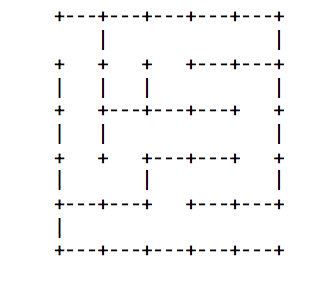
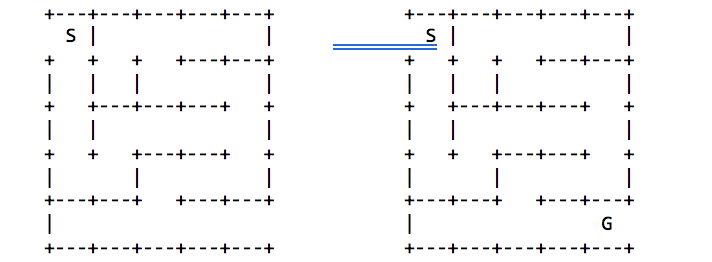
- Set start: The program prompts the user for X-Y coordinates and reads in user input. If coordinates are valid, it prints to the console the current maze with the start location indicated with a S, as illustrated below (left). If not valid it prints an error message.
- Set goal: The program prompts the user for X-Y coordinates and reads in user input. If coordinates are valid, it prints to the console the current maze with the goal location indicated with a G, as illustrated below (right). If not valid it prints an error message.
- Find path (BFS): The program runs a Breadth-First Search to find a path from the start location S to the goal G. (See further explanations hereafter about this process.) If successful, it prints the path coordinates in sequence (incl. start and goal locations), e.g.:
(1,1) (1,2) (1,3) (1,4) (2,4) (2,3) (3,3) (4,3)
(5,3) (5,4) (4,4) (3,4) (3,5) (4,5) (5,5)
- Find path (DFS): The program runs a Depth-First Search to find a path from the start location S to the goal G. (See further explanations hereafter about this process. Note that, depending on the maze, BFS and DFS may find different paths.) If successful, it prints the path coordinates in sequence (incl. start and goal locations) as per above.
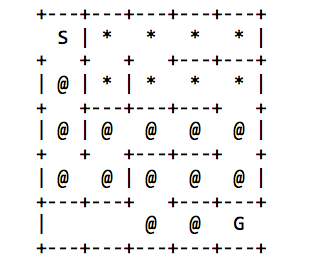
- Display path: The program prints to the console the maze and the last path found. Cells on the path are shown as @; cells visited by BFS/DFS but not on the path are shown as *; cells not visited are left blank. A sample output is as follows. (Note that, in this case, the search backed out of the dead-end twice in the upper right-hand quadrant before eventually following the correct downward path towards the goal.)
- Exit: The program prints a goodbye message to the console and terminates.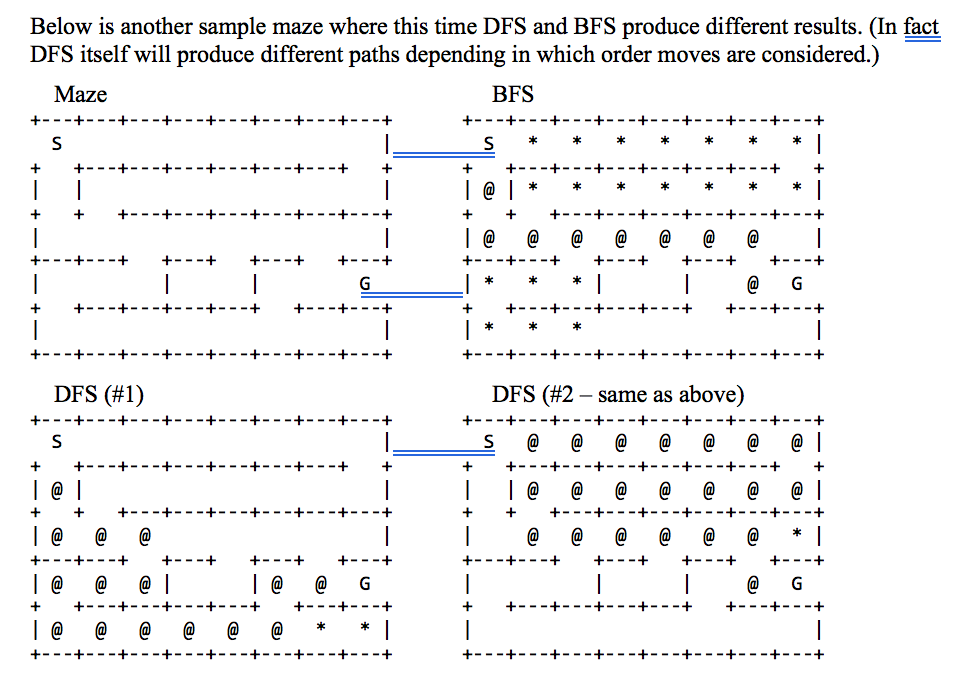
In your program, you should represent a maze using two classes: Maze and Cell.
A Maze object is rectangular grid of cells i.e., a 2-dimensional array of Cell objects. The cell in the upper left-hand corner has coordinates (1,1) and the cell in the lower right-hand corner has coordinates (width, height). Each grid cell has at most four neighbors (left, right, above, below). Any two neighboring cells are either separated by a wall, or not (cf. above maze examples). Empty space between cells allows moving from one to the other (in either direction). The start and goal locations may be defined in the maze file, and can be set/changed by the user.
The process of solving a maze involves continually selecting non-walled-off neighbor cells based of the current position until the goal/exit is reached. Partial code (pseudo-code) is given in the lecture slides that shows how to use a Stack, resp. a Queue, to implement Depth-First Search and Breadth-First Search mechanisms, and the process was explained in class. Your job is to complete the implementation successfully and test it on sample maze files.
To this purpose, you need to add attributes to the Cell class to store wall and neighbor information, also to mark a cell as visited or not. (As per the given pseudo code, note that marking cells as visited is essentialto avoid cycles / infinite loops.) When implementing the search, you also need to decide in which order neighbors cells are explored (it does not matter, but it must be consistent e.g., above first, then right, below, and left, in that order). Lastly, you need to add one attribute to remember which cell was visited immediately before the current cell (this allows retrieving and printing the solution path, as is required).
Appendix 1:The following programs reads a maze file to extract and print all cell data. You need to adapt the code to populate your Maze and Cell objects instead.
ifstream in("Text.txt");
char str1[100], str2[100], str3[100];
in.getline(str1, 100);
in.getline(str2, 100);
in.getline(str3, 100);
int line = 1, cell = 1;
while (!in.eof())
{ cell = 1;
cout
int i = 0;
bool top, down, right, left;
top = down = right = left = false;
int j = 0, k = 1;
cout
while (i
{
top = down = right = left = false;
if (str1[i] == '+') i++; /ew cell
if (str1[i] == '-')top = true;
else if (str1[i] == ' ')top = false; i = i + 3;
if (str2[j] == '|') left = true; else if (str2[j] == ' ')left = false; j = j + 4;
if (str2[j] == '|') right = true; else if (str2[j] == ' ')right = true; if (str3[k] == ' ') down = false; else if (str3[k] == '-') down = true; k = k + 4;
cout
cell++;
cout
cout
cout
cout
cout
strcpy(str1, str3);
cout
in.getline(str2, 100);
in.getline(str3, 100);
line++;
}
Step by Step Solution
There are 3 Steps involved in it

Get step-by-step solutions from verified subject matter experts
 Study Help