







Question: Using C programming and UNIX/Linux terminal. PLEASE DON'T FORGET TO EXPLAIN THE LAST PART! **********lab8q4_input.txt*************** 1 2 3 4 5 1 2 3 4 5
Using C programming and UNIX/Linux terminal. PLEASE DON'T FORGET TO EXPLAIN THE LAST PART!
**********lab8q4_input.txt***************
1 2 3 4 5 1 2 3 4 5 1 2 3 4 5 1 2 3 4 5 1 2 3 4 5 5 4 3 2 1 5 4 3 2 1 5 4 3 2 1 5 4 3 2 1 5 4 3 2 1
*************************
/*
* Program for lab8q4_incomplete.c
* originally written by Erik Frederiksen, esf791
*/
#include
#include
#include
#define MAX 5
#define LINE_LEN 128
/* This program performs a mysterious calculation on 5x5 matrices. */
void print( float m[MAX][MAX] );
int main( ) {
int x, y;
int i, j, k;
float accum;
float* a_p;
float* b_p;
int fill_first = 1; // start filling matrix a first
float a[MAX][MAX];
float b[MAX][MAX];
float first_result[MAX][MAX];
float second_result[MAX][MAX];
char* line_ptr;
char line_buf[LINE_LEN];
/* read in the data from stdin */
// for each row
for ( x=0; x
// get one line of input
if ( fgets( line_buf, LINE_LEN, stdin ) == NULL ) {
fprintf( stderr, "Early EOF! " );
return 1;
}
line_ptr = line_buf;
// for each column
for ( y=0; y
// Get the next value. It goes in the [x][y] position.
// If fill first is true, the value goes in a[x][y]
// else put it in b[x][y]
if ( fill_first ) {
a[x][y] = atof( line_ptr );
}
else {
b[x][y] = atof( line_ptr );
}
// Advance to the next value in the buffer
line_ptr = strstr( line_ptr+1, " " );
// When we reach the null byte at the end of the
// buffer, we are done
if ( line_ptr == NULL ) {
break;
}
}
// If we have read MAX rows and we were filling matrix
// a, reset so that we are now going to fill b with
// MAX rows of values
if ( x == MAX - 1 && fill_first ) {
fill_first = 0;
x = -1;
}
}
/* Calculation performed using the first method. */
for ( i=0; i
for ( j=0; j
a_p = &(a[i][0]);
b_p = &(b[0][j]);
accum = 0;
for ( k=0; k
accum += (*a_p) * (*b_p);
a_p++;
b_p += MAX;
}
first_result[i][j] = accum;
}
}
/* Calculation performed using the second method. */
for ( i=0; i
for ( j=0; j
accum = 0;
for ( k=0; k
accum += // complete the rest of this statement
}
second_result[i][j] = accum;
}
}
/* output input data and results */
printf( "a: " );
print( a );
printf( " " );
printf( "b: " );
print( b );
printf( " " );
printf( "Result using first method: " );
print( first_result );
printf( " " );
printf( "Result using second method: " );
print( second_result );
printf( " " );
return 0;
}
void print( float m[MAX][MAX] ) {
int x, y;
for ( x=0; x
for ( y=0; y
printf( "%.2f ", m[x][y] );
}
printf( " " );
}
}
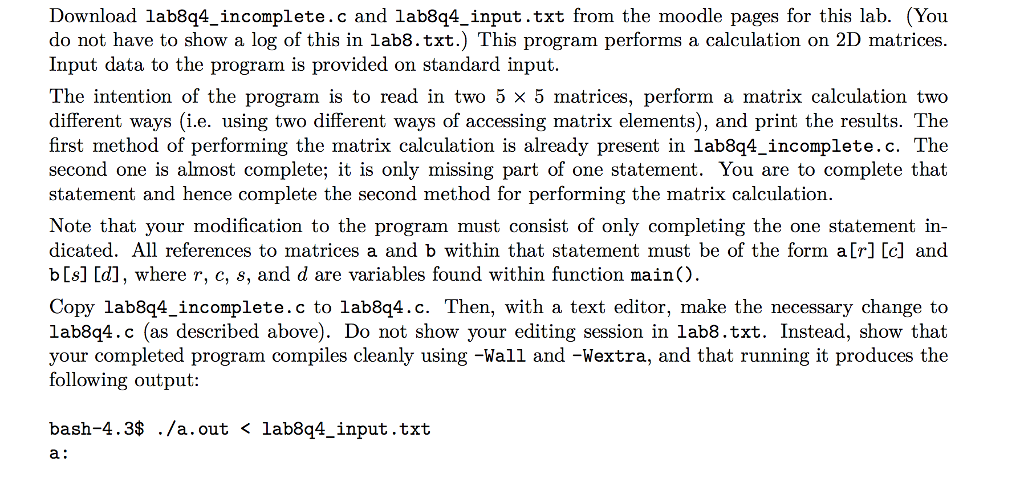
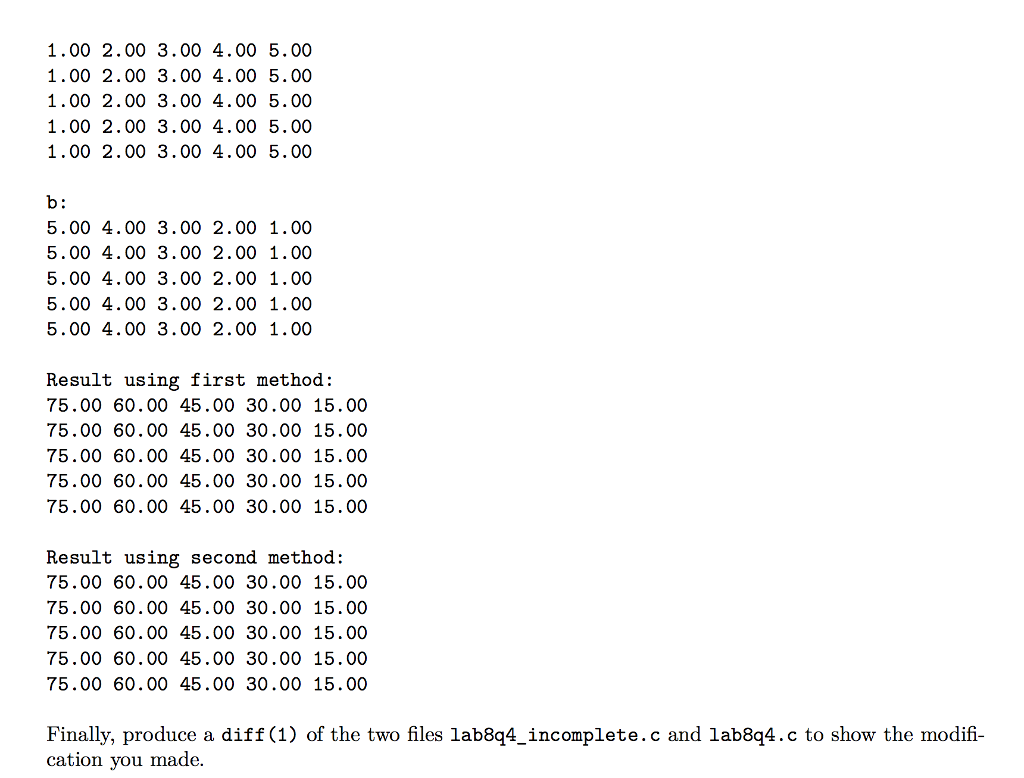
Download lab8q4_incomplete.c and lab844_input.txt from the moodle pages for this lab. (You do not have to show a log of this in lab8.txt.) This program performs a calculation on 2D matrices. Input data to the program is provided on standard input. The intention of the program is to read in two 5 x 5 matrices, perform a matrix calculation two different ways (i.e. using two different ways of accessing matrix elements), and print the results. The first method of performing the matrix calculation is already present in lab8q4_incomplete.c. The second one is almost complete; it is only missing part of one statement. You are to complete that statement and hence complete the second method for performing the matrix calculation. Note that your modification to the program must consist of only completing the one statement in- dicated. All references to matrices a and b within that statement must be of the form a[r] [c] and b[s] [d], where r, c, s, and d are variables found within function main(). Copy lab844_incomplete.c to lab8q4.c. Then, with a text editor, make the necessary change to lab8q4.c (as described above). Do not show your editing session in lab8.txt. Instead, show that your completed program compiles cleanly using -Wall and -Wextra, and that running it produces the following output: bash-4.3$ ./a.out
Step by Step Solution
There are 3 Steps involved in it

Get step-by-step solutions from verified subject matter experts
 Study Help