







Question: Using C++ You are asked to create a 1D terrain for a side-scrolling game. The 1D terrain consists of x blocks (think minecraft). Each block
Using C++
You are asked to create a 1D terrain for a side-scrolling game. The 1D terrain consists of x blocks (think minecraft). Each block is assigned a random height between l feets and h feets. We assume that both l and h are greater than or equal to 0 and less than or equal to 64. l is always less than or equal to h.
Code
#include#include #include
using namespace std;
const int x = 15; const int l = 2; const int h = 10;
int main() {
// length i.e. total number of blocks // lowest height (in feet) of a block // highest height (in feet) of a block
srand(time(NULL)); int height[x]; // 1D array to store the heights of
// different blocks
for (int i=0; i } 1 The code shown above stores block heights in a 1D array. It randomly assigns heights to different blocks. Function print_height can be used for debugging. It prints the contents of the 1D array. Functions get_max is used to find the highest point in the terrain. pprint_height displays the terrain in a graphical manner (see below). Function get_max returns an random integer between two values. Part 1 - What to do? You are asked to complete the following functions Desired Output When you compile and run the completed program, you will get the following output. $ g++ terrain.cpp $ ./a.out Print raw: 933442285727645 Print max height: 9 Pretty print: Part 2 - Reading and writing to a file Now add the following two command line options: -s; and -l. When we execute the program as follows: $ ./a.out -s it saves the heights (all 10 of them) to a text file heights.txt. Similarly when we execute the program as follows: $ ./a.out -l it loads the block heights (all 10 of them) from a text file heights.txt. Extra Can you change the code such that the height of any two adjacent blocks do not vary more than (h-l)/4. Also that at least one block has height greater than 1-l/9. cout
cout
cout
pprint_height(height, x); }
int get_random(int l, int h) { } int get_max(int height[], int sz) { } void print_height(int height[], int sz) { } void pprint_height(int height[], int sz) { } 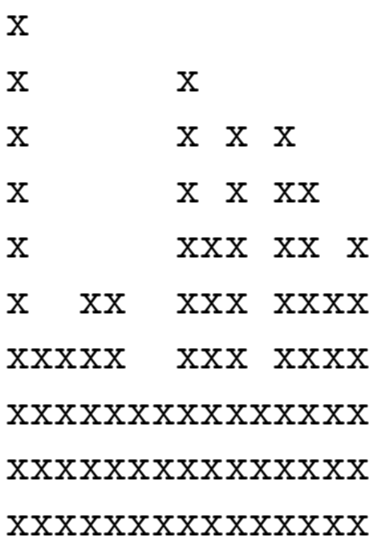
Step by Step Solution
There are 3 Steps involved in it

Get step-by-step solutions from verified subject matter experts
 Study Help