







Question: using Cisco Packet Tracer program. 1. Make a Network Topology as per the given below Snapshot using the following settings. Display Name: User1 (0.5 mark)
using Cisco Packet Tracer program.
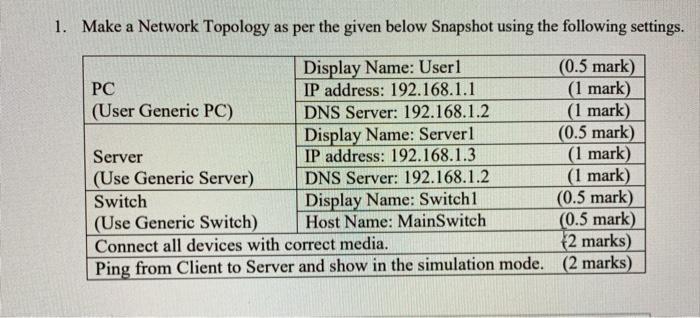
1. Make a Network Topology as per the given below Snapshot using the following settings. Display Name: User1 (0.5 mark) PC IP address: 192.168.1.1 (1 mark) (User Generic PC) DNS Server: 192.168.1.2 (1 mark) Display Name: Server1 (0.5 mark) Server IP address: 192.168.1.3 (1 mark) (Use Generic Server) DNS Server: 192.168.1.2 (1 mark) Switch Display Name: Switch1 (0.5 mark) (Use Generic Switch) Host Name: MainSwitch (0.5 mark) Connect all devices with correct media. [2 marks) Ping from Client to Server and show in the simulation mode. (2 marks)
Step by Step Solution
There are 3 Steps involved in it
1 Expert Approved Answer
Step: 1 Unlock

Question Has Been Solved by an Expert!
Get step-by-step solutions from verified subject matter experts
Step: 2 Unlock
Step: 3 Unlock
 Study Help