







Question: Using Excel: 2. Label the following sheetsDocumentation, Variables, Financial Statements 3. Variables: All numbers given in the problem. You will need all the variables to
Using Excel: 2. Label the following sheetsDocumentation, Variables, Financial Statements 3. Variables: All numbers given in the problem. You will need all the variables to prepare the statements. 4. Financial statements: For single and double accounting lines, use format cells, font, underline, and select either single or double accounting lines. Use currency formatting. 5. Link variables to financial statements. Formulas can be included in the links. A link begins in the destination cell with = and then you pick up the variable from the variables page. If necessary, build a formula and add more variables. When complete, hit enter. 6. Remember to use currency, not accounting formatting. 7. On your Financial Statements sheet, prepare in good form a Statement of Costs of Goods Manufactured and a Statement of Cost of Goods Sold (follow the format on pages 17-18). 8. Check figures: CGM, $823,000. CGS $819,000. 9. Prepare an Income Statement. 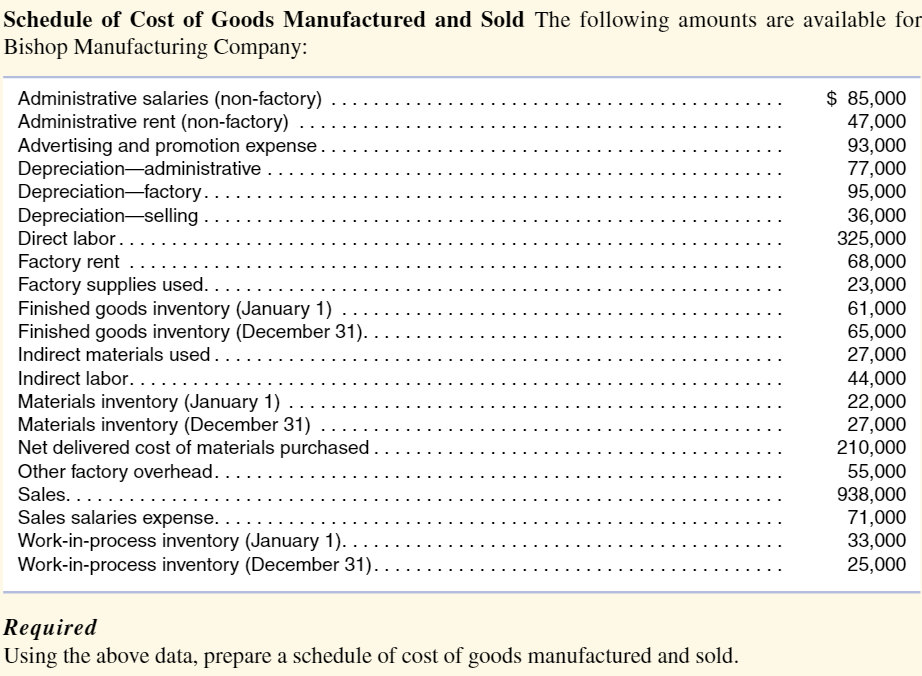
Schedule of Cost of Goods Manufactured and Sold The following amounts are available for Dichon Manuforturino Romnonv. Required Using the above data, prepare a schedule of cost of goods manufactured and sold
Step by Step Solution
There are 3 Steps involved in it

Get step-by-step solutions from verified subject matter experts
 Study Help