







Question: Using Figure 3 below as the starting point, perform resource leveling by copying and pasting the task bars provided below into Figure 4 (resize task
Using Figure 3 below as the starting point, perform resource leveling by copying and pasting the task bars provided below into Figure 4 (resize task bars as needed). Then, type the number of workers required each day in the row next to "Workers." Assume that each task can be performed independently of the other tasks. Finally, type the number of "Worker Days" in the column on the far right and total the worker days in the cell on the bottom right in Figure 4.
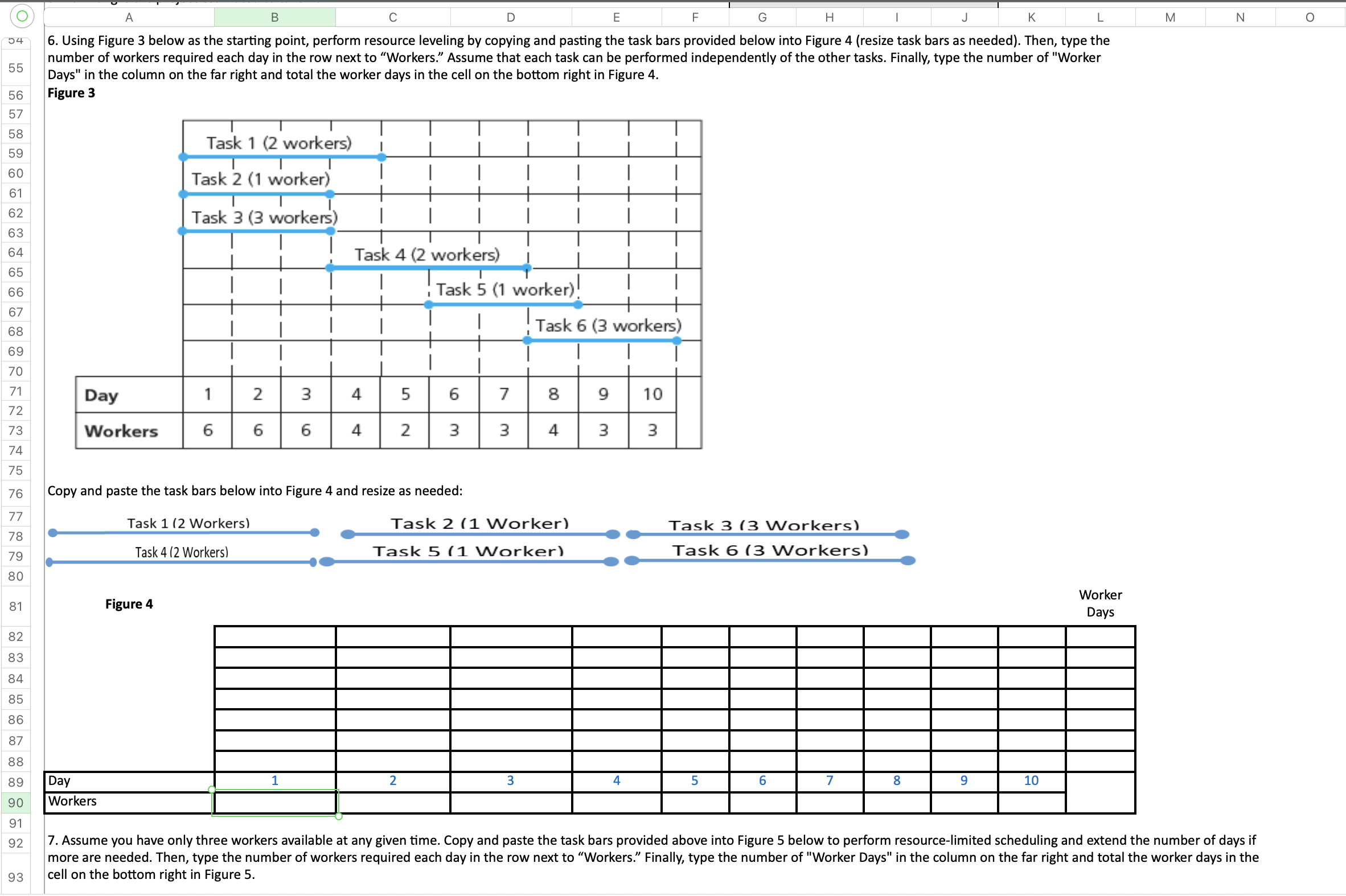
O B D E G H K M N O 04 6. Using Figure 3 below as the starting point, perform resource leveling by copying and pasting the task bars provided below into Figure 4 (resize task bars as needed). Then, type the 55 number of workers required each day in the row next to "Workers." Assume that each task can be performed independently of the other tasks. Finally, type the number of "Worker Days" in the column on the far right and total the worker days in the cell on the bottom right in Figure 4. 56 Figure 3 57 58 Task 1 (2 workers) 59 60 Task 2 (1 worker) 61 62 Task 3 (3 workers) 63 64 Task 4 (2 workers) 65 66 Task 5 (1 worker ) 67 68 Task 6 (3 workers) 69 70 71 Day 2 3 5 6 7 8 9 10 72 73 Workers 6 6 6 4 2 3 3 4 3 3 74 75 76 Copy and paste the task bars below into Figure 4 and resize as needed: 77 Task 1 (2 Workers) Task 2 (1 Worker) Task 3 (3 Workers) 78 79 Task 4 (2 Workers) Task 5 (1 Worker) Task 6 (3 Workers) 80 Figure 4 Worker 81 Days 82 83 84 85 86 87 88 89 Day 1 2 3 4 5 6 8 9 10 90 Workers 91 92 7. Assume you have only three workers available at any given time. Copy and paste the task bars provided above into Figure 5 below to perform resource-limited scheduling and extend the number of days if more are needed. Then, type the number of workers required each day in the row next to "Workers." Finally, type the number of "Worker Days" in the column on the far right and total the worker days in the 93 cell on the bottom right in Figure 5
Step by Step Solution
There are 3 Steps involved in it

Get step-by-step solutions from verified subject matter experts
 Study Help