





Question: Using Fortran 90/95 code run a program that will prompt the user for a name of a file (dataTinyTest.txt) . Check to ensure that the
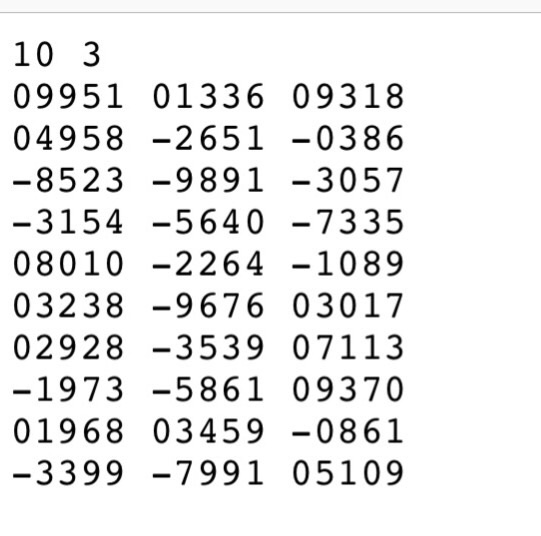
Using Fortran 90/95 code run a program that will prompt the user for a name of a file (dataTinyTest.txt) . Check to ensure that the file can be opened successfully.The first two values in the file will include the number of rows and
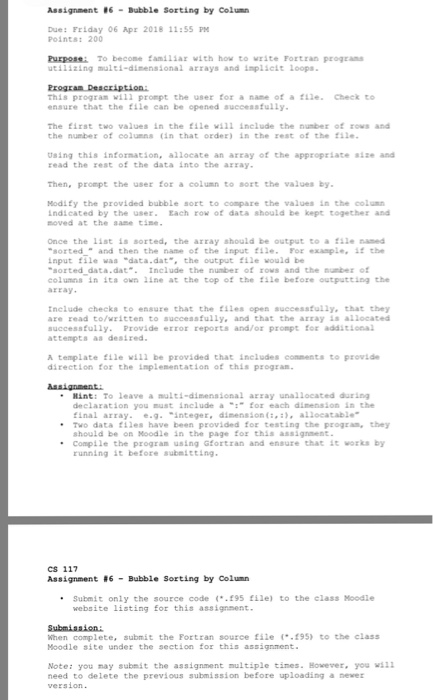
the number of columns (in that order) in the rest of the file. Using this information, allocate an array of the appropriate size and read the rest of the data into the array. Then, prompt the user for a column to sort the values by. Modify the provided bubble sort to compare the values in the column indicated by the user. Each row of data should be kept together and moved at the same time. Once the list is sorted, the array should be output to a file named sorted_ and then the name of the input file. For example, if the input file was data.dat, the output file would be sorted_data.dat. Include the number of rows and the number of columns in its own line at the top of the file before outputting the array. Include checks to ensure that the files open successfully, that they
are read to/written to successfully, and that the array is allocated successfully. Provide error reports and/or prompt for additional attempts as desired. A template file will be provided that includes comments to provide direction for the implementation of this program.
 Using Fortran 90/95 code run a program that will prompt the
user for a name of a file (dataTinyTest.txt) . Check to ensure
that the file can be opened successfully.The first two values in the

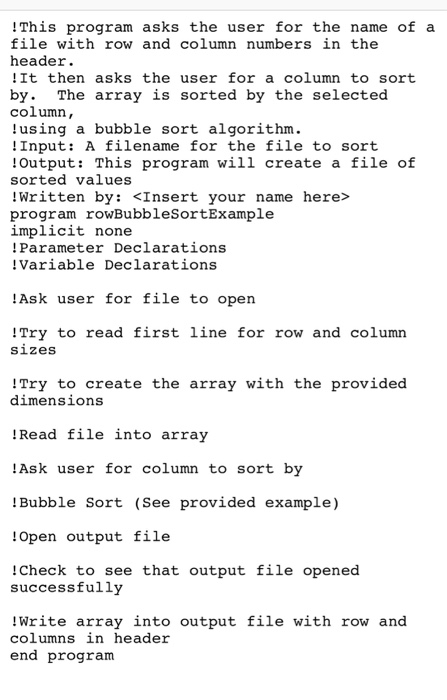
!This program asks the user for the name of a file with row and column numbers in the header !It then asks the user for a column to sort by. The array is sorted by the selected column, using a bubble sort algorithm . !Input: A filename for the file to sort lOutput: This program will create a file of sorted values !Written by: program rowBubbleSortExa implicit none !Parameter Declarations Variable Declarations mple lAsk user for file to open !Try to read first line for row and column sizes !Try to create the array with the provided dimensions Read file into array Ask user for column to sort by !Bubble Sort (See provided example) Open output file !Check to see that output file opened successfully Write array into output file with row and columns in header end program !This program asks the user for the name of a file with row and column numbers in the header !It then asks the user for a column to sort by. The array is sorted by the selected column, using a bubble sort algorithm . !Input: A filename for the file to sort lOutput: This program will create a file of sorted values !Written by: program rowBubbleSortExa implicit none !Parameter Declarations Variable Declarations mple lAsk user for file to open !Try to read first line for row and column sizes !Try to create the array with the provided dimensions Read file into array Ask user for column to sort by !Bubble Sort (See provided example) Open output file !Check to see that output file opened successfully Write array into output file with row and columns in header end program

Step by Step Solution

There are 3 Steps involved in it

1 Expert Approved Answer
Step: 1 Unlock blur-text-image
Question Has Been Solved by an Expert!

Get step-by-step solutions from verified subject matter experts

Step: 2 Unlock
Step: 3 Unlock

Students Have Also Explored These Related Databases Questions!