







Question: Using HTML and CSS, along with the bmi.jpg image, create a webpage that matches the layout of Screenshot2.png. Make sure to use unique IDs to
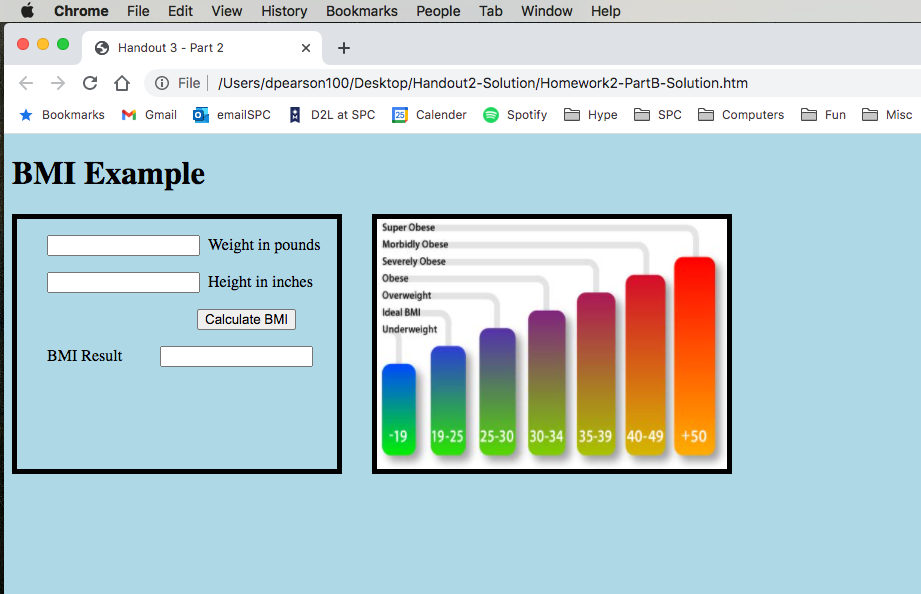 Using HTML and CSS, along with the bmi.jpg image, create a webpage that matches the layout of Screenshot2.png. Make sure to use unique IDs to the 3 text inputs, so you can read the values for weight & height, then write to the area by BMI Result 09 Inside the section, create a Javascript function called calcBMI, which reads the two values entered for height and weight. Use the formula: BMI = (weight_in_pounds * 703) / (height_in_inches * height_in_inches) to calculate the BMI. Apply the Math.round() function to the result to convert it to an integer. See http://www.w3schools.com/jsref/jsref_round.asp for more details. Write the variable to the BMI Result text input area. 10 Modify the Calculate BMI button to run calcBMI when clicked. Save and view the result in a browser. Enter 170 pounds for Weight and 72 inches for height, the click Calculate. The result should be 23. Take a screenshot and save the result as Homework2B-Screen1.png. Try different values for height and weight, calculate and take another screenshot. Save as Homework2B-Screen2.png
Chrome File Edit View History Bookmarks People Tab Window Help Handout 3 - Part 2 + + Co File /Users/dpearson100/Desktop/Handout2-Solution/Homework2-PartB-Solution.htm Bookmarks M Gmail emailSPC D2L at SPC 25 Calender Spotify Hype Computers SPC Fun Misc BMI Example Weight in pounds Height in inches Super Obese Morbidly Obese Severely Obese Obese Overweight Ideal BMI Underweight Calculate BMI BMI Result -19 19-25 25-30 30-34 35-39 40-49 +50
Step by Step Solution
There are 3 Steps involved in it

Get step-by-step solutions from verified subject matter experts
 Study Help