







Question: Using HTML, CSS, Javascript, XML, XSD, XSL and XLST to develop the content The output using the style sheet file should look like the following,

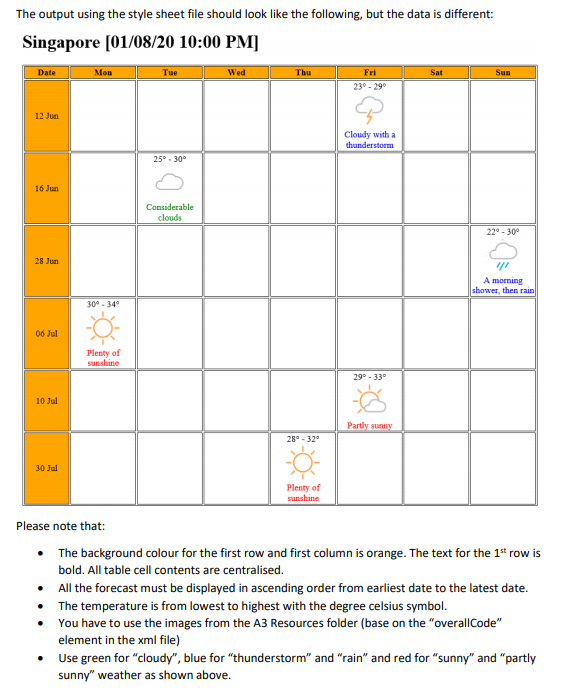
Using HTML, CSS, Javascript, XML, XSD, XSL and XLST to develop the content The output using the style sheet file should look like the following, but the data is different: Singapore (01/08/20 10:00 PM] Date Mon Tue Wed Thu Sat Sun Fri 230-290 12 Jun Cloudy with a thunderstorm 25 - 30 16 Jun Considerable clouds 220 - 300 28 Jun A morning shower, then rain 30. 34 06 Jul Plenty of sunshine 29 - 33 10 Jul Partly sunny 280 - 320 30 Jul Plenty of sunshine Please note that: The background colour for the first row and first column is orange. The text for the 1st row is bold. All table cell contents are centralised. All the forecast must be displayed in ascending order from earliest date to the latest date. The temperature is from lowest to highest with the degree celsius symbol. You have to use the images from the A3 Resources folder (base on the "overallCode" element in the xml file) Use green for "cloudy", blue for "thunderstorm" and "rain" and red for "sunny" and "partly sunny" weather as shown above
Step by Step Solution
There are 3 Steps involved in it

Get step-by-step solutions from verified subject matter experts
 Study Help