







Question: USING HTML, JAVASCRIPT, BOOTSTRAP You may want to use font awesome icons instead of buttons for the like and delete action. Requirements You can develop
USING HTML, JAVASCRIPT, BOOTSTRAP
You may want to use font awesome icons instead of buttons for the like and delete action.
Requirements
You can develop an application based on the following requirements or based on your personal requirements. The basic requirements are that the application should have has CRUD (create, read, update and delete) operations to a backend database. You can use bootstrap style or whatever CSS framework.
In the following sample, you will create a contact management application using Node.js. The backend should be a Node.js server application that read/write data. When you start the server process again, it can read saved data from a database to give the frontend the list of contacts. The frontend is a web page that calls the backend REST API to read/write data.
The user should be able to list, create, update and delete a list of contacts. The page should be properly styled. The screenshot is an example showing the basic styles. Feel free to change the style to whatever you like.
Feature Descriptions
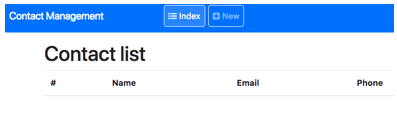
3.1 A start page with an empty contact list
When a user starts the application for the first time, it shows an empty list of contacts and two buttons (or icons) allowing the use to list contacts or to create a new contact.
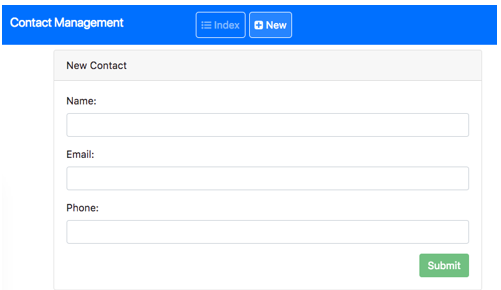
3.2 New contact page
When a user clicks the New button, it shows a form to let the user type in contact information.
All fields are required and the email has a pattern username@server.domain pattern. The phone number must be 10 digits not started with 0 and 1. When the user clicks submit with valid data, it saves the data to the backend REST API. The web pages then displays a details page.
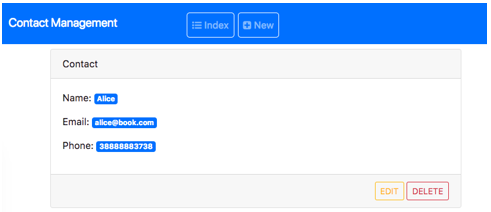
3.3 Details Page
A user can edit or delete this newly created contact.
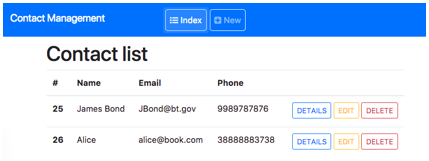
3.4 Contact list allowing update, edit and delete
If a user clicks the index button, it shows all created contacts with buttons allowing the user to see details, edit or delete it. When a user accesses the site with saved data, it shows the list too.
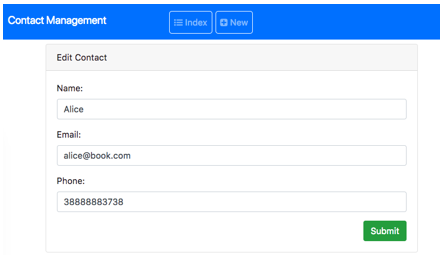
3.5 The edit page
Its like the new page filled with data from the selected contact.
The user should be able to change any field. And valid changes are written to the backend when the user submits the change.
3.6 The Delete
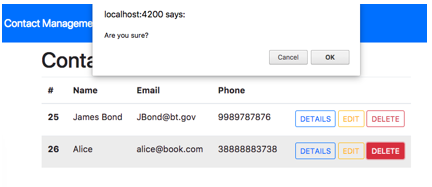
If the user clicks the delete button, it shows a confirmation dialog. If the user cancels, nothing happen. Otherwise, the contact is deleted from the backend and is removed from the web page.
Contact Management Contact list Name Email Phone Contact Management Contact list Name Email Phone
Step by Step Solution
There are 3 Steps involved in it

Get step-by-step solutions from verified subject matter experts
 Study Help