







Question: Using Java, create a registration program with a display like this: Condition: In the registration program, the user can enter data and choose to press
Using Java, create a registration program with a display like this:
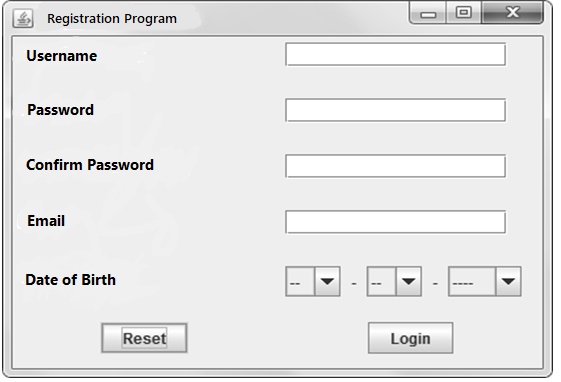
Condition: In the registration program, the user can enter data and choose to press the Login and Reset buttons. Here are some validations that need to be considered when the user press the Login button:
1. Validate that username cannot be empty. If the username is still empty, the following warning will appear: " username need to be filled" 2. Validate that passwords cannot be empty. If the user name has been filled in but the password is blank, a warning will appear as follows: "password need to be filled" 3. Validate that the password must be the same as confirm password. If the password does not match the confirmation password, a warning will appear as follows: "password and confirm password need to be the same" 4. Validate that email is required. If the email is not filled in, a warning will appear as follows: "email need to be filled" 5. Validate that the email filled must contain the characters "@" and "." If the email filled does not contain the characters "@" and "." Then a warning will appear as follows: "email format is incorrect" 6. Validate that date, month, and year must be selected. -If a date is not selected, the following warning will appear: "you need to select a date" -If the month is not selected, the following warning will appear: "you need to select a month" -If a year is not selected, the following warning will appear: "you need to select a year" 7. If all conditions are correct, the user will successfully log in and display the message as follows: "login success"
>> Meanwhile, if the user press the Reset button, there will be a display of confirmation message to the user as follows: "are you sure to reset?" >> If the user selects 'No' then nothing will be done, but if the user selects 'Yes' then all the fields will be returned to their initial conditions like above
O 10 x Registration Program Username Password Confirm Password Email Date of Birth -- -- Reset Login
Step by Step Solution
There are 3 Steps involved in it

Get step-by-step solutions from verified subject matter experts
 Study Help