







Question: using Java & swing I'm trying to make a Frame that contains 1. bouncing balls 2. white rectangle 3. labels and text fields on that
using Java & swing I'm trying to make a Frame that contains 1. bouncing balls 2. white rectangle 3. labels and text fields on that rectangle the issues that face me 1. two frames appear after running - one because of the extended JFrame and one is because of the graphics2D 2. when i try to add a label on the extended JFrame it doesn't appear while running 3. when i tried to add the label with graphics2D it appears with fixed bounds so that when i change the bounds no effect takes place Here's my code : import java.awt.Color; import java.awt.Dimension; import java.awt.Graphics; import java.awt.Graphics2D; import java.util.ArrayList; import java.util.Random; import javax.swing.JFrame; import javax.swing.JLabel; import javax.swing.JPanel; import javax.swing.JTextField; import static javax.swing.WindowConstants.EXIT_ON_CLOSE;
/** * * @author Hani */
public class LoginGui extends JFrame {
private Display display; int x=0,y=100; private ArrayList
getContentPane().setBackground( new Color(224,255, 255) ); JLabel j = new JLabel("welcome to bouncing balls window"); add(j); display = new Display(800, 600); addBalls(); mainLoop(); display.destroy(); setLayout(null); setTitle("Welcome Page"); setSize(new Dimension(800,600)); setDefaultCloseOperation(EXIT_ON_CLOSE); } private void mainLoop() { while (!display.isCloseRequested()) { updatePhysics(); paint(display.getGraphics()); display.update(); display.sync(60); } }
private void addBalls() { int numberOfBalls = 10; Random random = new Random();
for (int i = 0; i
int radius = random.nextInt(40) + 10;
int x = random.nextInt(display.width - radius * 2) + radius; int y = random.nextInt(display.height - radius * 2) + radius;
float speedX = random.nextFloat() * 0.5f + 3f; float speedY = random.nextFloat() * 1f + 3f;
Color color; switch (random.nextInt(3)) { case 0: color = new Color(70, 130, 180); break; case 1: color = new Color(64, 181, 173); break; case 2: color = Color.white; break; case 3 : color = new Color(0, 150, 255); break; default: color = new Color(240, 255, 255); break; }
Ball ball = new Ball(x, y, speedX, speedY, radius, color); balls.add(ball); } } private JTextField Input = new JTextField(); //Input.setBounds(-3,-5, 200,20); private void updatePhysics() { for (Ball ball : balls) {
ball.x += ball.speedX; ball.y += ball.speedY;
if (ball.x - ball.radius display.width) { ball.speedX = -Math.abs(ball.speedX); } if (ball.y - ball.radius display.height) { ball.speedY = -Math.abs(ball.speedY); } } } public void paint(Graphics g){ super.paint(g); Graphics2D g2d=(Graphics2D) g; g2d.setBackground(new Color(173, 216, 230)); g2d.clearRect(0, 0, display.width, display.height);
for (Ball ball : balls) { g.setColor(ball.color);
int x = (int) (ball.x - ball.radius); int y = (int) (ball.y - ball.radius); int size = ball.radius * 2;
g2d.fillOval(x, y, size, size); } // g2d.drawRoundRect(10, 20, 300, 400, 90, 10); g2d.setColor(new Color(255,255,255,90)); g2d.fillRect(200, 60, 400, 450);
} } Run 1 - first frame(with action) 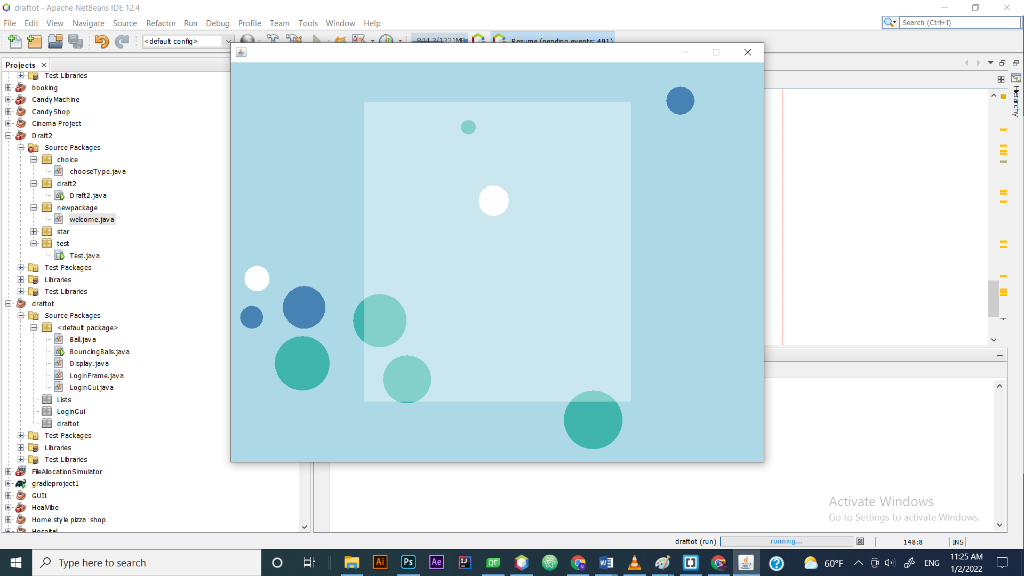 Run1 - 2nd frame ( fixed as an image) - appears after i close the first one
 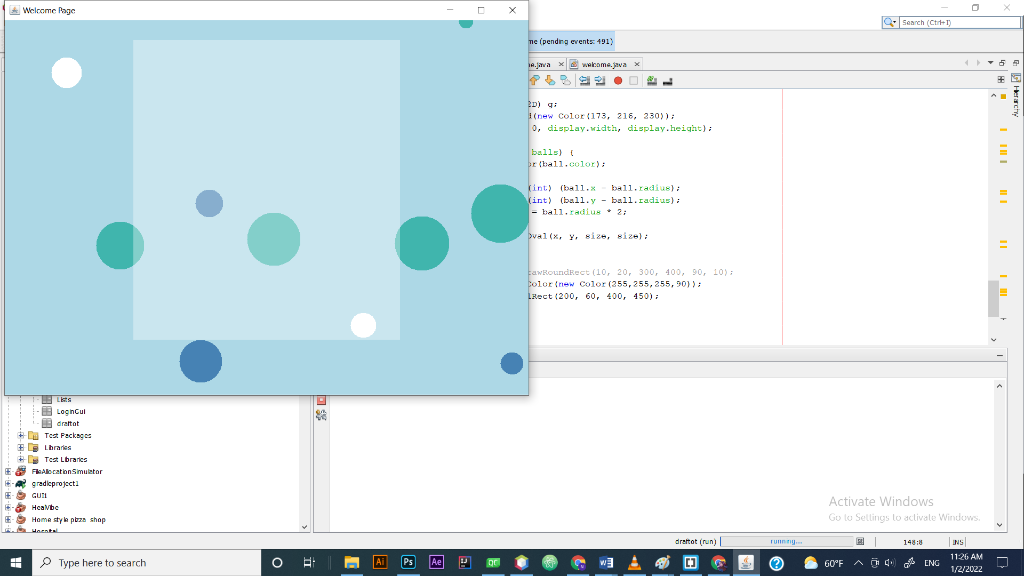 please fix those issues using Swing Thanks in advance,
Odrattot -Apache NetBeans IDE 124 File Edit View Navigate Source Refactor Run Debug Profile Team Tools Window Help ATTR...inanden. mante: 403 SPSC Q- Search ( C1) choice Projects x Test Lbraries booking Candy Machine Candy Shop - Cinema Project E Draft2 - Source Packages 3 chooseType.java dralt 2 Draft.java nawpackage welcome.java star ; test - GB Tast.jeva De Test Packages #braries Test Lbraries draitot Source Packages B defaut package Balja Bouncing Baljava Deplay.java LoginFrame.java Loginulava - Login Cul Baratot # Test Packages Libraries + Test. Lbraries & Felocation Simulator A gradieproject GUR Healybe Home style poza shop Woesti Activate Windows Gulu Sellings to activate Windows draftot (run) 148:8 Type here to search INS 1125 AM 1/2/2022 O Ail PS w . [] e 60F A) ENG TH : Welcome Page Q- Search ( C1) The ipending events 491) Ajava xwelcome.java x 2D) : (new Color (173, 216, 230)); 0, display.width, display.height); balls) br ball.color); (int) (ball. ball.radius: (int) (ball.y - ball.radius); = ball.radius 2: val(x, y, size, size): FawRoundRect (10, 20, 300, 400, 90, 10); Dolor new color (255, 255, 255,90)); LRect (200, 60, 400, 450); Las Logincul draitot # Test Packages Libraries Test Lbraries & Felocation Simulator A gradieproject GUR Healybe Home style poza shop Woesti Activate Windows Gulu Sellings to activate Windows draitot (run) 148:8 Type here to search INS 1126 AM 1/2/2022 O Ail PS Ae w . [] e 60F A) ENG TH
Step by Step Solution
There are 3 Steps involved in it

Get step-by-step solutions from verified subject matter experts
 Study Help