







Question: Using Matlab, need help writing Functions into the syntax %Equation 1 clear; clc; dydt = @(t,y) [1-sin(t)]; % ODE equation [t,y] = ode45(dydt,0:0.1:4,[1]); % Solver,
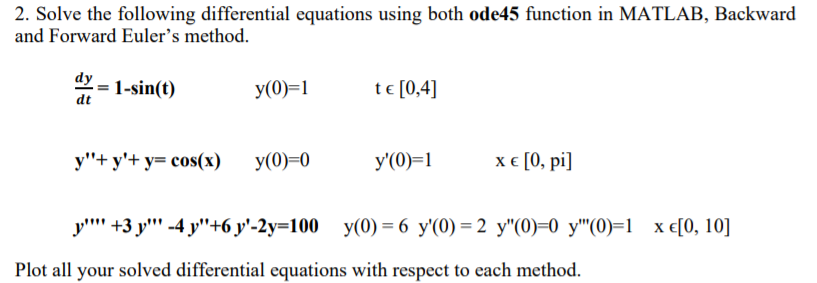
Using Matlab, need help writing Functions into the syntax
%Equation 1 clear; clc; dydt = @(t,y) [1-sin(t)]; % ODE equation [t,y] = ode45(dydt,0:0.1:4,[1]); % Solver, step size, and Initial Condition plot(t,y) %Plot
%Forward Syntax
clear; clc; nsteps = 10;%Change this dx = 0.1;%Change this x0 = 1; y0 = 0; %Change this xplot = zeros(1,nsteps); yplot = zeros(1,nsteps); tplot = zeros(1,nsteps); for j = 1:nsteps t = j*dx; x = x0+dx*(); y = y0+dx*();%Change this For the Equation in your problem tplot(j) = t; xplot(j) = x; yplot(j) = y; x0 = x; y0 = y; end plot(')
%Backward Syntax
nsteps = 10;%Change this dx = 0.1;%Change this y1o = ; y2o = ; %Change this xplot = zeros(1,nsteps); yplot = zeros(1,nsteps); tplot = zeros(1,nsteps); for j = 1:nsteps t = j*dx; g = @(y) [y(1)-y1o-dx*(];%Both equations ynew = fsolve(g,[y1o;y2o]); tplot(j) = t; y1plot(j) = y1o; y2plot(j) = y2o; y1o = ynew(1); y2o = ynew(2); end plot(')
%Equation 2 clear; clc; dydx = @(x,y) [y(2);cos(x)-y(1)-y(2)]; % ODE equation [x,y] = ode45(dydx,0:0.1:pi,[0;1]); % Solver, step size, and Initial Condition plot(x,y) %Plot
%Forward Syntax
clear; clc; nsteps = 10;%Change this dx = 0.1;%Change this x0 = 1; y0 = 0; %Change this xplot = zeros(1,nsteps); yplot = zeros(1,nsteps); tplot = zeros(1,nsteps); for j = 1:nsteps t = j*dx; x = x0+dx*(); y = y0+dx*();%Change this For the Equation in your problem tplot(j) = t; xplot(j) = x; yplot(j) = y; x0 = x; y0 = y; end plot(')
%Backward Syntax
nsteps = 10;%Change this dx = 0.1;%Change this y1o = ; y2o = ; %Change this xplot = zeros(1,nsteps); yplot = zeros(1,nsteps); tplot = zeros(1,nsteps); for j = 1:nsteps t = j*dx; g = @(y) [y(1)-y1o-dx*(];%Both equations ynew = fsolve(g,[y1o;y2o]); tplot(j) = t; y1plot(j) = y1o; y2plot(j) = y2o; y1o = ynew(1); y2o = ynew(2); end plot()
%Equation 3
clear; clc; dydx = @(x,y) []; % ODE equation [x,y] = ode45(dydx,0:0.1:10,[0;1]); % Solver, step size, and Initial Condition plot(x,y) %Plot
%Forward Syntax
clear; clc; nsteps = 10;%Change this dx = 0.1;%Change this x0 = 1; y0 = 0; %Change this xplot = zeros(1,nsteps); yplot = zeros(1,nsteps); tplot = zeros(1,nsteps); for j = 1:nsteps t = j*dx; x = x0+dx*(); y = y0+dx*();%Change this For the Equation in your problem tplot(j) = t; xplot(j) = x; yplot(j) = y; x0 = x; y0 = y; end plot(')
%Backward Syntax
nsteps = 10;%Change this dx = 0.1;%Change this y1o = ; y2o = ; %Change this xplot = zeros(1,nsteps); yplot = zeros(1,nsteps); tplot = zeros(1,nsteps); for j = 1:nsteps t = j*dx; g = @(y) [y(1)-y1o-dx*(];%Both equations ynew = fsolve(g,[y1o;y2o]); tplot(j) = t; y1plot(j) = y1o; y2plot(j) = y2o; y1o = ynew(1); y2o = ynew(2); end plot()
2. Solve the following differential equations using both ode45 function in MATLAB, Backward and Forward Euler's method. dy1-sin(t) y(0-te [0,4] y"+ y+ y- cos(x)y(0)-0 y(0-1x e[0, pi] y"" +3y','-4y'46 y'-2y-100 y(0)-6 y'(0)-2 y"(0)-0 y'"(0)-1 xt[0, 10] Plot all your solved differential equations with respect to each method
Step by Step Solution
There are 3 Steps involved in it

Get step-by-step solutions from verified subject matter experts
 Study Help