







Question: USING MATLAB The person in a few image frames blocks the background trees, road, and statue. However, in most of the frames, the background is
USING MATLAB
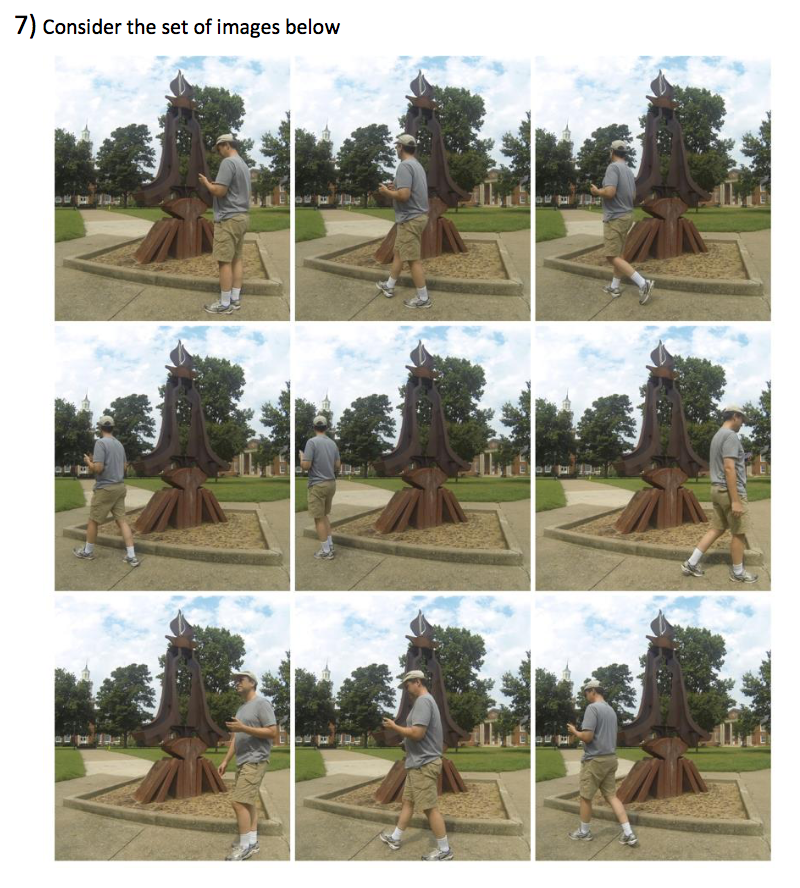
The person in a few image frames blocks the background trees, road, and statue. However, in most of the frames, the background is visible and remains the same. Notice the person blocks different pixels each frame. If we could identify which pixels are the background, we could completely remove the person completely.
We make the assumption that at a given [row, col] the image pixels are basically the same color throughout the set of frames. In one or two frames, the pixel at [row, col] will be radically different from the other frames due to the person. What we want to due is sort the pixels at a given [row, col] and take the median one as our final background pixel value.
With Matlab, this entire process can be done in a few lines of code without a loop for processing the images with the median. If all of the frames are put into a 3D matrix [row, col, frame], we can use the median function and tell it to take the median along the 3rd frame dimension.
To load the images in, use the imread function. You can manually do this for all 9 images, or write a for loop to load them all in. The cat function might be helpful if you are trying to concatenate along the 3rd dimension. The zeros function might be useful if you are trying to create an empty matrix.
Write a script or function to take in all these images and output a new image without the person in it.
7) Consider the set of images below 7) Consider the set of images below
Step by Step Solution
There are 3 Steps involved in it

Get step-by-step solutions from verified subject matter experts
 Study Help