







Question: using matlab Write a script that does the following. After each step, display the result using the disp() command. 1. Creates and stores the following
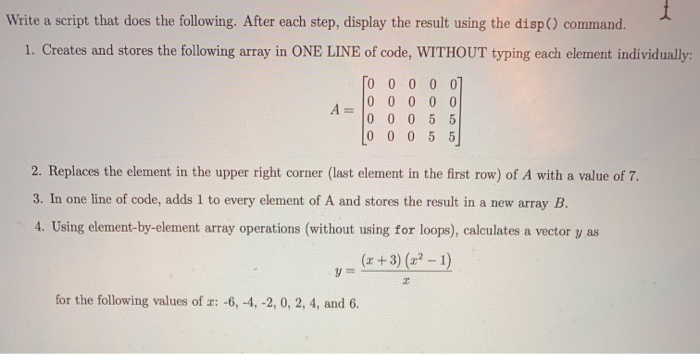
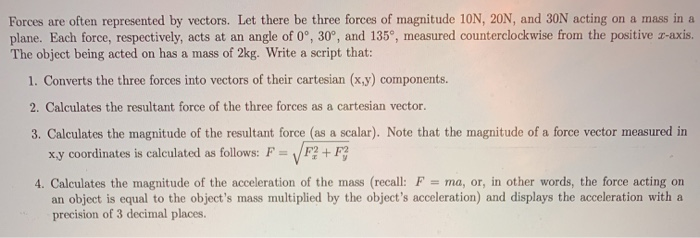
Write a script that does the following. After each step, display the result using the disp() command. 1. Creates and stores the following array in ONE LINE of code, WITHOUT typing each element individually: To 0 0 0 0] 0 0 0 0 0 0 0 0 5 5 Lo o 0 5 5 2. Replaces the element in the upper right corner (last element in the first row) of A with a value of 7. 3. In one line of code, adds 1 to every element of A and stores the result in a new array B. 4. Using element-by-element array operations (without using for loops), calculates a vector y as (x+3)(x2-1) for the following values of a: -6, -4, -2,0, 2, 4, and 6. Forces are often represented by vectors. Let there be three forces of magnitude 10N, 20N, and 30N acting on a mass in a plane. Each force, respectively, acts at an angle of 0, 30, and 135, measured counterclockwise from the positive z-axis. The object being acted on has a mass of 2kg. Write a script that: 1. Converts the three forces into vectors of their cartesian (x,y) components. 2. Calculates the resultant force of the three forces as a cartesian vector 3. Calculates the magnitude of the resultant force (as a scalar). Note that the magnitude of a force vector measured in xy coordinates is calculated as follows: F = F3+ F3 4. Calculates the magnitude of the acceleration of the mass (recall: F = ma, or, in other words, the force acting on an object is equal to the object's mass multiplied by the object's acceleration and displays the acceleration with a precision of 3 decimal places
Step by Step Solution
There are 3 Steps involved in it

Get step-by-step solutions from verified subject matter experts
 Study Help