







Question: Using *** SQL*** 1.) Complete the following exercises by creating a database called M5 using SQL server management server (SSMS) . As you write and
Using ***SQL***
1.) Complete the following exercises by creating a database called M5 using SQL server management server (SSMS) . As you write and execute the SQL DDL commands to complete the exercises below: PART A,B, & C,. Cut and paste the SQL into the Word document labeling each command with the corresponding exercise number. Answer any additional questions asked in each exercise below the SQL command.
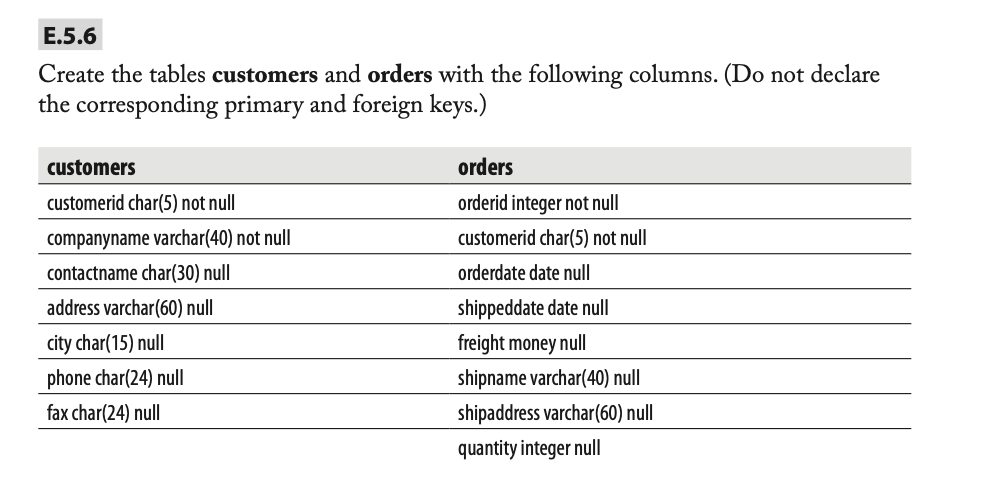
PART A) Complete exercises E.5.3, E.5.6.
PART B) Complete exercise E.5.11 You will need to drop the tables you initially created to do this and modify the SQL commands from E.5.6 to add the primary key and foreign key constraints. Name the key constraints pk_customer, pk_order and fk_order_customer.
PART C) Complete exercises E.5.12
-----------------------------------------------------------------------------------------------------------------------------
E.5.3- Using the ALTER DATABASE statement, change the file size of the test_db database to 10MB.
E.5.11- Re-create the tables customers and orders, enhancing their definition with all primary and foreign keys constraints.
E.5.12 -Using SQL Server Management Studio, try to insert a new row into the orders table with the following values:
(10, 'ord01', getdate(), getdate(), 100.0, 'Windstar', 'Ocean', 1). Why isnt that working?
***if possible please provide screenshots. I am new to this and would like to see how it looks like.
E.5.6 Create the tables customers and orders with the following columns. (Do not declare the corresponding primary and foreign keys.) orders customers customerid char(5) not null companyname varchar(40) not null contactname char(30) null address varchar(60) null city char(15) null phone char(24) null fax char(24) null orderid integer not null customerid char(5) not null orderdate date null shippeddate date null freight money null shipname varchar(40) null shipaddress varchar(60) null quantity integer null
Step by Step Solution
There are 3 Steps involved in it

Get step-by-step solutions from verified subject matter experts
 Study Help