







Question: Using SQL*Plus on OMEGA, access the tables you created in Project 2 and complete the following SQL transactions. Log your statements and results by spooling
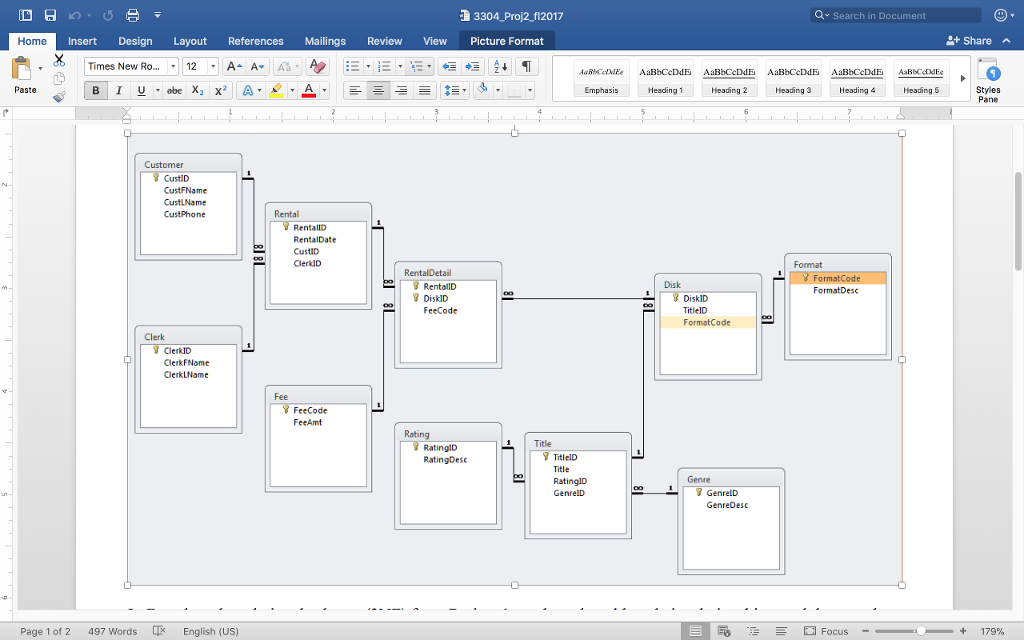 Using SQL*Plus on OMEGA, access the tables you created in Project 2 and complete the following SQL transactions. Log your statements and results by spooling your file (with echo on). Directions for creating and running SQL files are available in the Assignments and Exams page in Blackboard (in the Project 2 group of files). All column headings must show in their entirety
2 points
List the count of unique titles for which we have disks in our inventory. Use TitleCount as the column heading. Hint: Query from the disk table only.
3 points
List the GenreID and Count of titles in each genre. Use the following column headings: GenreID, TitleCount. Hint: Use a GROUP BY clause.
3 points
List rental ID, rental date, and the sum of all rental fees in rental 10. Format the total as currency and use the following column headings: RentalID, Date, RentalTotal.
4 points
List the customer ID, customer first name, customer last name, and customer count of rentals for each customer. Combine the first and last name into one column. Sort by rental count in descending order, then by customer ID in ascending order. Use the following column headings: CustomerID, CustomerName, RentalCount. Hint: Use a GROUP BY clause.
11. 3 points
List all rows and all columns from the RentalDetail table; sort by Rental ID then by Disk ID, both in ascending order. Use the following column headings: RentalID, DiskID, FeeCode.
12. 3 points
List the title ID, title name, and count of each format type for each title. Sort by count in descending order. Hint: Use a GROUP BY clause.
13. 4 points
List the customer ID, customer first name, customer last name, and customer phone number for all customers; sort by customer ID. Show the phone number formatted as (###) ###-#### and use the following column headings: Customer_ID, First_Name, Last_Name, Phone.
4 points
List the rental ID, genre ID, genre name, title ID, title name, and fee amount of the titles(s) with the lowest fee amount in each Rental, and sort by fee amount in descending order. Show the fee amount formatted as currency, and use the following column headings: GenreID, Genre, TitleID, Title, Fee. Hint: use a GROUP BY clause and a nested SELECT.
3 points
List the genre name, title name, and rating for all titles; sort by genre then by title name.
4 points
List the genre name and count of titles in each genre. Use the following column headings: GenreName, TitleCount. Sort by title count in descending order. Hint: use a GROUP BY clause.
3304 Proj2_f12017 Q Search in Document Home Insert Design Layout References Mailings Review View Picture Format Share X Times New Ro 12 A AvIA a. , 1-,-, E T Paste Heading 1 Heading 2 Heading 3 Heading Heading 5 Styles Pane Customer CustiD CustiD Disk FormatDesc DiskID FeeCode DiskID TitlelD FormatCode Clerk ClerkID ClerkFName ClerkLName FeeCode Title TitlelD Title 7 GenrelD Page 1 of 2 497 Words English (US) Focus 179%
Step by Step Solution
There are 3 Steps involved in it

Get step-by-step solutions from verified subject matter experts
 Study Help