







Question: Using the attached network diagram configure the CSR routers. NOTE: GigabitEthernet 1 has already been configured and will act as a WAN link and a
Using the attached network diagram configure the CSR routers. NOTE: GigabitEthernet 1 has already been configured and will act as a WAN link and a Management network
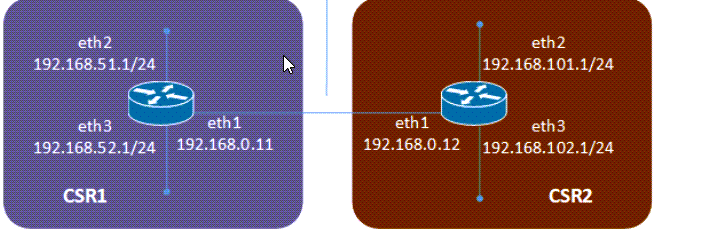
I just need help with configuring OSPF, how would you go about it. I choose OSPF and I need help with it. It just those two routers above
Here are the tasks
- Setup routing tables between the routers (your choice of static routing, ospf, rip, bgp, or other)
- Name the devices
- Configure the additional interfaces with the listed IP addresses
- Disable DNS lookup.
- Require that a minimum of 10 characters be used for all passwords.
- Encrypt all plaintext passwords.
- Create a banner that warns anyone accessing the device that unauthorized access is prohibited. Make sure to include the word Warning in the banner.
- Configure the console and VTY lines to log out after five minutes of inactivity.
- Block anyone for three minutes who fails to log in after four attempts within a two-minute period
eth 2 192.168.51.1/24 eth 2 192.168.101.1/24 eth 3 eth1 192.168.52.1/24 192.168.0.11 eth1 eth3 192.168.0.12 192.168.102.1/24 CSR1 CSR2 eth 2 192.168.51.1/24 eth 2 192.168.101.1/24 eth 3 eth1 192.168.52.1/24 192.168.0.11 eth1 eth3 192.168.0.12 192.168.102.1/24 CSR1 CSR2
Step by Step Solution
There are 3 Steps involved in it
1 Expert Approved Answer
Step: 1 Unlock

Question Has Been Solved by an Expert!
Get step-by-step solutions from verified subject matter experts
Step: 2 Unlock
Step: 3 Unlock
 Study Help