







Question: Using the InputBox Function Note: The InputBox function's syntax also includes optional XPos and YPos arguments for specifying the dialog box's horizontal and vertical positions,
Using the InputBox Function
Note: The InputBox function's syntax also includes optional XPos and YPos arguments for
specifying the dialog box's horizontal and vertical positions, respectively. If both arguments are
omitted, the dialog box appears centered on the screen.
Basic syntax
InputBoxprompt title defaultResponse
Example
strSales
InputBoxEnter a sales amount. Click Cancel to end.",
"Sales Entry",
Displays the input dialog box shown in Figure B When the user closes the dialog box, the
assignment statement assigns the function's return value to the strSales variable.
Example
strCity InputBoxCity name:", "City"
Displays an input dialog box that shows "City name:" as the prompt, "City" in the title bar, and
an empty input area. When the user closes the dialog box, the assignment statement assigns
the function's return value to the strCity variable.
Example
Const strPROMPT As String "Enter the discount rate:"
Const strTITLE As String "Discount Rate"
strRate InputBoxstrPROMPT strTITLE,
Displays an input dialog box that shows the contents of the strPROMPT constant as the prompt,
the contents of the strTITLE constant in the title bar, and in the input area. When the
user closes the dialog box, the assignment statement assigns the function's return value to the
strRate variable.
Example
Integer.TryParseInputBoxHow old are you?",
"Discount Verification" intAge
Displays an input dialog box that shows "How old are you?" as the prompt, "Discount Verification"
in the title bar, and an empty input area. When the user closes the dialog box, the TryParse
method converts the function's return value from String to Integer and then stores the result in
the intAge variable.
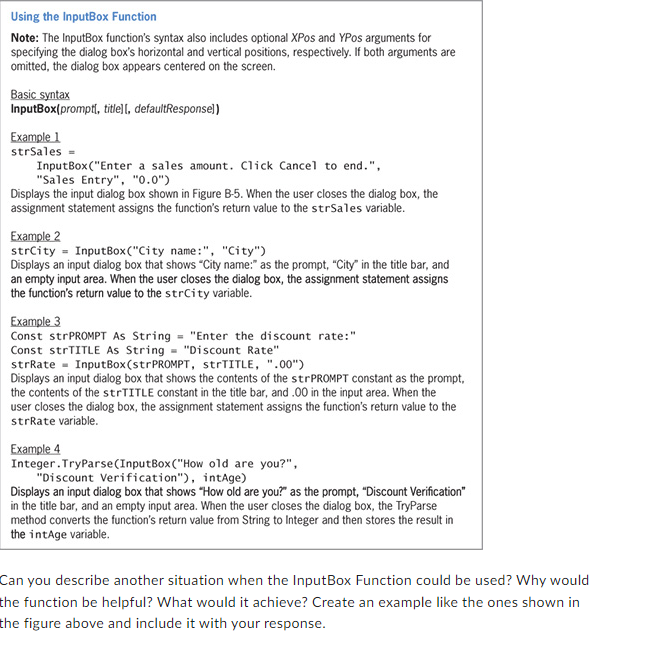
Can you describe another situation when the InputBox Function could be used? Why would
the function be helpful? What would it achieve? Create an example like the ones shown in
the figure above and include it with your response.
Step by Step Solution
There are 3 Steps involved in it
1 Expert Approved Answer
Step: 1 Unlock

Question Has Been Solved by an Expert!
Get step-by-step solutions from verified subject matter experts
Step: 2 Unlock
Step: 3 Unlock
 Study Help