







Question: Using this format to finish it: /* * Project11.java * * A program that reads in a text file that uses a specific input format
Using this format to finish it:
/* * Project11.java * * A program that reads in a text file that uses a specific input format and uses it to * produce a formatted report for output. * * See the write-up for Homework Lab 13 for more details. * * This skeleton is more "skeletal" than previous labs. You MUST break your code up into * more methods than what you see here. Consider methods to display the formatted report * as well as more methods to compute values for the report. * * @author ENTER YOUR NAME HERE * */ package osu.cse1223; import java.io.*; import java.util.*; public class Project11 { public static void main(String[] args) { // Fill in the body } // Given a Scanner as input read in a list of integers one at a time until a negative // value is read from the Scanner. Store these integers in an ArrayList and // return the ArrayList to the calling program. private static ArrayList readNextSeries(Scanner inScanner) { // Fill in the body } // Given a ArrayList of integers, compute the median of the list and return it to // the calling program. private static int getMedian(ArrayList inList) { // Fill in the body } // Given a ArrayList of integers, compute the average of the list and return it to // the calling program. private static int getAverage(ArrayList inList) { // Fill in the body } } Input File Format
Your program needs to read files in a specific format. Each player is designated by a block of lines that follow the following format:
... -1
Where the elipses (...) indicate more scores are possible, though not required. A minimum of one score per player is required. Multiple blocks appended together form the whole file. For example, the following sample shows four players and their associated scores:
Rory Williams 88 92 78 -1 James Barnes 87 76 91 54 66 -1 Sarah Jane Smith 92 86 95 85 82 -1 Jack Sparrow 18 54 13 0 -1
Note that different players will have different numbers of scores, but after the last score for a player there will always be a line with a negative number. Your code must be able to take this into account and not assume that every player will have the same number of scores. A sample text file containing example scores can be found at the link below. Make sure your code works with ANY input file we might use that follows the same format. We will test your code with files other than the one provided below.
project11Input.txt
Output Report Format Your program should generate a text file that follows a specific reporting format. For the sample file given above, here is a sample output report: Final Overall Scores Report 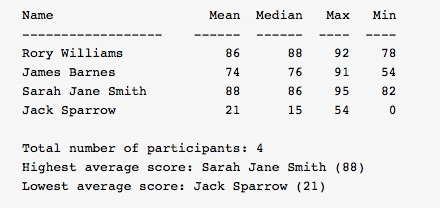 Note that for this assignment you must be able to compute the Mean (average) of a list of scores and the Median of the same list of scores. The Mean can be found by adding together all of the scores and then dividing by the total number of scores (so Rory Williams's Mean is computed as (88+92+78)/3 = 86). A simple algorithm for finding the median of a list of numbers is:
Sort the list
If the list has an odd number of elements
The median is the value in the exact center of the sorted list
If the list has an even number of elements
The median is the average of the two elements in the middle of the list
So Rory Williams's Median can be computed by putting his scores in order: [78, 88, 92] and seeing that 88 is in the center of the list. Jack Sparrow's median can be found by putting his scores in order: [0,13,18,54] and taking the average of the middle two elements (13+18)/2 = 31/2 = 15 in integer math. HINT: You may want to use the method Collections.sort() to sort your ArrayList of scores. HINT 2: The formatting of the report is important. Make sure that your output lines up appropriately regardless of the scores that the players get. In particular, make sure that single digit scores and scores of 100 line up appropriately. You may want to use a formatted output method such as printf() or format() to make your report print appropriately.
Project 11 Sample Output
This is a sample transcript of what your program should do. Items in bold are user input and should not be put on the screen by your program. Enter an input file name: project11Input.txt Enter an output file name: project11Output.txt The console output for this assignment is very boring - the real output for this assignment will be in the creation of the output file as discussed above. Make sure that your program behaves appropriately if the input file does not exist or the output file cannot be written to, and that if a user attempts to use the same name for the output file that they provided as an input file, the program warns them and makes them select a new output file name.
Submission Instructions
Make sure your programs compile and run correctly before submitting. To submit, follow the instructions from Closed Lab 01 to create a single zip file named Project11.zip that contains the file Project11.java and then upload that zip file to the Carmen dropbox for Project 11.
Name Mean Median Max Min 86 Rory Williams James Barnes Sarah Jane Smith Jack Sparrow 76 86 15 92 91 95 5 4 78 54 82 74 21 Total number of participants: 4 Highest average score: Sarah Jane Smith (88) Lowest average score: Jack Sparrow (21)
Step by Step Solution
There are 3 Steps involved in it

Get step-by-step solutions from verified subject matter experts
 Study Help