







Question: Using ubuntu Pipes The pipe() system call creates a unidirectional communication buffer space managed by the operating system. It also initializes two file descriptors -
Using ubuntu
Pipes
The pipe() system call creates a unidirectional communication buffer space managed by the operating system. It also initializes two file descriptors - one associated with each end of the pipe (the "writing" end and the "reading" end). This is similar to opening a file and getting a file handle back, except there is both a reading and a writing handle. Using the read() and write() system calls, the pipe can be used for communication by connecting a process to each end, and proceeding as if you are reading/writing a file. Pipe communication is unidirectional; so typically one process (the Producer) writes to a pipe and the other process (the Consumer) reads from the pipe. Therefore, the writer closes their "read" handle, and the reader closes their "write" handle. Note: redirection (as implemented via the dup2() calls in the program below) is not required; i.e. when appropriate, pipe handles can be used directly for I/O, just like file handles. It's simply convenient in certain cases. The following program illustrates the general concept of interprocess communication and many of the system calls discussed in this section of the lab.
Sample Program
#include
#define READ 0 #define WRITE 1 #define MAX 1024
int main() { int fd[2]; ssize_t num; pid_t pid; char str[MAX];
if (pipe (fd) // point A
if ((pid = fork()) // point B
else if (!pid) { dup2 (fd[WRITE], STDOUT_FILENO); // point C close (fd[READ]); close (fd[WRITE]); // point D fgets (str, MAX, stdin); write (STDOUT_FILENO, (const void *) str, (size_t) strlen (str) + 1); exit (0); }
dup2 (fd[READ], STDIN_FILENO); // point C close (fd[READ]); close (fd[WRITE]); // point D num = read (STDIN_FILENO, (void *) str, (size_t) sizeof (str)); if (num > MAX) { perror ("pipe read error "); exit(1); } puts (str); return 0; }
Perform the following and answer the questions:
- study, compile and run Sample Program
- what exactly does the program do (i.e. describe its high-level functionality)?
- create a diagram that visually describes the input/output structure of the executing program. Show processes and handles as in the pipe example diagrammed in the handout; show the file descriptor table as presented above in the File I/O section::
- at point A (after the pipe is created)
- at point B (after the parent forks)
- at point C (after the parent and child have duplicated descriptors)
- at point D (after parent and child have closed descriptors)
The figure below shows the expected diagram at point A. You should submit a total of 4 diagrams
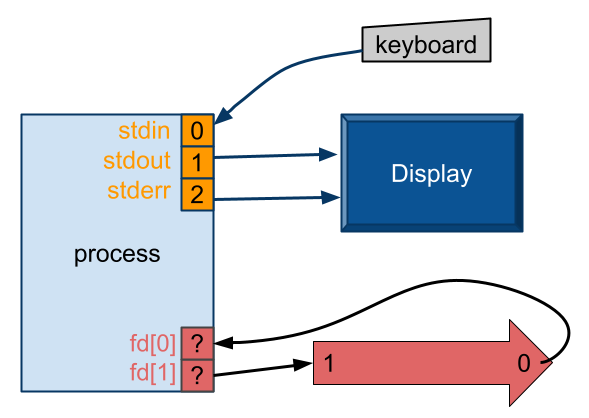
keyboard stdino stdout 1 stderr 2 Display process fd[0]? 1 fd[1] ? keyboard stdino stdout 1 stderr 2 Display process fd[0]? 1 fd[1]
Step by Step Solution
There are 3 Steps involved in it

Get step-by-step solutions from verified subject matter experts
 Study Help