







Question: Using Visual studios 2019 C++ File Using visual studios 2019 C++ File Programming Exercise #2 - Online Order Program (12 pts) In this question, you
Using Visual studios 2019 C++ File 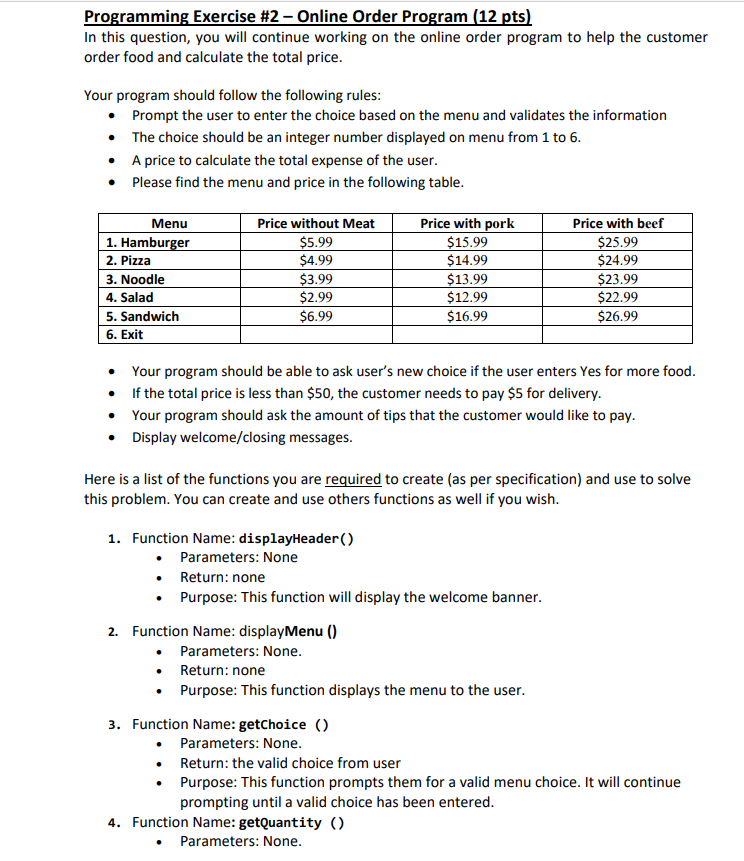
 Using visual studios 2019 C++ File
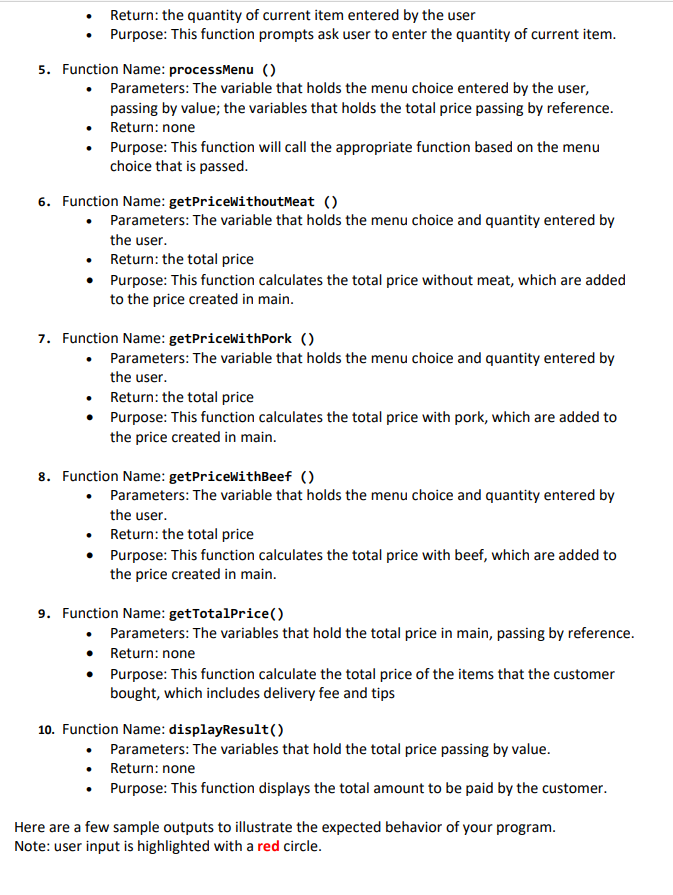
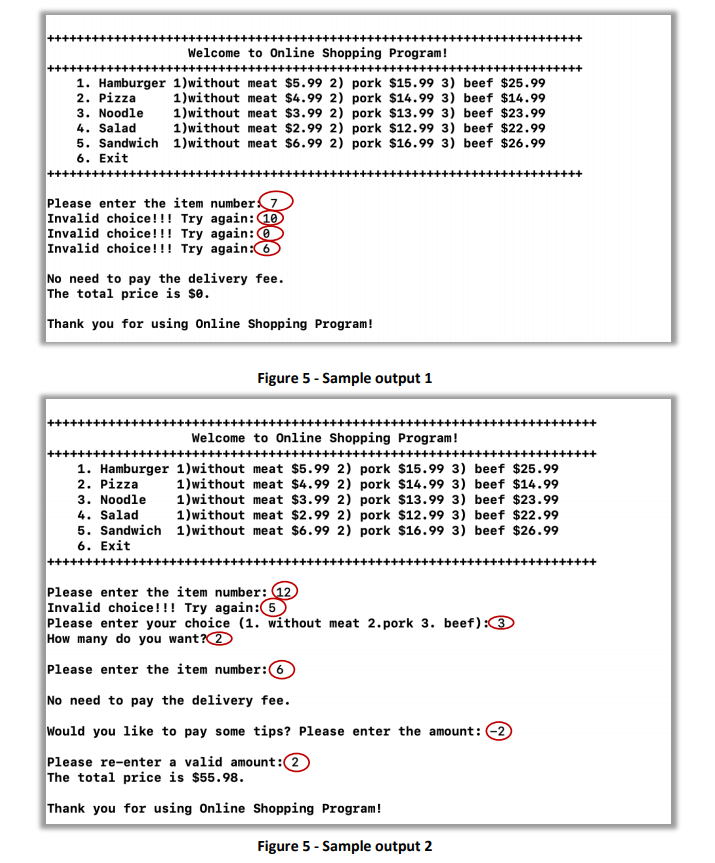
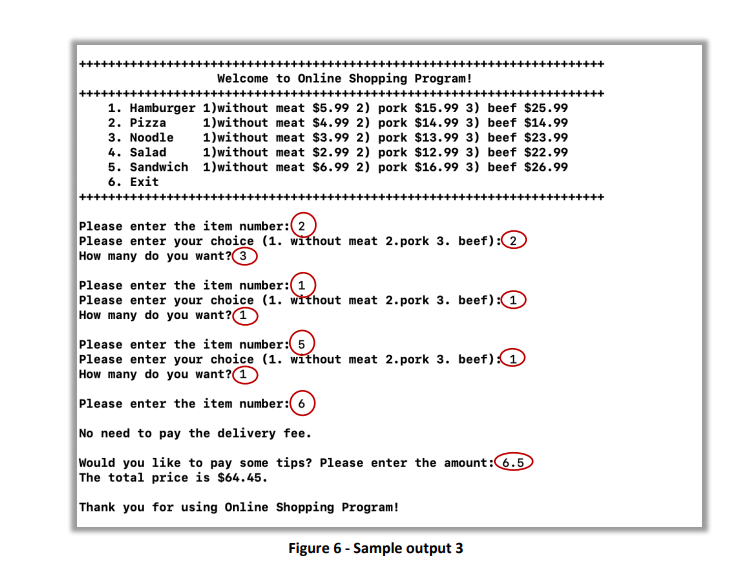
Programming Exercise #2 - Online Order Program (12 pts) In this question, you will continue working on the online order program to help the customer order food and calculate the total price. Your program should follow the following rules: Prompt the user to enter the choice based on the menu and validates the information The choice should be an integer number displayed on menu from 1 to 6. A price to calculate the total expense of the user. Please find the menu and price in the following table. Menu 1. Hamburger 2. Pizza 3. Noodle 4. Salad 5. Sandwich 6. Exit Price without Meat $5.99 $4.99 $3.99 $2.99 $6.99 Price with pork $15.99 $14.99 $13.99 $12.99 $16.99 Price with beef $25.99 $24.99 $23.99 $22.99 $26.99 Your program should be able to ask user's new choice if the user enters Yes for more food. If the total price is less than $50, the customer needs to pay $5 for delivery. Your program should ask the amount of tips that the customer would like to pay. Display welcome/closing messages. Here is a list of the functions you are required to create (as per specification) and use to solve this problem. You can create and use others functions as well if you wish. 1. Function Name: displayHeader() Parameters: None Return: none Purpose: This function will display the welcome banner. 2. Function Name: displayMenu() Parameters: None. Return: none Purpose: This function displays the menu to the user. 3. Function Name: getChoice () Parameters: None. Return: the valid choice from user Purpose: This function prompts them for a valid menu choice. It will continue prompting until a valid choice has been entered. 4. Function Name: getQuantity () Parameters: None. Return: the quantity of current item entered by the user Purpose: This function prompts ask user to enter the quantity of current item. 5. Function Name: processMenu() Parameters: The variable that holds the menu choice entered by the user, passing by value; the variables that holds the total price passing by reference. Return: none Purpose: This function will call the appropriate function based on the menu choice that is passed. 6. Function Name: getPriceWithoutMeat () Parameters: The variable that holds the menu choice and quantity entered by the user. Return: the total price Purpose: This function calculates the total price without meat, which are added to the price created in main. 7. Function Name: getPriceWithPork () Parameters: The variable that holds the menu choice and quantity entered by the user. Return: the total price Purpose: This function calculates the total price with pork, which are added to the price created in main. 8. Function Name: getPriceWithBeef () Parameters: The variable that holds the menu choice and quantity entered by the user. Return: the total price Purpose: This function calculates the total price with beef, which are added to the price created in main. 9. Function Name: getTotalPrice() Parameters: The variables that hold the total price in main, passing by reference. Return: none Purpose: This function calculate the total price of the items that the customer bought, which includes delivery fee and tips 10. Function Name: displayResult() Parameters: The variables that hold the total price passing by value. Return: none Purpose: This function displays the total amount to be paid by the customer. Here are a few sample outputs to illustrate the expected behavior of your program. Note: user input is highlighted with a red circle. Welcome to Online Shopping Program! 1. Hamburger 1)without meat $5.99 2) pork $15.99 3) beef $25.99 2. Pizza 1)without meat $4.99 2) pork $14.99 3) beef $14.99 3. Noodle 1)without meat $3.99 2) pork $13.99 3) beef $23.99 4. Salad 1)without meat $2.99 2) pork $12.99 3) beef $22.99 5. Sandwich 1)without meat $6.99 2) pork $16.99 3) beef $26.99 6. Exit Please enter the item number: 7 Invalid choice!!! Try again: 10 Invalid choice!!! Try again: Invalid choice!!! Try again:6 No need to pay the delivery fee. The total price is $e. Thank you for using Online Shopping Program! Figure 5 - Sample output 1 Welcome to Online Shopping Program! 1. Hamburger 1)without meat $5.99 2) pork $15.99 3) beef $25.99 2. Pizza 1)without meat $4.99 2) pork $14.99 3) beef $14.99 3. Noodle 1)without meat $3.99 2) pork $13.99 3) beef $23.99 4. Salad 1)without meat $2.99 2) pork $12.99 3) beef $22.99 5. Sandwich 1) without meat $6.99 2) pork $16.99 3) beef $26.99 6. Exit Please enter the item number: 12 Invalid choice!!! Try again: Please enter your choice (1. without meat 2.pork 3. beef):3 How many do you want? Please enter the item number: No need to pay the delivery fee. Would you like to pay some tips? Please enter the amount: 2 Please re-enter a valid amount: The total price is $55.98. Thank you for using Online Shopping Program! Figure 5 - Sample output 2 Welcome to Online Shopping Program! +++++++++++++++++++++++++++++++++ ++++++ 1. Hamburger 1)without meat $5.99 2) pork $15.99 3) beef $25.99 2. Pizza 1)without meat $4.99 2) pork $14.99 3) beef $14.99 3. Noodle 1)without meat $3.99 2) pork $13.99 3) beef $23.99 4. Salad 1)without meat $2.99 2) pork $12.99 3) beef $22.99 5. Sandwich 1)without meat $6.99 2) pork $16.99 3) beef $26.99 6. Exit Please enter the item number: 2 Please enter your choice (1. without meat 2.pork 3. beef): 2 How many do you want? 3 Please enter the item number: 1 Please enter your choice (1. without meat 2.pork 3. beef): 1 How many do you want? 1 Please enter the item number: 5 Please enter your choice (1. without meat 2.pork 3. beef): 2 How many do you want? 1 Please enter the item number: 6 No need to pay the delivery fee. Would you like to pay some tips? Please enter the amount: 6.5 The total price is $64.45. Thank you for using Online Shopping Program! Figure 6 - Sample output 3
Step by Step Solution
There are 3 Steps involved in it

Get step-by-step solutions from verified subject matter experts
 Study Help