







Question: v Instructions Now it's time to practice statusing and forecasting a project. You'll be using the cost baseline you developed in a previous lesson. We've
v 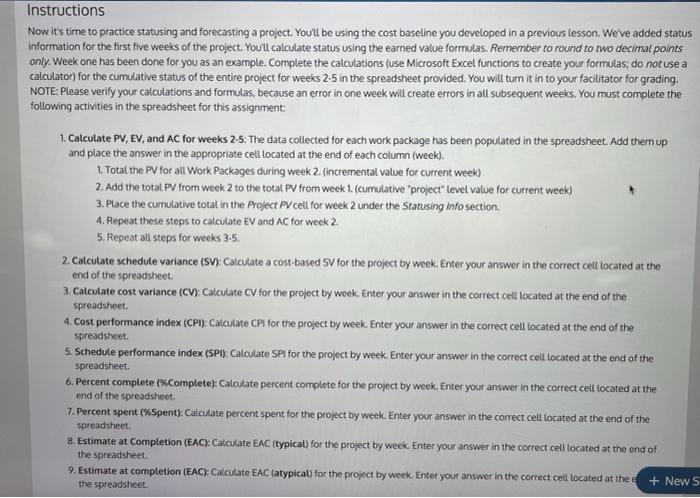
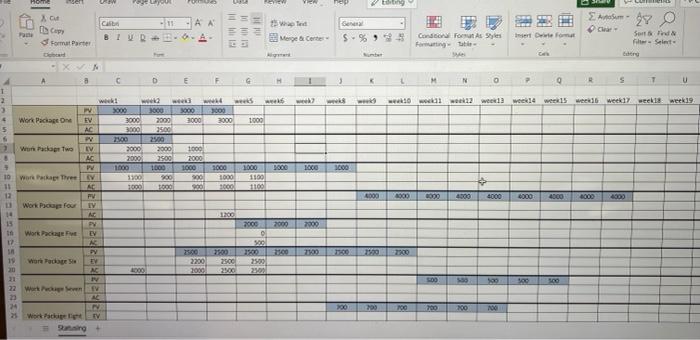
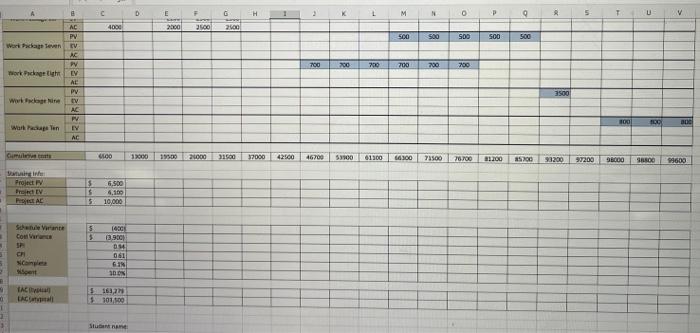
Instructions Now it's time to practice statusing and forecasting a project. You'll be using the cost baseline you developed in a previous lesson. We've added status Information for the first five weeks of the project. You'll calculate status using the earned value formulas. Remember to round to two decimal points only. Week one has been done for you as an example. Complete the calculations (use Microsoft Excel functions to create your formulas; do not use a calculator) for the cumulative status of the entire project for weeks 2.5 in the spreadsheet provided. You will turn it in to your facilitator for grading. NOTE: Please verify your calculations and formulas, because an error in one week will create errors in all subsequent weeks. You must complete the following activities in the spreadsheet for this assignment 1. Calculate PV, EV, and AC for weeks 2-5. The data collected for each work package has been populated in the spreadsheet. Add them up and place the answer in the appropriate cell located at the end of each column (week). 1. Total the PV for all Work Packages during week 2. (incremental value for current week) 2. Add the total PV from week 2 to the total PV from week 1. (cumulative project" level value for current week) 3. Place the cumulative total in the Project PV cell for week 2 under the Statusing Info section 4. Repeat these steps to calculate EV and AC for week 2. 5. Repeat all steps for weeks 3-5. 2. Calcutate schedule variance (SV): Calculate a cost based SV for the project by week. Enter your answer in the correct cell located at the end of the spreadsheet. 3. Calculate cost variance (CV): Calculate CV for the project by week. Enter your answer in the correct cell located at the end of the spreadsheet 4. Cost performance Index (CPI) Calculate CPU for the project by week. Enter your answer in the correct cell located at the end of the spreadsheet. 5. Schedule performance index (SP Calculate Spi for the project by week. Enter your answer in the correct cell located at the end of the spreadsheet 6. Percent complete (Completes Calculate percent complete for the project by week. Enter your answer in the correct cell located at the end of the spreadsheet. 7. Percent spent (%Spents: Calculate percent spent for the project by week. Enter your answer in the correct cell located at the end of the spreadsheet 8. Estimate at Completion (EAC): Calculate EAC (typical) for the project by week. Enter your answer in the correct cell tocated at the end of the spreadsheet 9. Estimate at completion (EAC): Calculate EAC (atypical) for the project by week. Enter your answer in the correct cell located at the + News the spreadsheet Home VER SHI ting X G 27 O Cat PIESAA BIURO- Fan wat === Merge & Cortes of sommat ww SE6% Condicions Forsytes Forting to Sortid fr Site tre - XN a C D E F 3 N O D 5 7 n 1 2 w wo wew2 weed week!4 weeks weeds week weeks werk 1000 3000 Work Package One EV AC 1.000 Package Twe Salalalala 21 22 23 w w 3000 3000 3000 3000 2000 3000 3000 1100 2500 2000 2000 1000 2000 2500 2000 1000 1000 1000 1700 900 900 1000 3000 Hace 1000 1000 1000 1000 1000 1100 11.00 006 COOY 1000 1990 4300 4000 6000 4000 4000 10 Waraka The 11 12 Work Poup four 14 15 th Work Package 12 1200 2000 2000 EY AC PY EV WI 002 7100 19 on Page 2500 2500 2500 2300 DE 2200 200 0007 DO 1.00 21 22 West za A 24 N Worki TV Bung 200 790 700 CE 700 200 OG C D E G H 1 2 K M N 0 P 6 R 5 T U V 4000 200 2500 2.600 500 500 SOO 005 500 Wo Paleren PV 700 700 700 700 700 700 work Page Light 222222 OOSE 100 100 2010 war Papelen AC Current 4100 12000 190 21000 31500 37000 43500 46700 COLES DOCTO 4300 78500 76700 81200 BOSH 91200 $1200 0009 SEO 00966 33 Winther Project PV REAL $ 5 6.500 5.100 10,000 18001 Se Vrante Cour 5 5 ) 3.900 014 CH xcsingle 190 NES gut TAC LAC 51612 $ Strane Step by Step Solution
There are 3 Steps involved in it
1 Expert Approved Answer
Step: 1 Unlock

Question Has Been Solved by an Expert!
Get step-by-step solutions from verified subject matter experts
Step: 2 Unlock
Step: 3 Unlock
 Study Help