







Question: VBA code pls. Open the P6-TrackingWorkbook.xlsm and write a VBA subroutine to copy (and merge) the data from the worksheets entitled Employer Data Part 1
VBA code pls.
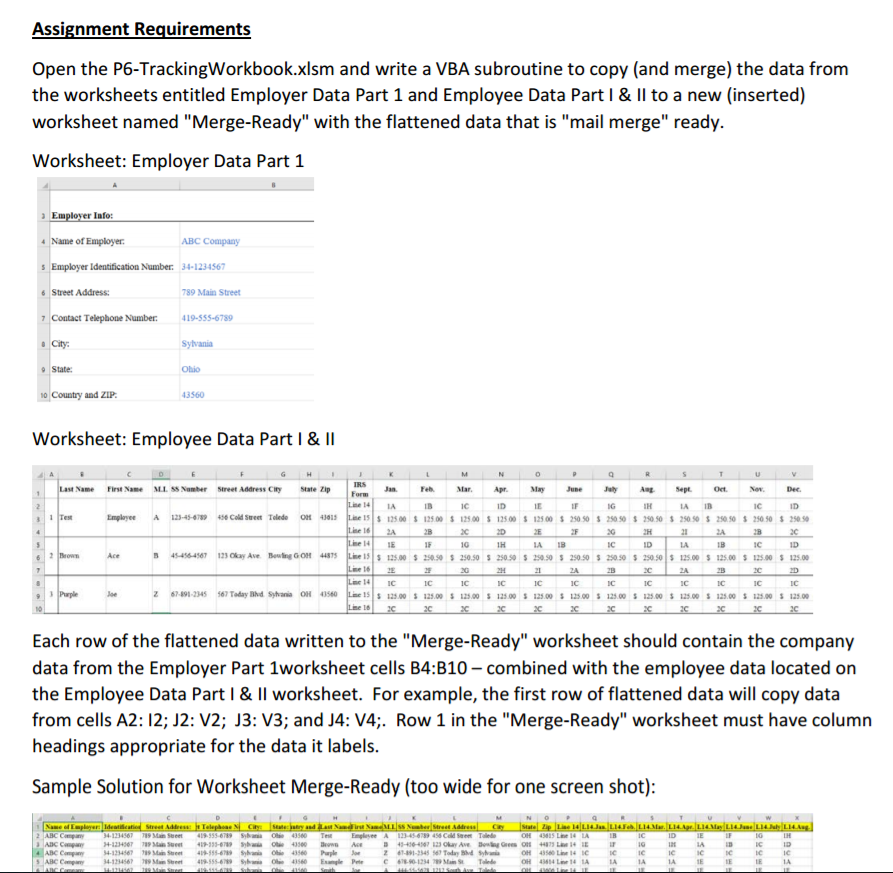
Open the P6-TrackingWorkbook.xlsm and write a VBA subroutine to copy (and merge) the data from the worksheets entitled Employer Data Part 1 and Employee Data Part I & II to a new (inserted) worksheet named "Merge-Ready" with the flattened data that is "mail merge" ready. Worksheet: Employer Data Part 1 Each row of the flattened data written to the "Merge-Ready" worksheet should contain the company data from the Employer Part 1worksheet cells B4: B10 - combined with the employee data located on the Employee Data Part I & II worksheet. For example, the first row of flattened data will copy data from cells A2: I2: J2: V2: J3: V3: and J4: V4;. Row 1 in the "Merge-Ready" worksheet must have column headings appropriate for the data it labels. Sample Solution for Worksheet Merge-Ready (too wide for one screen shot)
Step by Step Solution
There are 3 Steps involved in it

Get step-by-step solutions from verified subject matter experts
 Study Help