







Question: vba.skilling.us Avoiding bugs Programming with Excel VBA Please Look At The Calo - VBAProject (FUNCRES.XLAM) 29 Solver (Solver.xlam) VBAProject (taxes-bad-formatting.xl... Yucky code Exercise Download a
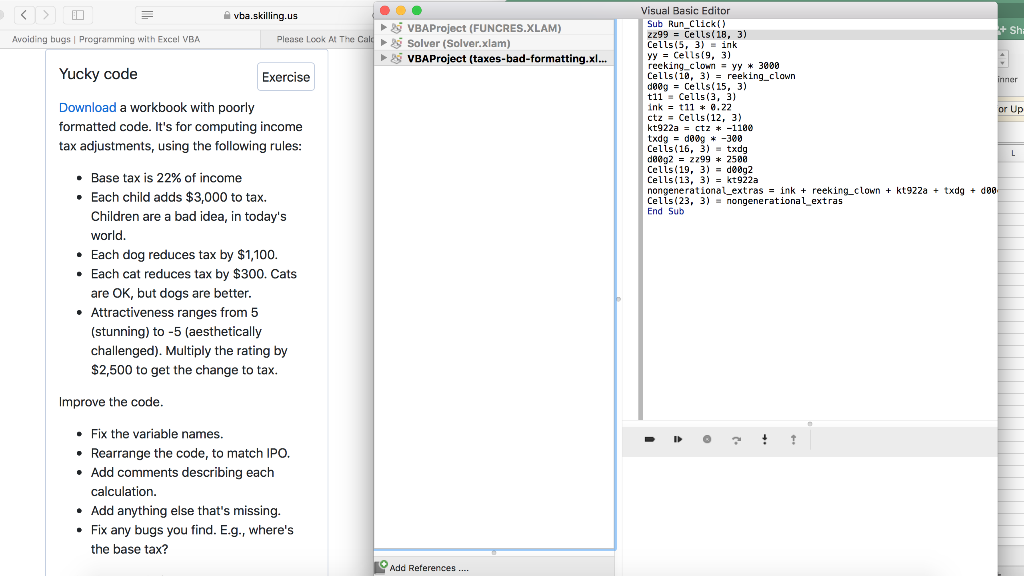
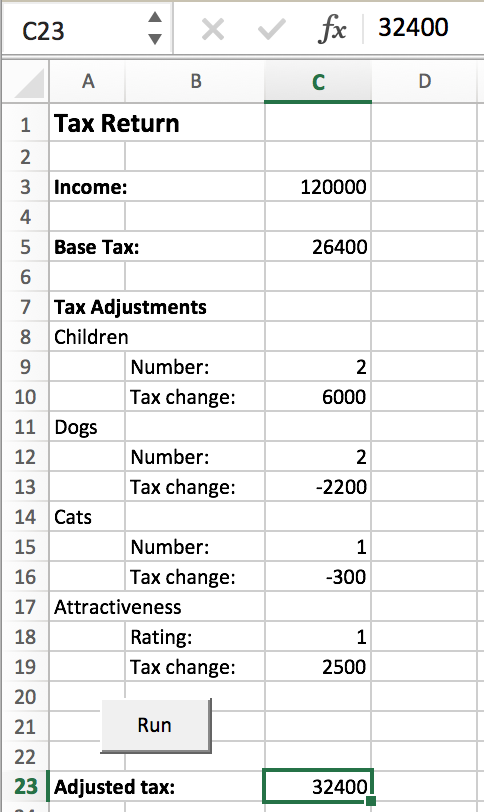
vba.skilling.us Avoiding bugs Programming with Excel VBA Please Look At The Calo - VBAProject (FUNCRES.XLAM) 29 Solver (Solver.xlam) VBAProject (taxes-bad-formatting.xl... Yucky code Exercise Download a workbook with poorly formatted code. It's for computing income tax adjustments, using the following rules: Visual Basic Editor Sub Run_Click() zz99 = Cells(18, 3) + Sh; Cells(5, 3) = ink yy = Cells(9, 3) reeking_clown = yy * 3000 - Cells(ie, 3) = reeking_clown inner de0g = Cells(15, 3) t11 = Cells(3, 3) ink = t11 * 0.22 or Up ctz = Cells(12, 3) kt922a = ctz * -1100 txdg = dog # -300 Cells(16, 3) = txdg L L de@g2 - 2299 * 2588 Cells(19, 3) = deg2 Cells(13, 3) = kt922a nongenerational extras = ink + reeking_clown + kt922a + txdg + 000 Cells(23, 3) = nongenerational_extras End Sub Base tax is 22% of income . Each child adds $3,000 to tax. Children are a bad idea, in today's world. Each dog reduces tax by $1,100. Each cat reduces tax by $300. Cats are OK, but dogs are better. Attractiveness ranges from 5 (stunning) to -5 (aesthetically challenged). Multiply the rating by $2,500 to get the change to tax. Improve the code. D 3 ! 1 . Fix the variable names. Rearrange the code, to match IPO. Add comments describing each calculation. Add anything else that's missing. Fix any bugs you find. E.g., where's the base tax? Add References.... C23 X fx 32400 . B D 120000 26400 2 6000 12 1 Tax Return 2 3 Income: 4 5 Base Tax: 6 7 Tax Adjustments 8 Children 9 Number: 10 Tax change: 11 Dogs Number: 13 Tax change: 14 Cats 15 Number: Tax change: 17 Attractiveness 18 Rating: Tax change: 20 21 Run 22 23 Adjusted tax: 2 -2200 1 -300 16 1 2500 19 32400 vba.skilling.us Avoiding bugs Programming with Excel VBA Please Look At The Calo - VBAProject (FUNCRES.XLAM) 29 Solver (Solver.xlam) VBAProject (taxes-bad-formatting.xl... Yucky code Exercise Download a workbook with poorly formatted code. It's for computing income tax adjustments, using the following rules: Visual Basic Editor Sub Run_Click() zz99 = Cells(18, 3) + Sh; Cells(5, 3) = ink yy = Cells(9, 3) reeking_clown = yy * 3000 - Cells(ie, 3) = reeking_clown inner de0g = Cells(15, 3) t11 = Cells(3, 3) ink = t11 * 0.22 or Up ctz = Cells(12, 3) kt922a = ctz * -1100 txdg = dog # -300 Cells(16, 3) = txdg L L de@g2 - 2299 * 2588 Cells(19, 3) = deg2 Cells(13, 3) = kt922a nongenerational extras = ink + reeking_clown + kt922a + txdg + 000 Cells(23, 3) = nongenerational_extras End Sub Base tax is 22% of income . Each child adds $3,000 to tax. Children are a bad idea, in today's world. Each dog reduces tax by $1,100. Each cat reduces tax by $300. Cats are OK, but dogs are better. Attractiveness ranges from 5 (stunning) to -5 (aesthetically challenged). Multiply the rating by $2,500 to get the change to tax. Improve the code. D 3 ! 1 . Fix the variable names. Rearrange the code, to match IPO. Add comments describing each calculation. Add anything else that's missing. Fix any bugs you find. E.g., where's the base tax? Add References.... C23 X fx 32400 . B D 120000 26400 2 6000 12 1 Tax Return 2 3 Income: 4 5 Base Tax: 6 7 Tax Adjustments 8 Children 9 Number: 10 Tax change: 11 Dogs Number: 13 Tax change: 14 Cats 15 Number: Tax change: 17 Attractiveness 18 Rating: Tax change: 20 21 Run 22 23 Adjusted tax: 2 -2200 1 -300 16 1 2500 19 32400
Step by Step Solution
There are 3 Steps involved in it

Get step-by-step solutions from verified subject matter experts
 Study Help