







Question: // // ViewController.swift // Gill.light // // Created by Amado Gil on 2/20/23. // import UIKit class ViewController: UIViewController { var lightOn = true override
//
// ViewController.swift
// Gill.light
//
// Created by Amado Gil on 2/20/23.
//
import UIKit
class ViewController: UIViewController {
var lightOn = true
override func viewDidLoad() {
super.viewDidLoad()
updateUI()
// Do any additional setup after loading the view.
}
func updateUI() {
view.backgroundColor = lightOn ? .white : .black
}
@IBAction func buttonPressed(_ sender: UIButton) {
lightOn.toggle()
updateUI()
}
}
SWIFT LANGUAGE
By the end of this guided project, you'll have created an app named Light that changes the screen from black to white and back again when the user taps a button.
I'm having issued with my application running properly. When I run simulator, an error shows (see picture attached). Please help find solution to fix this. 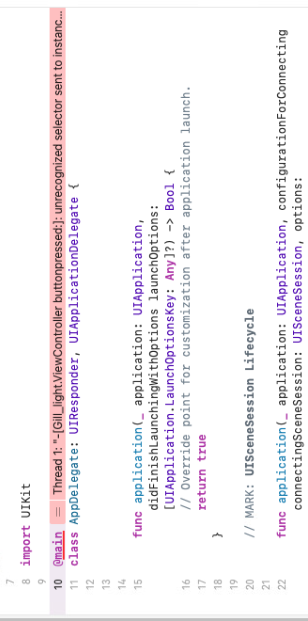
Step by Step Solution
There are 3 Steps involved in it

Get step-by-step solutions from verified subject matter experts
 Study Help