







Question: VISUAL BASIC ASSIGNMENT Modify the application in Visual Studios. Modify the application to allow the user to answer the questions in any order and also
VISUAL BASIC ASSIGNMENT
Modify the application in Visual Studios.
Modify the application to allow the user to answer the questions in any order and also to change his or her answers. The modified application should display the number of incorrect answers only when the user requests the information. Make the appropriate modifications to the code.
Here what the current form looks like:
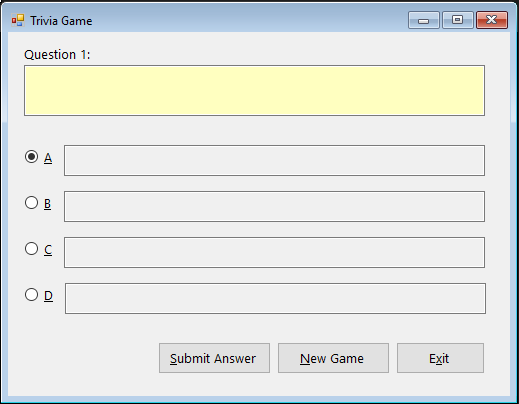
This is the code for the program that needs to be modified:
Option Explicit On Option Strict On Option Infer Off
Public Class MainForm Private Sub exitButton_Click(sender As Object, e As EventArgs) Handles exitButton.Click Me.Close() End Sub
Private Sub MainForm_Load(sender As Object, e As EventArgs) Handles MyBase.Load 'TODO: This line of code loads data into the 'TriviaDataSet.tblGame' table. You can move, or remove it, as needed. Me.TblGameTableAdapter.Fill(Me.TriviaDataSet.tblGame)
End Sub
Private Sub newButton_Click(sender As Object, e As EventArgs) Handles newButton.Click ' starts a new game
TblGameBindingSource.MoveFirst() questionNumLabel.Text = "Question 1:" newButton.Enabled = False submitButton.Enabled = True End Sub
Private Sub submitButton_Click(sender As Object, e As EventArgs) Handles submitButton.Click ' determines whether the user's answer is correct ' and the number of incorrect answers
Dim ptrPosition As Integer Dim userAnswer As String Static numIncorrect As Integer
' store record pointer's position ptrPosition = TblGameBindingSource.Position
' determine selected radio button Select Case True Case aRadioButton.Checked userAnswer = aRadioButton.Text.Substring(1, 1) Case bRadioButton.Checked userAnswer = bRadioButton.Text.Substring(1, 1) Case cRadioButton.Checked userAnswer = cRadioButton.Text.Substring(1, 1) Case Else userAnswer = dRadioButton.Text.Substring(1, 1) End Select
' if necessary, update the number of incorrect answers If userAnswer TriviaDataSet.tblGame(ptrPosition).CorrectAnswer Then numIncorrect += 1 End If
If ptrPosition
You have to use the database engine from microsoft: https://www.microsoft.com/en-us/download/details.aspx?id=13255
The new form should look like this:
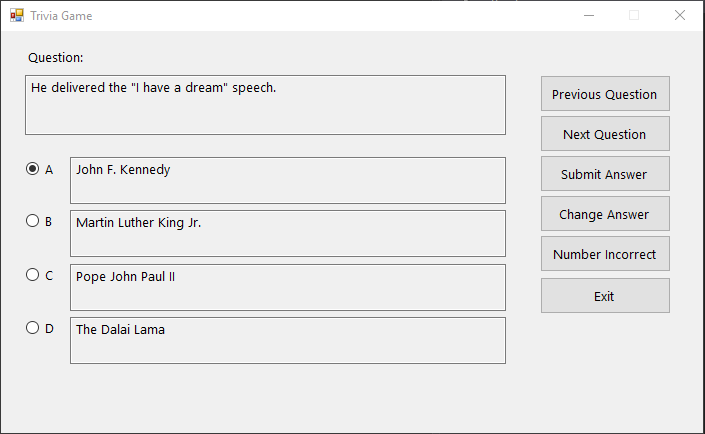
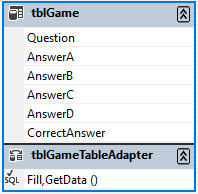
Trivia Game Question 1 Submit Answer New Game Exit Trivia Game Question: He delivered the "I have a dream" speech. Previous Question Next Question A John F. Kennedy OB Martin Luther King Jr. OC Pope John Paul l Submit Answer Change Answer Number Incorrect Exit OD The Dalai Lama tblGame Question AnswerA AnswerB AnswerC AnswerD CorrectAnswer S tblGame TableAdapter Fill,GetData
Step by Step Solution
There are 3 Steps involved in it

Get step-by-step solutions from verified subject matter experts
 Study Help