







Question: Visual Basic .NET Project: Determine Poker Hand A poker hand can be stored in a two-dimensional array. The statement: Dim aryintCards(4,14) as Integer (See AryCardExample.xlsx
Visual Basic .NET Project: Determine Poker Hand
A poker hand can be stored in a two-dimensional array. The statement: Dim aryintCards(4,14) as Integer (See AryCardExample.xlsx excel spreadsheet) posted below declares an array which the first subscript 1-4 are the four suits and the second subscript ranges over the card denominations: 1-14: Ace, 2, ..., 10, Jack, Queen, King, Ace (repeated). First subscript of 0 is Total of each denomination. Second subscript of 0 is Total of each suit. Using these totals can determine what hand has been selected.
Write a program that requests the five cards as input from the user, creates the related array, totals the special 0 rows and columns, uses those total to determine the type of hand, and outputs the result in a message box.
Poker hands are:
Deck of Cards: 52 cards.
4 suits: Hearts, Spades, Clubs, Diamonds
13 cards per suit: 2,3,4,5,6,7,8,9,10,Jack,Queen,King,Ace( or 1)
5 Card Stud Poker (no Draws)
Poker Hands - From Greatest to Least:
Royal Flush - Ace, King, Queen, Jack, 10 of the same Suit
Straight Flush - any straight with same suit.
Four of Kind - 4 of the same value
Full House - 3 of same value and 2 of another same value
Flush - all of the same suit.
Straight - sequentially in order none missing any suit.
Three of A Kind - 3 of same value
Two Pair - 2 pairs of the same value
One Pair - 1 pair of the same value
Nothing
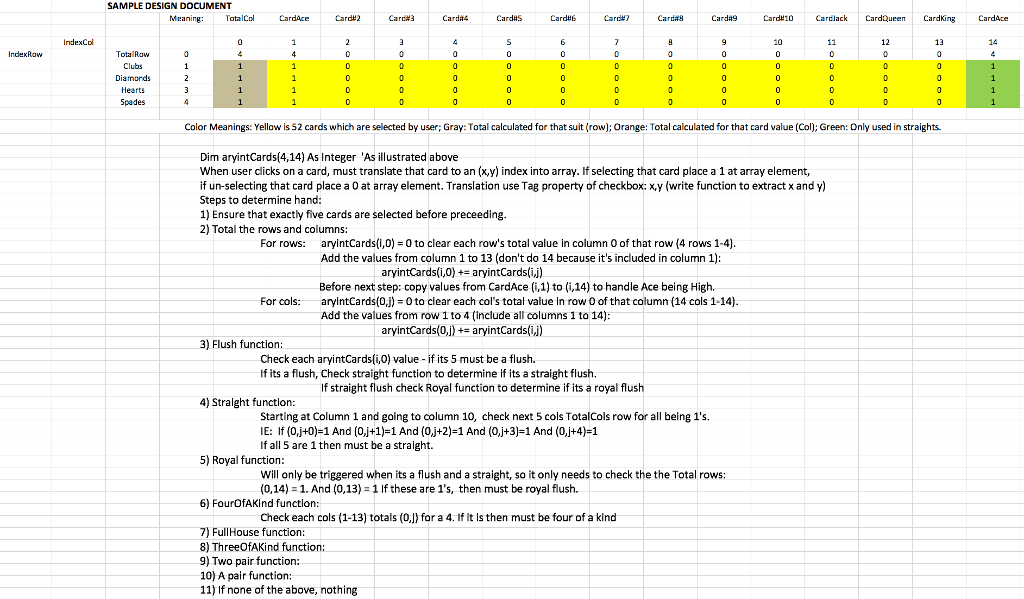
The program must use this layout:

Thank you in advance. Will give a good rating if program meets all requirements.
SAMPLE DESIGN DOCUMENT Meaning TatalCol CardH2 Card#7 Cardlack CardQueen Cardking IndexColota Raw 12 13 14 Clubs Hearts Spades Color Meanings: Yellow is 52 cards which are selected by user; Gray: Total calculated for that suit (row); Orange: Total calculated for that card value (Col): Green: Only used in straights Dim aryintCards(4,14) As Integer As illustrated above When user clicks on a card, must translate that card to an (x,y) index into array. If selecting that card place a 1 at array element, if un-selecting that card place a 0 at array element. Translation use Tag property of checkbox: x,y (write function to extract x and y Steps to determine hand 1) Ensure that exactly five cards are selected before preceeding 2) Total the rows and columns: For rows: aryintCards(i,0) 0 to clear each row's total value in column 0 of that row (4 rows 1-4) Add the values from column 1 to 13 (don't do 14 because it's included in column 1) Before next step: copy values from CardAce (i,1) to (i,14) to handle Ace being High. Add the values from row 1 to 4 (include all columns 1 to 14) aryintCards(i,0) +- aryintCards(ij) For cols:aryintCards(0,J) 0 to clear each col's total value In row 0 of that column (14 cols 1-14) aryintCards(0,j)+- aryintCards(j 3) Flush function Check each aryintCards(i,0) value -if its 5 must be a flush. If its a flush, Check straight function to determine if its a straight flush If straight flush check Royal function to determine if its a royal flush 4) Stralght function Starting at Column 1 and going to column 10, check next 5 cols TotalCols row for all being 1's. IE: If (0,j+0)-1 And (0,j+1)-1 And (0j+2)-1 And (0j+3)-1 And (0,j+4)-1 If all 5 are 1 then must be a straight. 5) Royal function Will only be triggered when its a flush and a straight, so it only needs to check the the Total rows: (0,14) 1. And (0,13) 1 If these are 1's, then must be royal flush. 6) FourOfAKInd functlon: Check each cols (1-13) totas (0, for a 4. If it Is then must be four of a kind 7) FullHouse function: 8) ThreeOfAKind functio 9) Two pair function: 10) A pair function: 11) If none of the above, nothing SAMPLE DESIGN DOCUMENT Meaning TatalCol CardH2 Card#7 Cardlack CardQueen Cardking IndexColota Raw 12 13 14 Clubs Hearts Spades Color Meanings: Yellow is 52 cards which are selected by user; Gray: Total calculated for that suit (row); Orange: Total calculated for that card value (Col): Green: Only used in straights Dim aryintCards(4,14) As Integer As illustrated above When user clicks on a card, must translate that card to an (x,y) index into array. If selecting that card place a 1 at array element, if un-selecting that card place a 0 at array element. Translation use Tag property of checkbox: x,y (write function to extract x and y Steps to determine hand 1) Ensure that exactly five cards are selected before preceeding 2) Total the rows and columns: For rows: aryintCards(i,0) 0 to clear each row's total value in column 0 of that row (4 rows 1-4) Add the values from column 1 to 13 (don't do 14 because it's included in column 1) Before next step: copy values from CardAce (i,1) to (i,14) to handle Ace being High. Add the values from row 1 to 4 (include all columns 1 to 14) aryintCards(i,0) +- aryintCards(ij) For cols:aryintCards(0,J) 0 to clear each col's total value In row 0 of that column (14 cols 1-14) aryintCards(0,j)+- aryintCards(j 3) Flush function Check each aryintCards(i,0) value -if its 5 must be a flush. If its a flush, Check straight function to determine if its a straight flush If straight flush check Royal function to determine if its a royal flush 4) Stralght function Starting at Column 1 and going to column 10, check next 5 cols TotalCols row for all being 1's. IE: If (0,j+0)-1 And (0,j+1)-1 And (0j+2)-1 And (0j+3)-1 And (0,j+4)-1 If all 5 are 1 then must be a straight. 5) Royal function Will only be triggered when its a flush and a straight, so it only needs to check the the Total rows: (0,14) 1. And (0,13) 1 If these are 1's, then must be royal flush. 6) FourOfAKInd functlon: Check each cols (1-13) totas (0, for a 4. If it Is then must be four of a kind 7) FullHouse function: 8) ThreeOfAKind functio 9) Two pair function: 10) A pair function: 11) If none of the above, nothing
Step by Step Solution
There are 3 Steps involved in it

Get step-by-step solutions from verified subject matter experts
 Study Help