







Question: ****Visual BAsic**** Open the VB2015Chap09Gross SolutionGross Solution (Gross Solution.sln) file. The application should store the pay codes and rates listed in Figure 9-59 in a
****Visual BAsic****
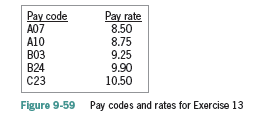
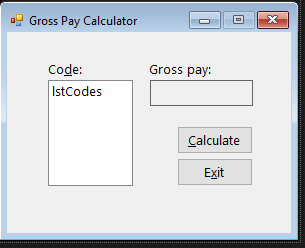
Open the VB2015\Chap09\Gross Solution\Gross Solution (Gross Solution.sln) file. The application should store the pay codes and rates listed in Figure 9-59 in a twodimensional array. It should also display the pay codes from the array in a list box. The btnCalc_Click procedure should display the gross pay, using the number of hours worked
**Gross Solution**
' Name: Gross Project ' Purpose: Displays the gross pay corresponding to a code ' Programmer:
Option Explicit On Option Strict On Option Infer Off
Public Class frmMain
Private Sub frmMain_Load(sender As Object, e As EventArgs) Handles Me.Load ' fills list box with codes and then selects the first item
lstCodes.SelectedIndex = 0 End Sub
Private Sub btnCalc_Click(sender As Object, e As EventArgs) Handles btnCalc.Click ' calculates and displays the gross pay
End Sub
Private Sub btnExit_Click(sender As Object, e As EventArgs) Handles btnExit.Click Me.Close() End Sub
Private Sub lstCodes_SelectedIndexChanged(sender As Object, e As EventArgs) Handles lstCodes.SelectedIndexChanged lblGross.Text = String.Empty End Sub End Class
Pay rate 8.50 8.75 9.25 9.90 10.50 Pay code A07 A10 B03 B24 C23 Figure 9-59 Pay codes and rates for Exercise 13
Step by Step Solution
There are 3 Steps involved in it

Get step-by-step solutions from verified subject matter experts
 Study Help