







Question: VISUAL BASIC PLEASE VISUAL BASIC PLEASE I need help with the code for my Travel Request form. When the user hits the save button, the
VISUAL BASIC PLEASE VISUAL BASIC PLEASE
I need help with the code for my Travel Request form. When the user hits the save button, the info they entered is saved into a file named travel.ser. A call will be made to a Function named RecordSaved which will create an instance of the TravelRequest class that contains the GUID and user entered data and use a Binary Formatter to serialize the data to the record.ser file. The function will return a Boolean indicating whether or not the record was saved successfully or not. If an exception occurs during the save operation the function will display a Message Box displaying the exception message to the user before returning False. I need help with the correct code for this Save button, to write to the file. Here is what the form looks like: (ON THE LEFT)
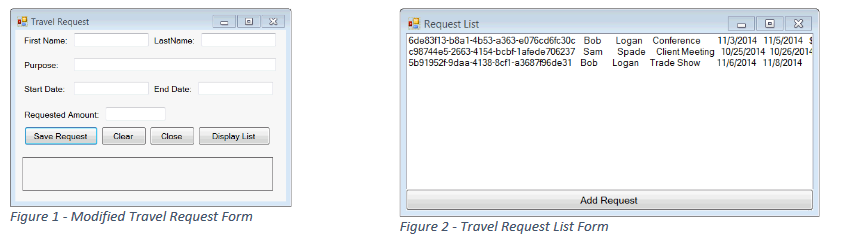
a Travel Request Request List 6de83f13-b8a1-4b53-a363-e076cd6fc30c Bob Logan Conference 1132014 11/5/2014 96744e5-2663-4154bcbf1afede706237 Sam Spade Client Meeting 10252014 5b91952f 9daa-4138-8cfl-a3637136d3 Bob Logan Trade Show 116/2014 11/B/2014 First Name: Purpose Start Date. Requested Amount Save RequestCle Clase Display List Figure 1 - Modified Travel Request Form Figure 2- Travel Request List Form a Travel Request Request List 6de83f13-b8a1-4b53-a363-e076cd6fc30c Bob Logan Conference 1132014 11/5/2014 96744e5-2663-4154bcbf1afede706237 Sam Spade Client Meeting 10252014 5b91952f 9daa-4138-8cfl-a3637136d3 Bob Logan Trade Show 116/2014 11/B/2014 First Name: Purpose Start Date. Requested Amount Save RequestCle Clase Display List Figure 1 - Modified Travel Request Form Figure 2- Travel Request List Form
Step by Step Solution
There are 3 Steps involved in it

Get step-by-step solutions from verified subject matter experts
 Study Help