







Question: VISUAL BASIC PLEASE VISUAL BASIC PLEASE VISUAL BASIC PLEASE VISUAL BASIC PLEASE I need help with the code for my applictaion. I have a Travel
VISUAL BASIC PLEASE VISUAL BASIC PLEASE VISUAL BASIC PLEASE VISUAL BASIC PLEASE I need help with the code for my applictaion. I have a Travel Request form that looks like the figure on the left. When data is entered and Save Request button is hit, the info must be saved into a file named travel.ser (located in debug executable file.... how do I put it there??) and when Display List button is hit, the form on the right must appear and show all informaiton in a listbox. I am having so much trouble starting this I would appreciate any help for the code. I will add the code for the travel request form I have already below. There also needs to be a TravelRecord CLASS that will be a serializable public class. It will contain public members for each of the data field. 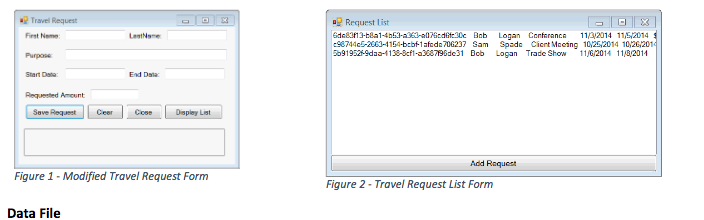
Public Class TravelRequestForm
Private Sub CancelButton_Click(sender As Object, e As EventArgs) Handles CancelButton.Click ClearInputControls 'Query user on close form Dim message As String Dim userResponse As MsgBoxResult message = "Do you want to close this form?" userResponse = MessageBox.Show(message, "Close Form?", MessageBoxButtons.YesNo) If userResponse = MsgBoxResult.Yes Then Me.Close() End If End Sub
Private Sub SubmitButton_Click(sender As Object, e As EventArgs) Handles SubmitButton.Click MessageLabel.Text = "Valdating Data ..." Try ValidateNotBlank(FirstNameBox) ValidateNotBlank(LastNameBox) ValidateNotBlank(PurposeBox) ValidateStartDate(StartDateBox) ValidateEndDate(EndDateBox, Convert.ToDateTime(StartDateBox.Text.Trim)) ValidateAmount(AmountBox) MessageLabel.Text = "All data is valid." Catch ex As Exception MessageLabel.Text = ex.Message End Try End Sub
Private Sub ClearInputControls() FirstNameBox.Clear() LastNameBox.Clear() PurposeBox.Clear() StartDateBox.Clear() EndDateBox.Clear() AmountBox.Clear() End Sub
Private Function ValidateNotBlank(input As TextBox) As Boolean If input.Text.Trim = String.Empty Then Throw New InputBlankException(input.Name & " cannot be blank.") Return False End If Return True End Function
Private Function ValidateStartDate(input As TextBox) As Boolean Dim startDate As Date Dim currentDate As Date = Today() Try startDate = Date.Parse(input.Text.Trim) If startDate
Private Function ValidateEndDate(input As TextBox, startDate As Date) As Boolean Dim endDate As Date Try endDate = Date.Parse(input.Text.Trim) If endDate
Private Function ValidateAmount(input As TextBox) As Boolean Dim amt As Double Try amt = Double.Parse(input.Text.Trim) Catch ex As Exception Throw ex Return False End Try If amt
Public Class InputBlankException Inherits Exception ' default constructor Public Sub New() MyBase.New("Input cannot be blank.") End Sub
' constructor for customizing error message Public Sub New(messageValue As String) MyBase.New(messageValue) End Sub
' constructor for customizing the exception's error ' message and specifying the InnerException object Public Sub New(messageValue As String, inner As Exception) MyBase.New(messageValue, inner) End Sub End Class 'InputBlankException
Public Class StartsInPastException Inherits Exception ' default constructor Public Sub New() MyBase.New("Start date is in the past.") End Sub
' constructor for customizing error message Public Sub New(messageValue As String) MyBase.New(messageValue) End Sub
' constructor for customizing the exception's error ' message and specifying the InnerException object Public Sub New(messageValue As String, inner As Exception) MyBase.New(messageValue, inner) End Sub End Class 'StartsInPastException
Public Class EndsBeforeStartException Inherits Exception ' default constructor Public Sub New() MyBase.New("End date is before start date.") End Sub
' constructor for customizing error message Public Sub New(messageValue As String) MyBase.New(messageValue) End Sub
' constructor for customizing the exception's error ' message and specifying the InnerException object Public Sub New(messageValue As String, inner As Exception) MyBase.New(messageValue, inner) End Sub End Class 'EndsBeforeStartException
Public Class NonPositiveAmountException Inherits Exception ' default constructor Public Sub New() MyBase.New("Requested amount must be greater than zero.") End Sub
' constructor for customizing error message Public Sub New(messageValue As String) MyBase.New(messageValue) End Sub
' constructor for customizing the exception's error ' message and specifying the InnerException object Public Sub New(messageValue As String, inner As Exception) MyBase.New(messageValue, inner) End Sub End Class 'NonPositiveAmountException End Class
Step by Step Solution
There are 3 Steps involved in it

Get step-by-step solutions from verified subject matter experts
 Study Help