







Question: Visual basic windows forms.net help! The purpose of this assignment is get more practice with looping. This is going to involve 3 separate tasks. Problem
Visual basic windows forms.net help!
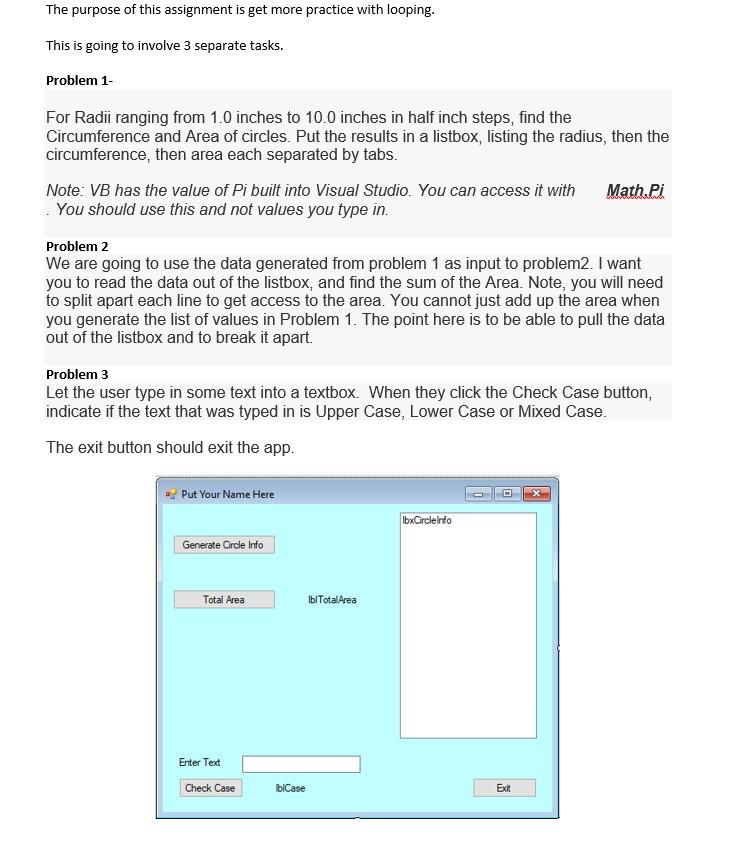
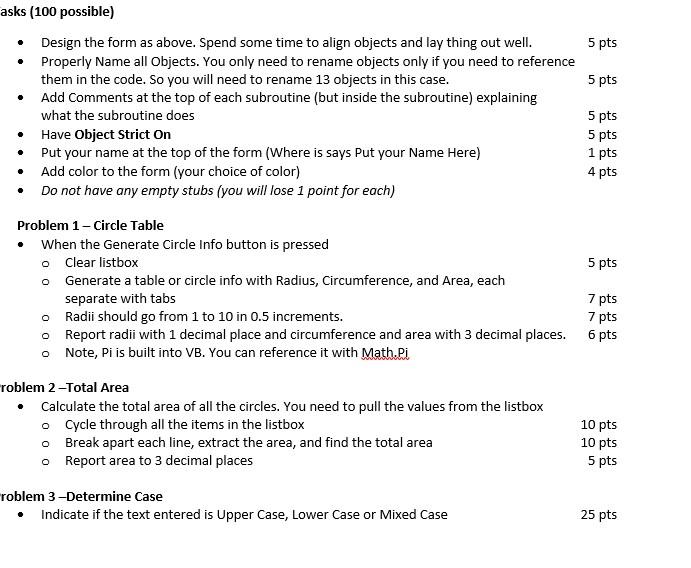
The purpose of this assignment is get more practice with looping. This is going to involve 3 separate tasks. Problem 1- For Radii ranging from 1.0 inches to 10.0 inches in half inch steps, find the Circumference and Area of circles. Put the results in a listbox, listing the radius, then the circumference, then area each separated by tabs. Note: VB has the value of Pi built into Visual Studio. You can access it with Math.Pi You should use this and not values you type in. Problem 2 We are going to use the data generated from problem 1 as input to problem2. I want you to read the data out of the listbox, and find the sum of the Area. Note, you will need to split apart each line to get access to the area. You cannot just add up the area when you generate the list of values in Problem 1. The point here is to be able to pull the data out of the listbox and to break it apart. Problem 3 Let the user type in some text into a textbox. When they click the Check Case button, indicate if the text that was typed in is Upper Case, Lower Case or Mixed Case. The exit button should exit the app. Put Your Name Here bxCircleInfo Generate Crcle Info Total Area Ibl Total Area Enter Text Check Case blCase Exit . . asks (100 possible) Design the form as above. Spend some time to align objects and lay thing out well. 5 pts Properly Name all objects. You only need to rename objects only if you need to reference them in the code. So you will need to rename 13 objects in this case. 5 pts Add Comments at the top of each subroutine (but inside the subroutine) explaining what the subroutine does 5 pts Have Object Strict On 5 pts Put your name at the top of the form (Where is says Put your Name Here) 1 pts Add color to the form (your choice of color) 4 pts Do not have any empty stubs (you will lose 1 point for each) Problem 1 - Circle Table When the Generate Circle Info button is pressed Clear listbox 5 pts o Generate a table or circle info with Radius, Circumference, and Area, each separate with tabs 7 pts Radii should go from 1 to 10 in 0.5 increments. 7 pts o Report radii with 1 decimal place and circumference and area with 3 decimal places. 6 pts o Note, Pi is built into VB. You can reference it with Math.Pi . O o roblem 2-Total Area Calculate the total area of all the circles. You need to pull the values from the listbox o Cycle through all the items in the listbox Break apart each line, extract the area, and find the total area o Report area to 3 decimal places o 10 pts 10 pts 5 pts roblem 3-Determine Case Indicate if the text entered is Upper Case, Lower Case or Mixed Case 25 pts
Step by Step Solution
There are 3 Steps involved in it

Get step-by-step solutions from verified subject matter experts
 Study Help