







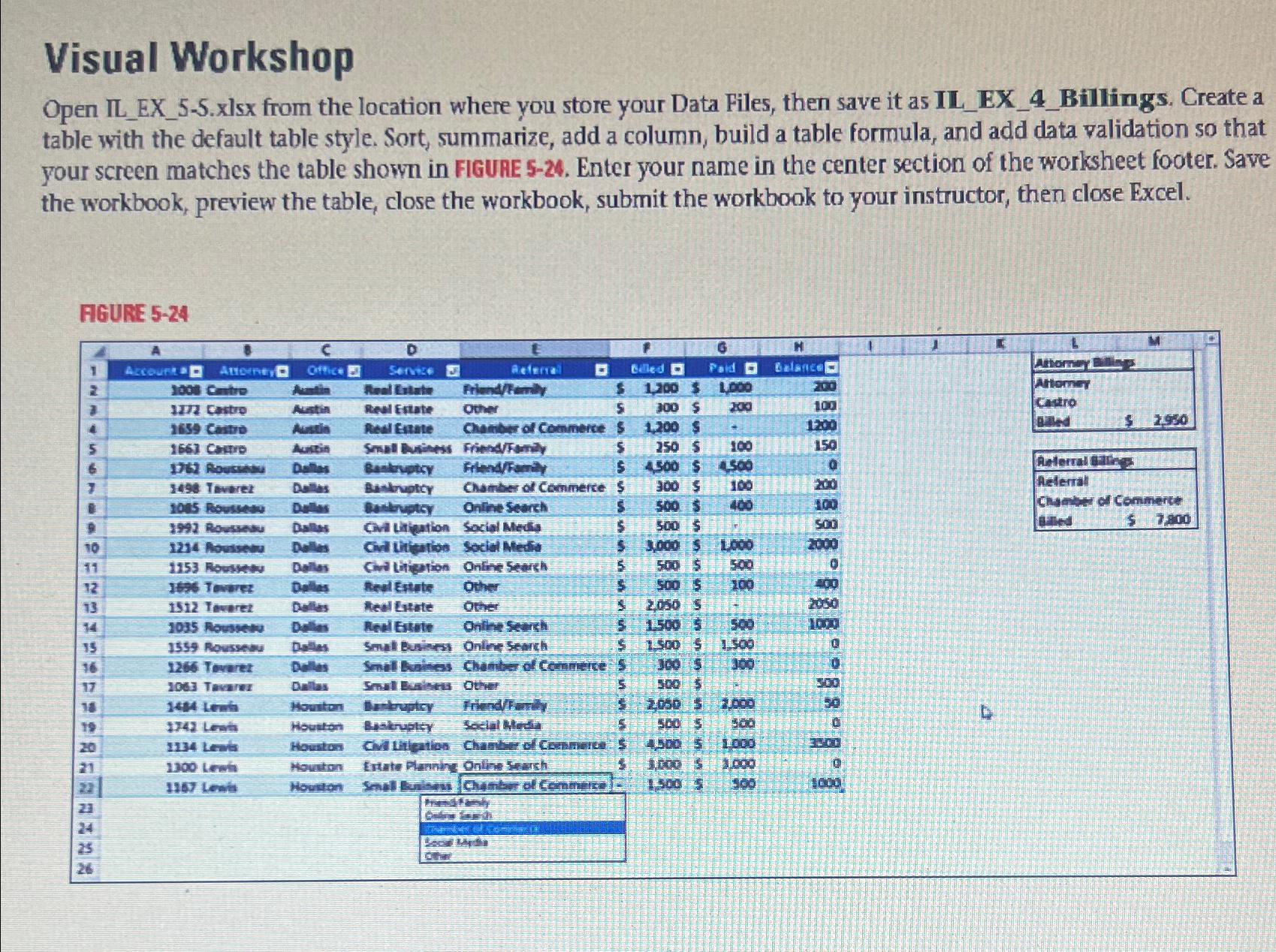
Question: Visual Workshop Open IL _ EX _ 5 - 5 . xlsx from the location where you store your Data Files, then save it as
Visual Workshop
Open ILEXxlsx from the location where you store your Data Files, then save it as ILEXBillings. Create a table with the default table style. Sort, summarize, add a column, build a table formula, and add data validation so that your screen matches the table shown in FIGUAE Enter your name in the center section of the worksheet footer. Save the workbook, preview the table, close the workbook, submit the workbook to your instructor, then close Excel.
AGURE
tableAEI,
Step by Step Solution
There are 3 Steps involved in it
1 Expert Approved Answer
Step: 1 Unlock

Question Has Been Solved by an Expert!
Get step-by-step solutions from verified subject matter experts
Step: 2 Unlock
Step: 3 Unlock
 Study Help