







Question: // ************************************************************************ // Warning.java // // Reads student data from a text file and writes data to another text file. // ************************************************************************ import java.util.Scanner; import
// ************************************************************************
// Warning.java
//
// Reads student data from a text file and writes data to another text file.
// ************************************************************************
import java.util.Scanner;
import java.io.*;
public class Warning
{
// -------------------------------------------------------------------
// Reads student data (name, semester hours, quality points) from a
// text file, computes the GPA, then writes data to another file
// if the student is placed on academic warning.
// -------------------------------------------------------------------
public static void main (String[] args)
{
String line, name, inputName = "students.dat";
String outputName = "warning.dat";
try
{
// Set up scanner to input file
// Set up the output file stream
// Print a header to the output file outFile.println ();
outFile.println ("Students on Academic Warning");
outFile.println ();
// Process the input file, one token at a time while ()
{
// Get the credit hours and quality points and
// determine if the student is on warning. If so,
// write the student data to the output file.
}
// Close output file
}
catch (FileNotFoundException exception)
{
System.out.println ("The file " + inputName + " was not found.");
}
catch (IOException exception)
{
System.out.println (exception);
}
catch (NumberFormatException e)
{
System.out.println ("Format error in input file: " + e);
}
}
}
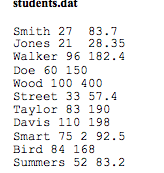
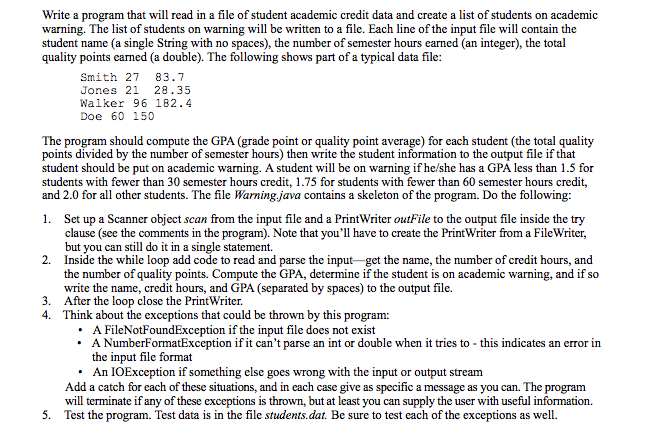
Write a program that will read in a file of student academic credit data and create a list of students on academic warning. The list of students on warning will be written to a file. Each line of the input file will contain the student name (a single String with no spaces), the number of semester hours earned (an integer), the total quality points earned (a double). The following shows part of a typical data file Smith 2 83.7 Jones 2 28.35 Walker 96 182 Doe 60 150 The program should compute the GPA (grade point or quality point average) for each student (the total quality points divided by the number of semester hours) then write the student information to the output file if that student should be put on academic warning. A student will be on warning if he/she has a GPA less than 1.5 for students with fewer than 30 semester hours credit, 1.75 for students with fewer than 60 semester hours credit, and 2.0 for all other students. The file Warningjava contains a skeleton of the program. Do the following 1. Set up a Scanner object scan from the input file and a PrintWriter outFile to the output file inside the try clause (see the comments in the program). Note that you'll have to create the PrintWriter from a FileWriter, but you can still do it in a single statement. 2. Inside the while loop add code to read and parse the input get the name, the number of credit hours, and the number of quality points. Compute the GPA, determine if the student is on academic warning, and if so write the name, credit hours, and GPA (separated by spaces) to the output file 3. After the loop close the PrintWriter 4. Think about the exceptions that could be thrown by this program: A FileNotFoundException if the input file does not exist A NumberFormatException if it can't parse an int or double when it tries to this indicates an error in the input file format An IOException if something else goes wrong with the input or output stream. Add a catch for each of these situations, and in each case give as specific a message as you can. The program will terminate if any of these exceptions is thrown, but at least you can supply the user with useful information. 5. Test the program. Test data is in the file students.dat. Be sure to test each of the exceptions as well
Step by Step Solution
There are 3 Steps involved in it

Get step-by-step solutions from verified subject matter experts
 Study Help