







Question: We would like to add the sll (shift left logical) instruction to the single cycle datapath discussed in class. You will need to feed the
We would like to add the sll (shift left logical) instruction to the single cycle datapath discussed in class. You will need to feed the shamt field to the ALU so that it can shift using the shift amount. (You can assume that the ALU has an implementation of shift left logical if a shift amount and an integer to be shifted are inserted and its ALUOp is 11.) Trace which datapaths in the following picture are used to perform the sll instruction by marking the paths, and add datapath(s) and control signal(s) to the single-cycle datapath for the sll instruction, if it is necessary. (You should also make sure that previously existing instructions such as R-format (add,sub,and,or,slt), lw, sw, and beq still work with this additional instruction.) Download the following PDF/JPG file, use some software (for instance, Microsoft Paint) to draw any new datapath(s) and signal(s) using red color. (You can copy & paste your image back into your document such as MS Word.) Explain when the new signal(s) that you chose is set to 0, and also 1, if any. Also specify the value of other existing control signals RegDst, ALUSrc, MemtoReg, RegWrite, MemRead, MemWrite, Branch, ALUOp0, and ALUOp1.
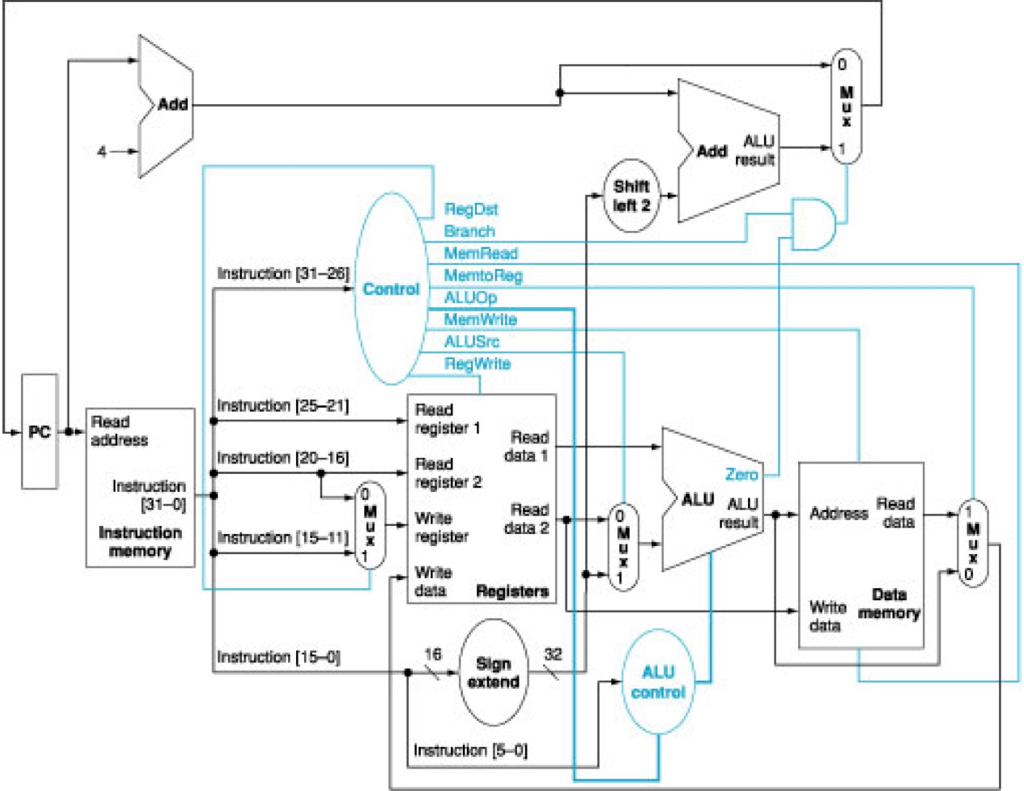
Add ALU Add resut Shift left 2 RegDst Branch MenRead MerntoRieg nstruction [31-28] Control ALUOp MernWrite ALUSrc RegWrite instruction |25-21] Read register 1 Read egister 2 Read address Read data 1 Instruction 120-161 Zero ALU ALU (31-0 Read data M Write Read resutAddress | Instruction | memory Instructon[15-11]| | register Write data Registers Data Write memory instruction [15-01 16 Sign 32 ALU extend Instruction [5-0]
Step by Step Solution
There are 3 Steps involved in it

Get step-by-step solutions from verified subject matter experts
 Study Help