







Question: Week 7 Exercises (Include screenshots in your responses) Book: Building Better Models with JMP Pro (Chapter 7) Use the Churn 2 BBM_v2.jmp dataset for this
Week 7 Exercises (Include screenshots in your responses)
Book: Building Better Models with JMP Pro (Chapter 7)
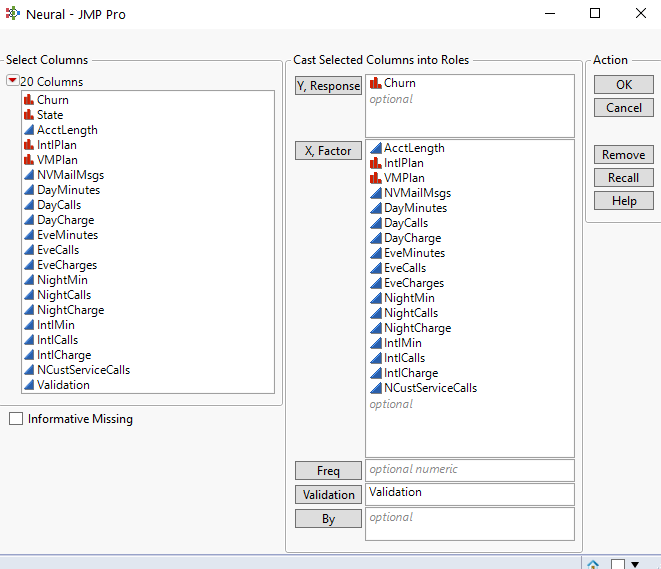
Use the Churn 2 BBM_v2.jmp dataset for this exercise. Please note there is an additional column is this data table entitled "Validation" that was not in the table I used in the lecture videos. We will be leveraging this additional column to ensure each student's analysis, if performed correctly, will return the same results.
Prior to running the neural network modeling analysis to answer the questions below, please complete these two steps.
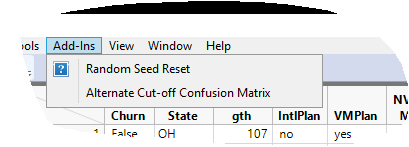
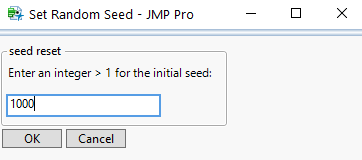
Step 1: After opening the data set in JMP, while you are in your data table view, go to the upper software menu and select add-ins > random seed reset. Enter a value of 1000.
1015 Add-Ins View Window Help Random Seed Reset 7 Alternate Cut-off Confusion Matrix Churn State gth IntlPlan VM Plan M -1 Calce OH 107 no yesSet Random Seed - JMP Pro seed reset Enter an integer > 1 for the initial seed; 1000 OK CancelNeural - JMP Pro 0 X Select Columns Cast Selected Columns into Roles Action 20 Columns Y, Response . Churn OK l. Churn optional Cancel l. State AcctLength . IntlPlan X, Factor AcctLength Remove I. VMPlan I. Int/Plan NVMailMags I. VMPlan Recall Day Minutes NVMailMags Day Calls Day Minutes Help DayCharge DayCalls EveMinutes Day Charge EveCalls EveMinutes EveCharges EveCalls NightMir EveCharges NightCalls NightMin NightCharge NightCalls IntlMin NightCharge IntlCalls Int/Min IntlCharge IntICalls NCustServiceCalls IntlCharge Validation NCustServiceCalls optional Informative Missing Freq optional numeric Validation Validation By optional
Step by Step Solution
There are 3 Steps involved in it

Get step-by-step solutions from verified subject matter experts
 Study Help