







Question: When using WriteHex to print out values, there is a 1 9 added to each one. For example, 0 9 EEB is printing out as
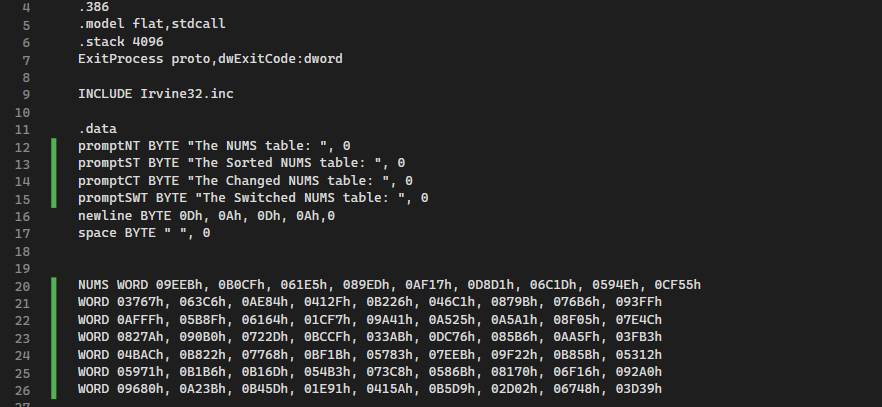
When using WriteHex to print out values, there is a added to each one. For example, EEB is printing out as EEB. How can I fix it to print out as it is written in the table code?
model flat,stdcall
stack
ExitProcess proto,dwExitCode:dword
INCLUDE Irvineinc
data
promptNT BYTE "The NUMS table:
promptST BYTE "The Sorted NUMS table:
promptCT BYTE "The Changed NUMS table:
promptSWT BYTE "The Switched NUMS table:
newline BYTE ODh, Ah ODh, Ah
space BYTE
NUMS WORD EEBh, BCFhEhEDh, AFhDDhCDhEhCFh
WORD hChAEhFhBhChBhBhFFh
WORD AFFFh, BFhhCFhAhAhAAhFhECh
WORD AhBhDhBCCFhABh, DChBhAAFhFBh
WORD BACh, BhhBFBhhEEBh, FhBBhh
WORD hBBhBDhBhChBhhFhAh
WORD hABhBDhEhAhBDhDhhDh
Console window output:
The NUMS table:
EEB BCF EED AFDDCD E CFCAEF
BCB BFF AFFF BF CFAAAAFE
C A BD BCCF AB DCBAAF FBBAC BBFB
EEB FBB BBBD B
AAB BD EA BDDD
printing PROC ; Print NUMS in a x table format
mov ecx,
mov esi, OFFSET NUMS
rowloop:
push ecx
mov ecx,
columnloop:
mov axesi
call WriteHex
mov edx, OFFSET space
call WriteString
add esi,
loop columnloop
pop ecx
loop rowloop
mov edx, OFFSET newline
call WriteString
ret
printing ENDP
Thank you
Step by Step Solution
There are 3 Steps involved in it
1 Expert Approved Answer
Step: 1 Unlock

Question Has Been Solved by an Expert!
Get step-by-step solutions from verified subject matter experts
Step: 2 Unlock
Step: 3 Unlock
 Study Help