







Question: Window.java// import javax.swing.*; class Window extends JFrame { JPanel pnl = new JPanel(); public static void main(String[]args) { Window gui = new Window() ; }
Window.java//
import javax.swing.*; class Window extends JFrame { JPanel pnl = new JPanel(); public static void main(String[]args) { Window gui = new Window() ; } public Window() { super("Swing Window"); setSize(500,200); setDefaultCloseOperation(EXIT_ON_CLOSE); add(pnl); setVisible(true); } }
![JPanel(); public static void main(String[]args) { Window gui = new Window() ;](https://dsd5zvtm8ll6.cloudfront.net/si.experts.images/questions/2024/09/66f3147489439_51666f314742afdf.jpg)
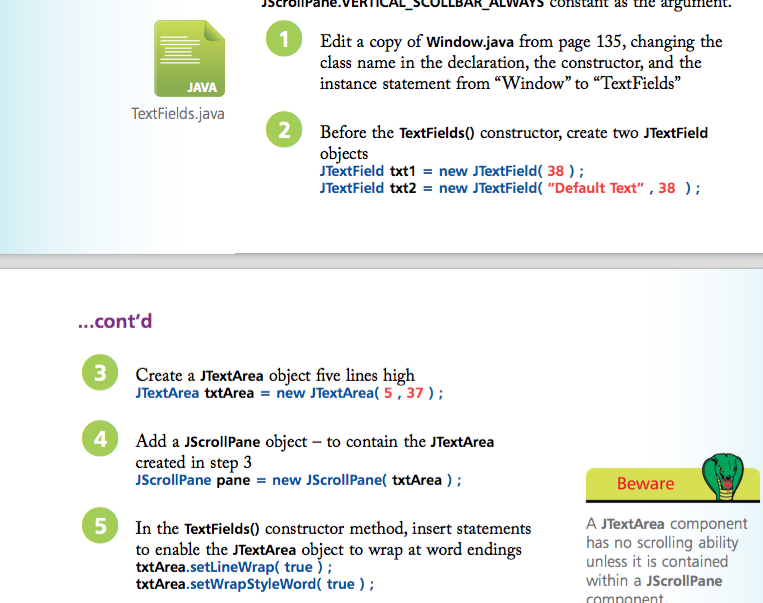
J Cro -a ne.VERI' AL COLLBAR LW constant as the argument. 1 Edit a copy of Window.java from page 135, changing the class name in the declaration, the constructor, and the instance statement from "Window to "TextFields" JAVA TextFields.java 2 Before the TextFields0 constructor, create two JTextField obiects TextField txt1 = new JTextField( 38 ) ; TextField txt2 = new JTextField( "Default Text" , 38 ) ; ...cont'd 3 Create a JTextArea object five lines high JTextArea txtArea new JTextArea( 5, 37); 4 Add a JScrollPane object - to contain the JTextArea created in step 3 JScrollPane pane new JScrollPane( txtArea ) ; Beware 5 In the TextFields) constructor method, insert statements to enable the JTextArea object to wrap at word endings txtArea.setLineWrap( true) txtArea.setWrapStyleWord( true) A JTextArea component has no scrolling ability unless it is contained within a JScrollPane comnonent
Step by Step Solution
There are 3 Steps involved in it

Get step-by-step solutions from verified subject matter experts
 Study Help