







Question: Windows IP Configuration Shinigami-PC Host Name Primary Dos suffix Node Type .: Hybrid WINS Proxy Enabled.. No DNS Suffix Sech Lfios-router.home Ethernet adapter Npcap Loopback
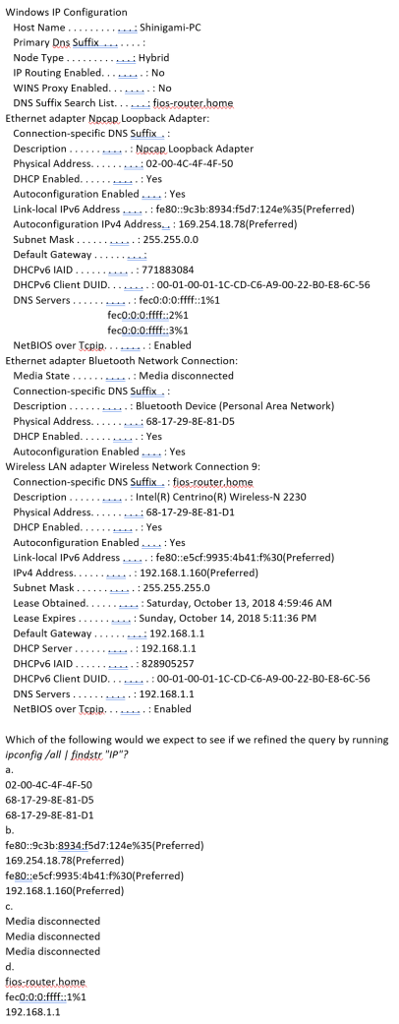
Windows IP Configuration Shinigami-PC Host Name Primary Dos suffix Node Type .: Hybrid WINS Proxy Enabled.. No DNS Suffix Sech Lfios-router.home Ethernet adapter Npcap Loopback Adapter: Connection-specific DNS Suffix Description Nocap Loopback Adapter DHCP Enabled. Autoconfiguration Enabled.... Yes Link-local IPv6 Address : fe80:9c3b: 8934 :f5d7:124e%35(Preferred) Autoconfiguration IPv4 Address. 169.254.18.78(Preferred) Subnet Mask Default Gateway DHCPv6 IAID DHCPv6 Client DUID.. . DNS Servers.... Yes .: 255.255.0.0 :771883084 :00-01-00-01-1C 22-BO-E8-6C-56 fec0:0:0:ffff:2%! fec0:0:0:ffff: :3%! NetBIOS over Tcpip. . . .- : Enabled Ethernet adapter Bluetooth Network Connection: ...: Media disconnected Media State Connection-specific DNS Suffix Description. Physical Address. ...._....: Bluetooth Device (Personal Area Network) .68-17-29-8E-81-D5 Yes Autoconfiguration Enabled: Yes Wireless LAN adapter Wireless Network Connection 9: Connection-specific DNS Suffix.: fios-router home Description.: Intel(R) Centrino(R) Wireless-N 2230 DHCP Enabled.... Yes Autoconfiguration Enabled Link-local IPv6 Address. Yes ress:fe80: :e5cf. dress....192.168.1.160(Preferred) 9935:4b41:1%30( Preferred) Subnet Mask :255.255.255.0 Saturday, October 13, 2018 4:59:46 AM Default Gateway 192.168.1.1 DHCP Server. DHCPv6 IAID 828905257 DHCPv6 Client DUID ..:00-01-00-01-1C-CD-C6-A9-00-22-BO-E8-6C-56 DNS Servers :192.168,1.1 NetBIOS over Tcpip. .Enabled Which of the following would we expect to see if we refined the query by running pconfig/all Ifindstr "IP"? a. 02-00-4C-4F-4F-50 68-17-29-8E-81-D5 68-17-29-8E-81-D1 b. fe80:9c3b:8934:f5d7:124e%35(Preferred) 169.254.18.78(Preferred) fe80:e5cf:9935:4641:1%30(Preferred) 192.168.1.160(Preferred) C. Media disconnected Media disconnected Media disconnected d. fios router.home fec0:0:0fff:1%) 192.168.1.1 Windows IP Configuration Shinigami-PC Host Name Primary Dos suffix Node Type .: Hybrid WINS Proxy Enabled.. No DNS Suffix Sech Lfios-router.home Ethernet adapter Npcap Loopback Adapter: Connection-specific DNS Suffix Description Nocap Loopback Adapter DHCP Enabled. Autoconfiguration Enabled.... Yes Link-local IPv6 Address : fe80:9c3b: 8934 :f5d7:124e%35(Preferred) Autoconfiguration IPv4 Address. 169.254.18.78(Preferred) Subnet Mask Default Gateway DHCPv6 IAID DHCPv6 Client DUID.. . DNS Servers.... Yes .: 255.255.0.0 :771883084 :00-01-00-01-1C 22-BO-E8-6C-56 fec0:0:0:ffff:2%! fec0:0:0:ffff: :3%! NetBIOS over Tcpip. . . .- : Enabled Ethernet adapter Bluetooth Network Connection: ...: Media disconnected Media State Connection-specific DNS Suffix Description. Physical Address. ...._....: Bluetooth Device (Personal Area Network) .68-17-29-8E-81-D5 Yes Autoconfiguration Enabled: Yes Wireless LAN adapter Wireless Network Connection 9: Connection-specific DNS Suffix.: fios-router home Description.: Intel(R) Centrino(R) Wireless-N 2230 DHCP Enabled.... Yes Autoconfiguration Enabled Link-local IPv6 Address. Yes ress:fe80: :e5cf. dress....192.168.1.160(Preferred) 9935:4b41:1%30( Preferred) Subnet Mask :255.255.255.0 Saturday, October 13, 2018 4:59:46 AM Default Gateway 192.168.1.1 DHCP Server. DHCPv6 IAID 828905257 DHCPv6 Client DUID ..:00-01-00-01-1C-CD-C6-A9-00-22-BO-E8-6C-56 DNS Servers :192.168,1.1 NetBIOS over Tcpip. .Enabled Which of the following would we expect to see if we refined the query by running pconfig/all Ifindstr "IP"? a. 02-00-4C-4F-4F-50 68-17-29-8E-81-D5 68-17-29-8E-81-D1 b. fe80:9c3b:8934:f5d7:124e%35(Preferred) 169.254.18.78(Preferred) fe80:e5cf:9935:4641:1%30(Preferred) 192.168.1.160(Preferred) C. Media disconnected Media disconnected Media disconnected d. fios router.home fec0:0:0fff:1%) 192.168
Step by Step Solution
There are 3 Steps involved in it

Get step-by-step solutions from verified subject matter experts
 Study Help