





Question: With Matlab: WSU EE221 Numerical Computing for Engineers HW #10 1 Create a new script that is called HW10a.m and save it. The script will

With Matlab:
With Matlab: WSU EE221 Numerical Computing for Engineers HW #10 1 Create

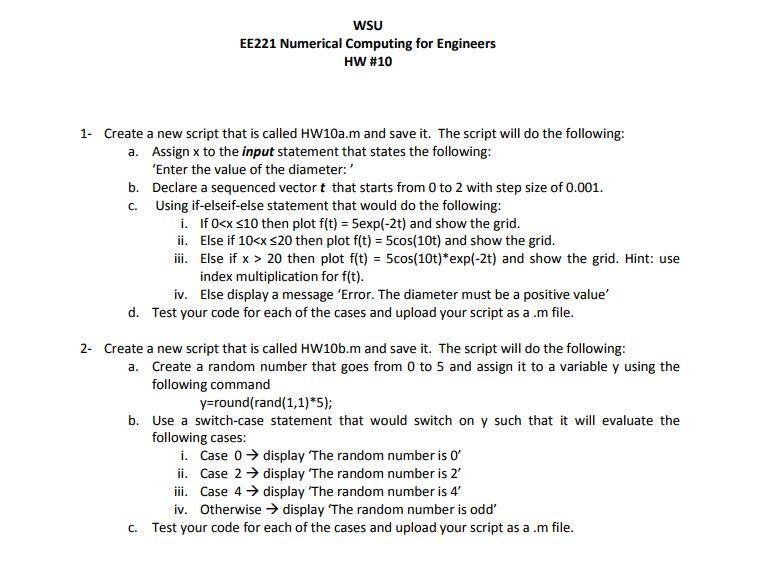
WSU EE221 Numerical Computing for Engineers HW #10 1 Create a new script that is called HW10a.m and save it. The script will do the following: Assign x to the input statement that states the following Enter the value of the diameter: Declare a sequenced vector t that starts from 0 to 2 with step size of 0.001 Using if-elseif-else statement that would do the following a. b. c. f0cx 10 then plot f(t) = 5exp(-2t) and show the grid Else if 10 20 then plot f(t) = 5cos(10t)*exp(-2t) and show the grid. Hint: use index multiplication for ft) Else display a message 'Error. The diameter must be a positive value' iv. d. Test your code for each of the cases and upload your script as a.m file 2- Create a new script that is called HW10b.m andsav it. The script will do the following a. Create a random number that goes from 0 to 5 and assign it to a variable y using the following command y=round(rand( 1,1)*5); b. Use a switch-case statement that would switch on y such that it wil evaluate the following cases i. ii. iii. iv. Case 0 display The random number is 0, Case 2 display The random number is 2, Case 4 display The random number is 4 Otherwise display 'The random number is odd, c. Test your code for each of the cases and upload your script as a.m file

Step by Step Solution

There are 3 Steps involved in it

1 Expert Approved Answer
Step: 1 Unlock blur-text-image
Question Has Been Solved by an Expert!

Get step-by-step solutions from verified subject matter experts

Step: 2 Unlock
Step: 3 Unlock

Students Have Also Explored These Related Databases Questions!