







Question: WSU EE221 Numerical Computing for Engineers HW #6 Create a script file called HW6.m and save it. The script file will do the following: 1
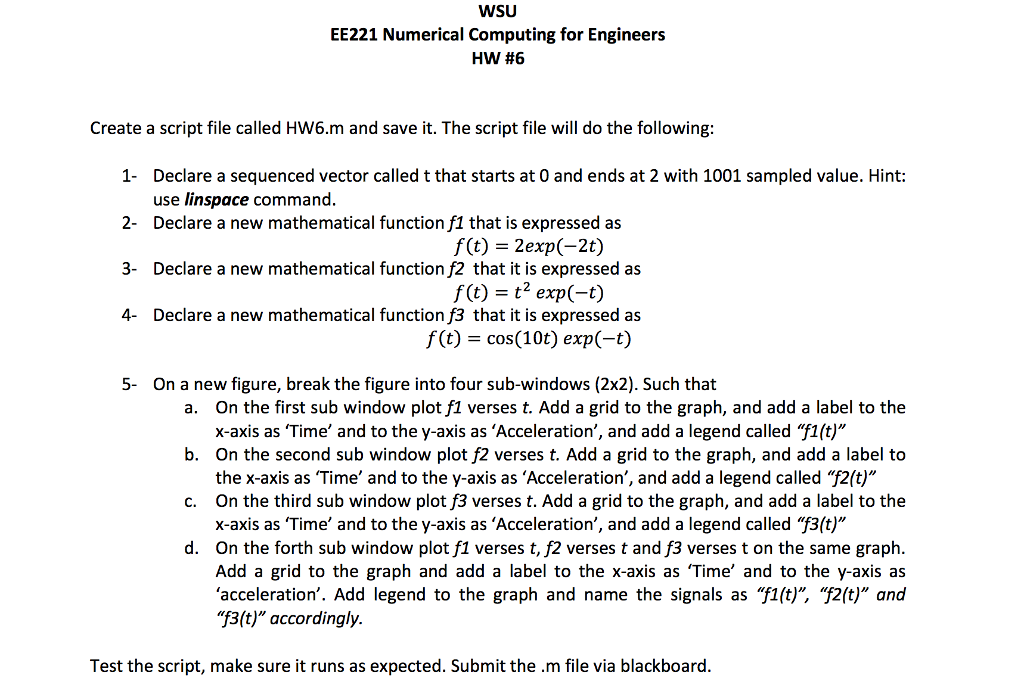
WSU EE221 Numerical Computing for Engineers HW #6 Create a script file called HW6.m and save it. The script file will do the following: 1 Declare a sequenced vector called t that starts at 0 and ends at 2 with 1001 sampled value. Hint: 2- 3- use linspace command Declare a new mathematical function f1 that is expressed as Declare a new mathematical function f2 that it is expressed as Declare a new mathematical function f3 that it is expressed as f(t) = 2exp(-2t) f(t) = t2 exp(-t) f(t) = cos(10) exp(-t) 4- 5- On a new figure, break the figure into four sub-windows (2x2). Such that On the first sub window plot f1 verses t. Add a grid to the graph, and add a label to the x-axis as 'Time' and to the y-axis as 'Acceleration', and add a legend called "fi(t)" On the second sub window plot f2 verses t. Add a grid to the graph, and add a label to the x-axis as Time, and to the y-axis as Acceleration, and add a legend called f2(t) On the third sub window plot f3 verses t. Add a grid to the graph, and add a label to the x-axis as 'Time' and to the y-axis as 'Acceleration', and add a legend called "f3(t)" a. b. c. d. On the forth sub window plot f1 verses t, f2 verses t and f3 verses t on the same graph Add a grid to the graph and add a label to the x-axis as 'Time' and to the y-axis as 'acceleration. Add legend to the graph and name the signals as "fit. (t)" and 3(t"accordingly. Test the script, make sure it runs as expected. Submit the.m file via blackboard
Step by Step Solution
There are 3 Steps involved in it

Get step-by-step solutions from verified subject matter experts
 Study Help