





Question: Worksheet 2, Task 2: 1 question (2 marks) Question Cells- Task/problem Example Excel Functions/features to you should use IF, LEN, CONCAT (or CONCATENATE) H4:H9- Create
Worksheet 2, Task 2: 1 question (2 marks)
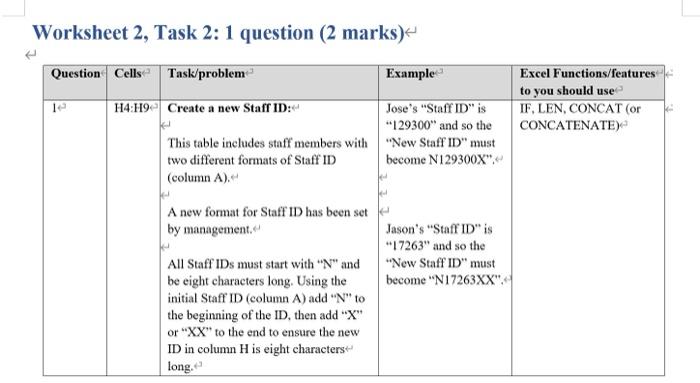
Worksheet 2, Task 2: 1 question (2 marks) Question Cells- Task/problem Example Excel Functions/features to you should use IF, LEN, CONCAT (or CONCATENATE) H4:H9- Create a new Staff ID:- Jose's "Staff ID" is "129300" and so the This table includes staff members with "New Staff ID" must two different formats of Staff ID become N129300X": (column A). A new format for Staff ID has been set by management. Jason's "Staff ID" is **17263" and so the "New Staff ID" must become "N17263XX": All Staff IDs must start with "N" and be eight characters long. Using the initial Staff ID (column A) add "N" to the beginning of the ID, then add "X" or "XX" to the end to ensure the new ID in column H is eight characters long. P c F G H New staff ID B D E 1 2 3 Staff ID First name Last name Office location Country 4 129300 Jose Fernandes Melbourne Australia 5 17263 Jason Flint Singapore Australia 6 928330 Melinda Greco Auckland New Zealand 7 18274 Marry Alaves Singapore Singapore 8 918260 Chavwe Osembe Sydney Australia 9 18263 Xiao Fan Singapore Singapore Department Position title IT Senior Network Engineer Marketing Team Lead Finance Manager Strategy Manager Prodution Operations Strategy Senior Strategist

Step by Step Solution

There are 3 Steps involved in it

1 Expert Approved Answer
Step: 1 Unlock blur-text-image

Question Has Been Solved by an Expert!

Get step-by-step solutions from verified subject matter experts

Step: 2 Unlock
Step: 3 Unlock

Students Have Also Explored These Related General Management Questions!