







Question: write a function in mips draw _ spiral ( int x , int y , int size, int colour ) that draws a spiral starting
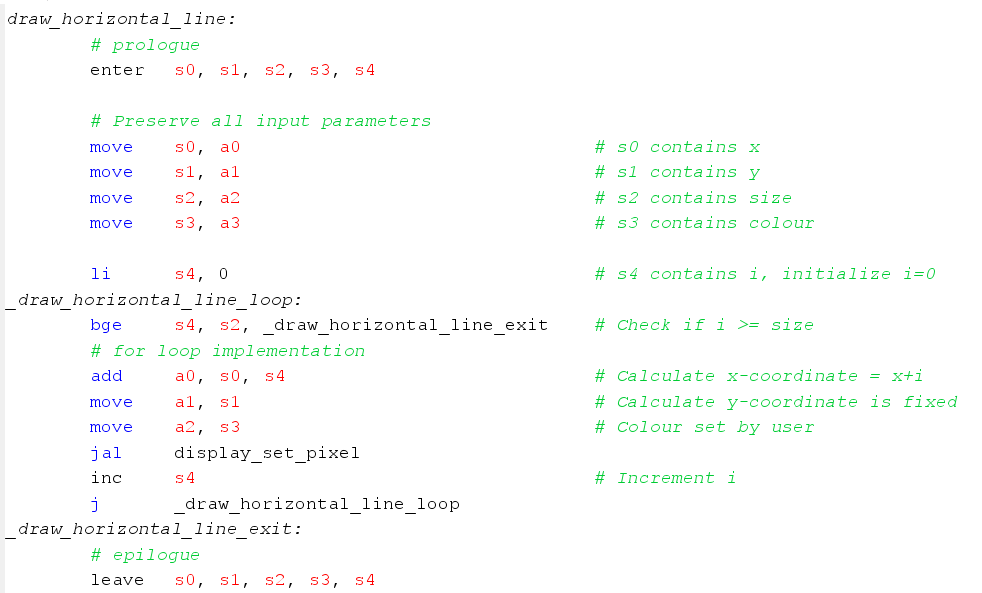
write a function in mips drawspiralint x int y int size, int colour that draws a spiral starting at x y where the first branch of the spiral has length size Use functions drawhorizontalline and drawverticalline to draw the spiral. Modify your main program to call drawspiral.
Note: Feel free to come up with your own implementation of drawing a spiral. But here is a possible implementation for reference:
drawspiralint x int y int size, int color
whilesize
drawhorizontallinex y size, color;
x x size ;
size;
drawverticallinex y size, color;
y y size ;
size;
x x size ;
drawhorizontallinex y size, color;
size;
y y size ;
drawverticallinex y size, color;
size;
Hint: Print different colours for vertical and horizontal lines while debugging.
Example: For the user input:
Please enter the x coordinate of the position:
this is the input
Please enter the y coordinate of the position:
this is the input
Please enter the size:
this is the input
Please enter the colour wwhite, ggreen, yyellow and rred:
w this is the input
The result of drawspiralw should be:
Example of spiral
Step by Step Solution
There are 3 Steps involved in it
1 Expert Approved Answer
Step: 1 Unlock

Question Has Been Solved by an Expert!
Get step-by-step solutions from verified subject matter experts
Step: 2 Unlock
Step: 3 Unlock
 Study Help