







Question: Write a function which provides counts of very specific elements in a list. This function will return a dictionary where the keys are the elements
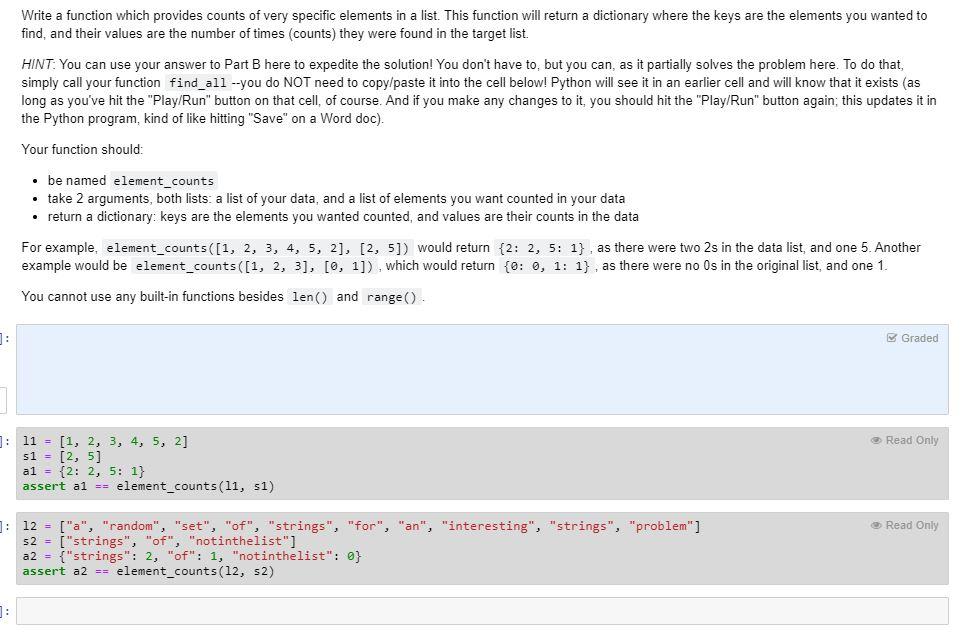
Write a function which provides counts of very specific elements in a list. This function will return a dictionary where the keys are the elements you wanted to find, and their values are the number of times (counts) they were found in the target list. HINT: You can use your answer to Part B here to expedite the solution! You don't have to, but you can, as it partially solves the problem here. To do that, simply call your function find_all --you do NOT need to copy/paste it into the cell below! Python will see it in an earlier cell and will know that it exists (as long as you've hit the "Play/Run" button on that cell, of course. And if you make any changes to it, you should hit the "Play/Run" button again, this updates it in the Python program, kind of like hitting "Save" on a Word doc). Your function should: be named element_counts take 2 arguments, both lists: a list of your data, and a list of elements you want counted in your data return a dictionary: keys are the elements you wanted counted, and values are their counts in the data For example, element_counts([1, 2, 3, 4, 5, 2], [2, 5]) would return {2: 2, 5: 1} , as there were two 2s in the data list, and one 5. Another example would be element_counts([1, 2, 3], [0, 1]), which would return {0:0, 1: 1} , as there were no Os in the original list, and one 1. You cannot use any built-in functions besides len() and range() Graded Read Only ]: 11 = (1, 2, 3, 4, 5, 2] s1 = [2, 5] al = {2: 2, 5: 1} assert al == element_counts(11, s1) Read Only 1: 12 = ["a", "random", "set", "of", "strings", "for", "an", "interesting", "strings", "problem" ] s2 - i "strings", "of", "notinthelist"] a2 = {"strings": 2, "of": 1, "notinthelist": 0} assert a2 == element_counts(12, s2) 1
Step by Step Solution
There are 3 Steps involved in it

Get step-by-step solutions from verified subject matter experts
 Study Help