







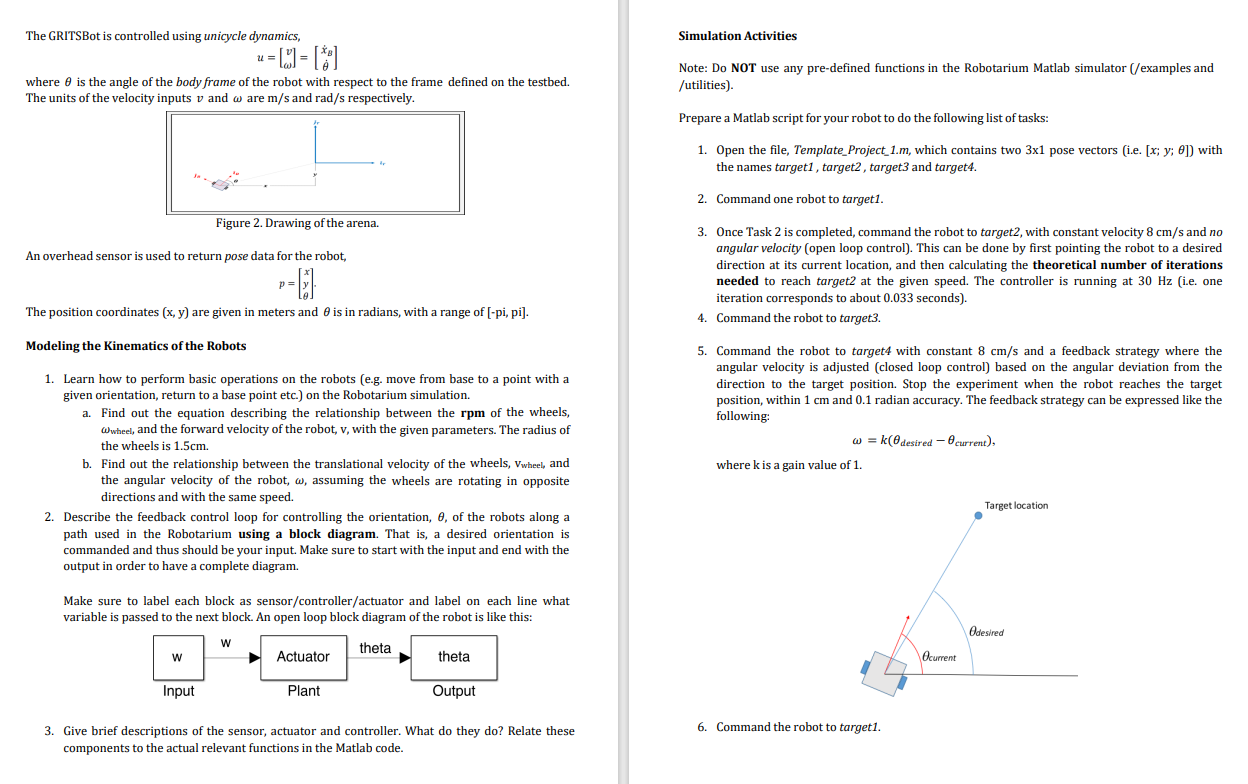
Question: WRITE A FUNCTIONAL MATLAB CODE FOR THE FOLLOWING PROJECT. MODEL THE KINEMATICS OF THE ROBOT AND SIMULATE IT BY CODING A FUNCTIONAL MATLAB CODE FOR
WRITE A FUNCTIONAL MATLAB CODE FOR THE FOLLOWING PROJECT. MODEL THE KINEMATICS OF THE ROBOT AND SIMULATE IT BY CODING A FUNCTIONAL MATLAB CODE FOR A UNICYCLE ROBOT.
BASE MATLAB CODE IS :
Simulator Skeleton File Project
This file provides the barebones requirements for interacting with the
Robotarium. Note that this code won't actually run. You'll have to
insert your own algorithm! If you want to see some working code, check
out the 'examples' folder.
close all
Get Robotarium object used to communicate with the robotssimulator
N ;
r RobotariumNumberOfRobots N 'ShowFigure', true;
data ;
Select the number of iterations for the experiment.
iterations ; Do not change
Create a boundary barrier
unibarriercertificate createunibarriercertificatewithboundary;
Other important variables
target; ; ;
target; ; ;
target; ; ;
target; ; ;
texttargettargetoplus'FontSize','Color','blue' ;
texttargettargetotimes'FontSize','Color','red';
texttarget:target:'Target
texttarget:target:'Target
texttargettargetoplus'FontSize','Color','black' ;
texttargettargetotimes'FontSize','Color','green';
texttarget:target:'Target
texttarget:target:'Target
k ;
Place Static Variables Here
Do not modify anything outside this area
var ;
Do not modify anything outside this area
Iterate for the previously specified number of iterations
for t :iterations
Retrieve the most recent poses from the Robotarium. The time delay is
approximately seconds
p rgetposes;
Place Algorithm Here
Do not modify anything outside this area
u ;
u ; ;
You can try with u ; and ; first. Observe what happens to
get a sense of how it works.
You should think about implementing a finitestate machine. How many
states are there? What are the transitions? What signals the transition
from one state to another?
Do not modify anything outside this area
Send velocities to agents
Apply the barrier to the valocities
u unibarriercertificateu p;
Set velocities of agents N
rsetvelocities:N u; u is the input, a x vector for robot
Send the previously set velocities to the agents. This function must be called!
data data p; u;
rstep;
end
Call rdebug after our experiment is over!
savedatamat', 'data';
rdebug; Do not modify
Place Helper Functions Here
Do not modify anything outside this area
function a foob
Do not modify anything outside this area
Step by Step Solution
There are 3 Steps involved in it
1 Expert Approved Answer
Step: 1 Unlock

Question Has Been Solved by an Expert!
Get step-by-step solutions from verified subject matter experts
Step: 2 Unlock
Step: 3 Unlock
 Study Help