







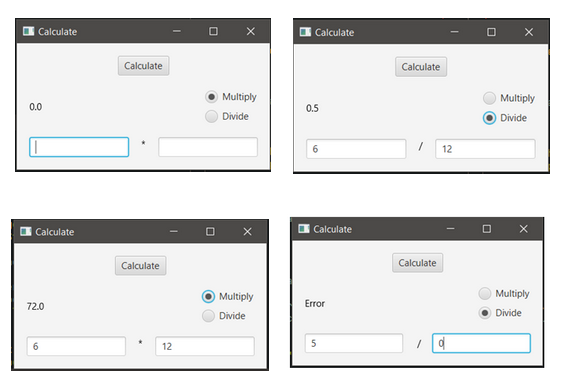
Question: Write a GUI program as shown below with a Border Pane that contains the following components: an HBox with two text fields and a Text
Write a GUI program as shown below with a Border Pane that contains the following components: an HBox with two text fields and a Text component in between displaying the operation or a toggle group with two radio buttons, a Text component to print out the result and a calculate button to perform the calculation.
Add the following event handling code to your GUI program:
For the calculate button:
Create an inner class called CalculateBtHandler which implements the EventHandler interface. In this class override the handle method. Within the method, perform the operation as shown in the diagram. If the user attempts to divide by zero, print Error in the result Text component.
For the radio buttons:
Create an event handler using lambda expression for both radio buttons that sets the Text component bottom between the text fields to display the operator or depending on what the user selected and controls what the Calculate button will do when clicked.
Step by Step Solution
There are 3 Steps involved in it
1 Expert Approved Answer
Step: 1 Unlock

Question Has Been Solved by an Expert!
Get step-by-step solutions from verified subject matter experts
Step: 2 Unlock
Step: 3 Unlock
 Study Help