







Question: Write a program that will create a grade distribution for students taking a class taught by multiple teachers in the same department using vectors .
Write a program that will create a grade distribution for students taking a class taught by multiple teachers in the same department using vectors. When you have completed the assignment, put the files: studentReport.cpp and data.txt in a zip file called assignment02.zip. Attach the zip file to assignment A02 in Canvas. Here is a link to a ZIP file that contains a C++ executable program and a data file: Assignment_02_ZIP
Student scores on tests for all of the classes have been randomly collected and stored in a file. A common denominator for every class it that a test is always worth 100 points. Students may have taken anywhere from 2 to 5 exams in their course.
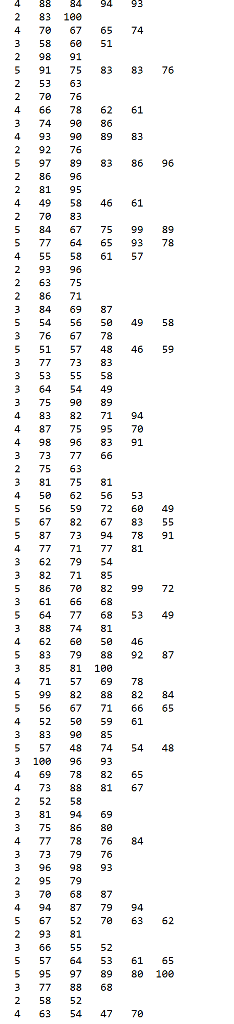
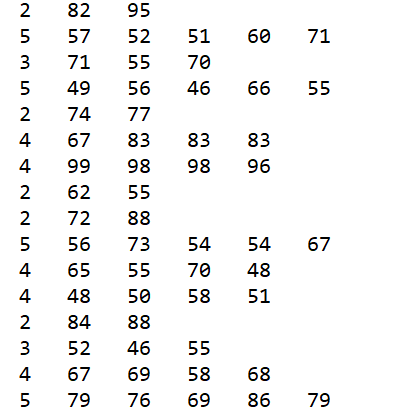
You will need to read data from a file and store it in a two-dimensional vector ( aka a vector of vectors ). I have created the data file for you. The description of the data file is at the end of the assignment. Here is a link to the data file: data.txt The file is named "data.txt".
After you have read all the data and stored it in the vector, I want your program to create a log file with the contents of your vector of vectors. Call the file "vector_data.txt". Here is a link to a file that shows what your log file should look like: vector_data_log_file.txt. After writing out the log file, you can begin processing the data in your vectors to create the grade report. Your report should be written to the file "grade_report.txt".
For every student you will need to calculate an average. Use the average to determine a letter grade using the scale 90 - 100...A 80 - 89...B 65 - 79...C 55 - 64...D
For every student you will be printing: (1) test scores (2) average score (3) letter grade. You will also need to keep track of the number of A's, B's, C's, etc. so that you can display this information at the end of the report.
Conceptually, a two-dimensional array and a two-dimensional vector are similar. An empty vector can be created initially and then the vector can be "grown" to accomodate data. You use the push_back( ) member function to add elements to a vector.
Note, fields 4-6 may not be present in a record since a student may only have taken 2 test while a different student may have taken up to 5.
Here is a declaration of an empty vector of vectors: vector > scores; This would create an empty vector called scores. Make sure you do NOT put ( ) following the name of the vector or C++ will think you are trying to create a function. The first dimension will represent a specific student, the second dimension will represent a specific student's scores on a set of tests.
Note: You must put a space before and after vector
Each element in scores when added is a vector of integers. Lets say a student took numScores tests where numScores is 3. Assume the record for this student looks like this: 3 85 83 79. Here is how this information would be stored: scores.push_back( vector
Here is how you would reference the first student's first exam score in your vector: scores.at(0).at(0) similiar to array notation of scores[0][0]. In fact you could use the array notation but then there would not be bounds checking (one of the reasons vectors are preferred over C-style arrays).
Please use the at() member function whenever you access an element in a vector.
When you create a loop to process elements in a vector, use the data type "unsigned" (recall that this declares an unsigned int) when declaring the loop control variable. Otherwise, a warning message may be displayed by the compiler. Take advantage of the fact that you can determine the size of a vector using a member function.
Here is a desription of the data file:
Input Record Layout - space delimited records
field Description Data type
1 Number of test scores integer
2 test 1 score integer
3 test 2 score integer
4 test 3 score integer
5 test 4 score integer
6 exam 5 score integer
screen capture for data.txt
data.txt cont...
|
|
Step by Step Solution
There are 3 Steps involved in it

Get step-by-step solutions from verified subject matter experts
 Study Help