







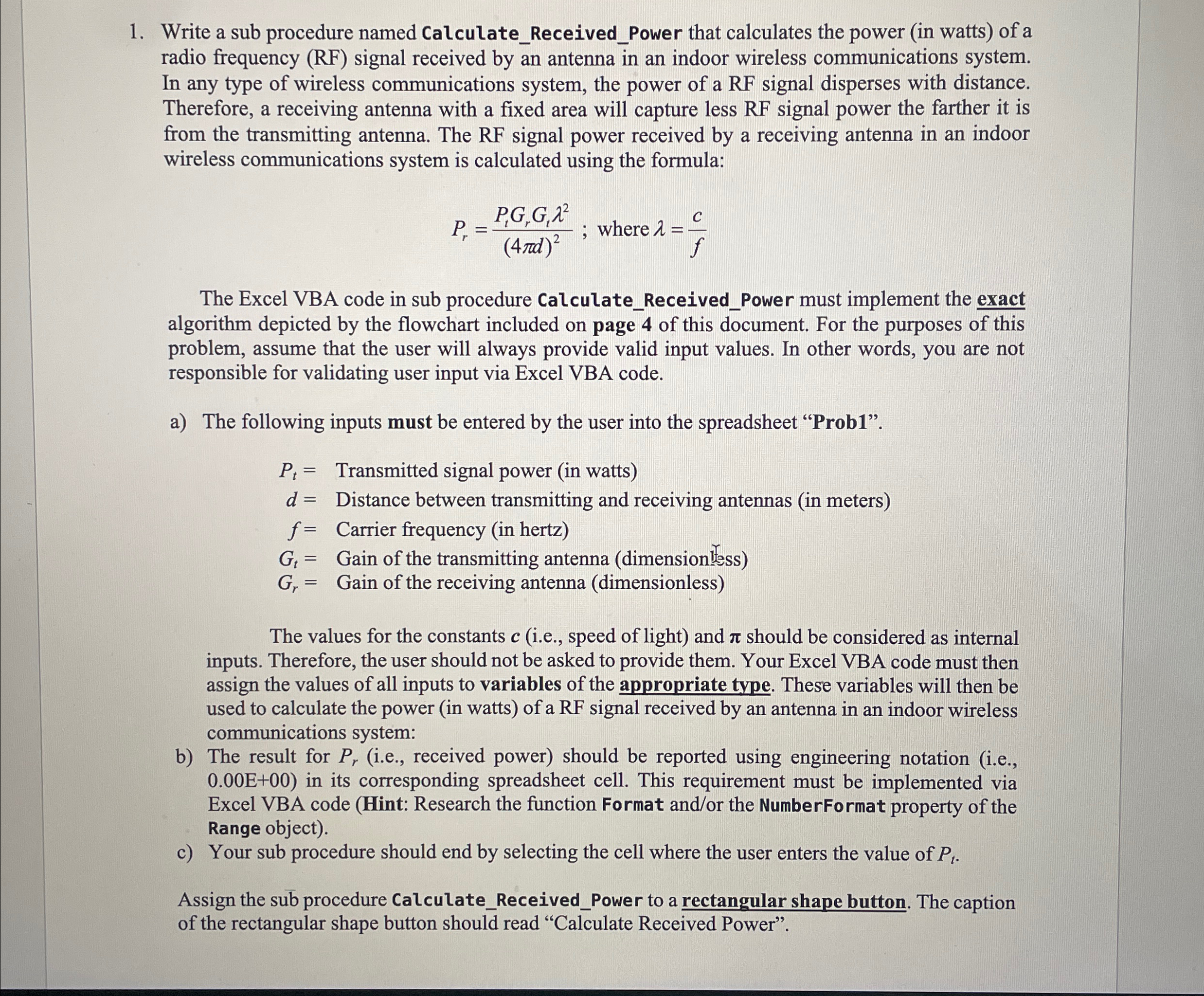
Question: Write a sub procedure named Calculate _ Received _ Power that calculates the power ( in watts ) of a radio frequency ( RF )
Write a sub procedure named CalculateReceivedPower that calculates the power in watts of a radio frequency RF signal received by an antenna in an indoor wireless communications system. In any type of wireless communications system, the power of a RF signal disperses with distance. Therefore, a receiving antenna with a fixed area will capture less RF signal power the farther it is from the transmitting antenna. The RF signal power received by a receiving antenna in an indoor wireless communications system is calculated using the formula:
; where
The Excel VBA code in sub procedure CalculateReceivedPower must implement the exact algorithm depicted by the flowchart included on page of this document. For the purposes of this problem, assume that the user will always provide valid input values. In other words, you are not responsible for validating user input via Excel VBA code.
a The following inputs must be entered by the user into the spreadsheet "Prob
Transmitted signal power watts
Distance between transmitting and receiving antennas meters
Carrier frequency hertz
Gain the transmitting antenna
Gain the receiving antenna
The values for the constants ie speed of light and should be considered as internal inputs. Therefore, the user should not be asked to provide them. Your Excel VBA code must then assign the values of all inputs to variables of the appropriate type. These variables will then be used to calculate the power in watts of a RF signal received by an antenna in an indoor wireless communications system:
b The result for ie received power should be reported using engineering notation ie in its corresponding spreadsheet cell. This requirement must be implemented via Excel VBA code Hint: Research the function Format andor the NumberFormat property of the Range object
c Your sub procedure should end by selecting the cell where the user enters the value of
Assign the sub procedure CalculateReceivedPower to a rectangular shape button. The caption of the rectangular shape button should read "Calculate Received Power".
Write a sub procedure named ClearValues that will clear all the input values provided by the user, as well as both the label and value for the output, Pr This sub procedure should end by selecting the cell where the user enters the value of Pt Assign the sub procedure clearvalues to a rectangular shape button. the caption of the rectangular shape should read clear.
Please provide a photo of the code working on your sude when submitting please. Thank you!
Step by Step Solution
There are 3 Steps involved in it
1 Expert Approved Answer
Step: 1 Unlock

Question Has Been Solved by an Expert!
Get step-by-step solutions from verified subject matter experts
Step: 2 Unlock
Step: 3 Unlock
 Study Help