







Question: Write a Visual Basic program using Visual Studio 2015. Do not develop this program using any other IDE or programming language. The program will meet
Write a Visual Basic program using Visual Studio 2015. Do not develop this program using any other IDE or programming language. The program will meet the following system requirements:
The user will start by typing in a positive integer.
When the user clicks on the Go! b utton, the program will:
Check to make sure that the user inputted a positive integer X , into the textbox.
If it is not a positive integer, the following instructions will execute:
i. Display in a MessageBox : Invalid Input
ii. Clear the contents of the textbox.
iii. Place the Focus back into the textbox
If X is a positive integer, simulate the picturebox moving from right to left X many times.
Have your program suspend (pause) for exactly 1 millisecond after each time that the picturebox moves 10 pixels to the left. This will slow down the speed at which the picturebox moves.
When the user clicks on the Reset button, the program wi ll: 1. Position the picturebox back to the right hand side of the form. 2. Clear the Contents of the textbox 3. Place the Focus back into the textbox
When the user clicks on the Exit button, the program will close.
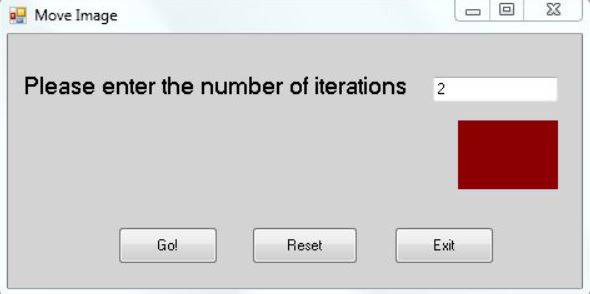
Move Image Please enter the number of iterations 2 Gol Reset Exit
Step by Step Solution
There are 3 Steps involved in it

Get step-by-step solutions from verified subject matter experts
 Study Help